

Ask AI which software may suit your team

n8n is a powerful workflow automation tool for people who want more control over their automations. It takes some time to learn, but once you do, it offers more flexibility than Zapier or Make and can save money, especially if you self-host it.
If you want a tool that's easy to use from day one with almost no learning curve, n8n probably isn't the right choice.
If you already know you want it, you can start your free n8n trial here or try n8n self-hosted for free.
Table of Contents
What Is n8n?
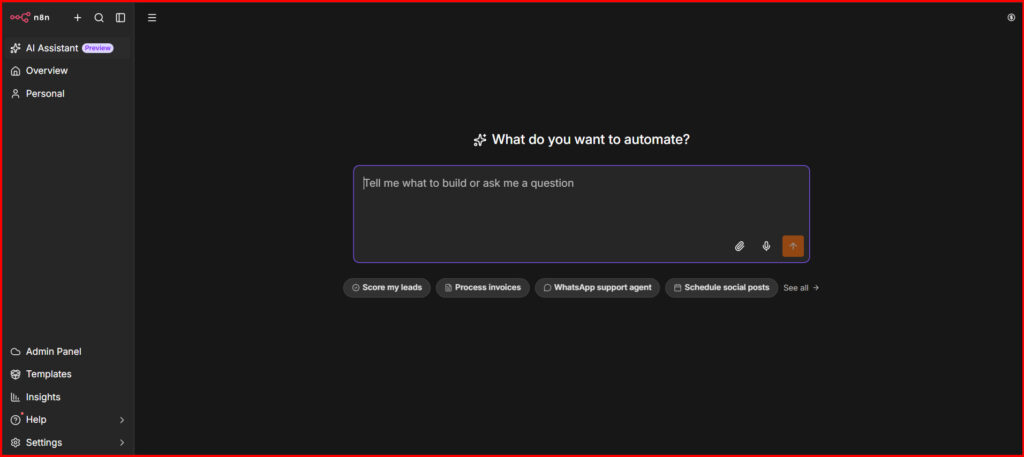
n8n (short for nodemation) is an open-source workflow automation tool. It connects apps like Gmail, Slack, Google Sheets, CRMs and databases, so they can automatically share data without manual work.
Unlike Zapier, n8n gives you more control. You can build custom workflows, add JavaScript or Python when needed and even self-host it to reduce long-term costs. It's not the easiest automation tool to learn, but it's one of the most powerful.
Explore n8n's complete feature set on its official website.
n8n Pricing (All Plans Compared)
Many reviews don't explain this clearly, but it's one of the most common questions about n8n.
n8n uses executions for pricing instead of charging per task like Zapier. An execution is one complete run of your workflow, whether it has 2 steps or 50.
This pricing model can make n8n much more cost-effective if you build complex automations.
A few things worth knowing before you pick a plan:
Our take: if you're technical enough to spin up a $5 VPS, self-hosting the Community Edition is by far the best value in the entire automation space. If you want zero DevOps involved, Starter Cloud at $20–24/month is fair, but watch your execution count closely.
Key Features at a Glance
What Makes n8n Different?
Most automation tools sell you convenience. n8n sells you capability and the gap between the two shows up the moment your automation gets even slightly complicated.
Here are a few examples of where n8n stands out:
- Build smarter workflows. You can create different paths based on conditions. For example, urgent support tickets can go to Slack immediately, while regular tickets are saved to Google Sheets and summarized later in the day.
- Add custom code when needed. If an app doesn't have a built-in integration, you can use JavaScript or Python to connect directly to its API instead of waiting for official support.
- Save money with self-hosting. If you run lots of workflows, self-hosting can be much cheaper because you don't pay per task like many other automation tools.
- Create AI-powered workflows. n8n includes integrations with popular AI models like OpenAI and Anthropic, making it easy to build AI agents and automate complex tasks.
It also leans hard into AI in 2026 - native nodes for OpenAI, Anthropic and other LLM providers mean you can build actual AI agents inside a workflow, not just trigger a chatbot from the outside.
Getting Started - Free Trial
You can get started with n8n in about 10–15 minutes using the Cloud version.
- Sign up for the free 14-day trial (no credit card required).
- Choose a ready-made template or start with a blank workflow.
- Add a trigger, such as a schedule, webhook or app event.
- Connect the next node to build your workflow.
- Test everything using the Execute Workflow button to see how data moves between nodes.
If you prefer self-hosting, you can install n8n on a VPS using Docker. It takes more setup, but you get unlimited executions and more control.
Tip: Start with the template library before building your own workflows. It's the quickest way to learn how n8n works.
What's Best to Automate With n8n
n8n isn't the right tool for everything but where it fits, it fits extremely well:
- Lead capture and enrichment - new form submission → enrich with Clearbit/Apollo → push to CRM → notify sales on Slack, all in one flow.
- Internal ops and reporting - daily/weekly reports pulled from multiple data sources and posted to Slack or emailed automatically.
- Data syncing between tools that don't natively talk - syncing a database to a spreadsheet or a CRM to an email tool, with custom field mapping.
- AI-powered content or support pipelines - auto-summarizing support tickets, generating first-draft replies or tagging content using an LLM node.
- Multi-step approval workflows - content review, expense approval or onboarding chains that need conditional branching, not just a straight line.
Where it's a poor fit: quick, one-off automations you'll use twice and forget or automations that live entirely on your local desktop files rather than cloud apps.
Running n8n Locally
n8n can run on your own computer using Docker or npm, so you don't need a cloud account. Your workflows, data and API keys stay on your own machine, giving you more privacy and helping you avoid monthly cloud hosting fees.
The downside is that you're responsible for everything. You'll need to install updates, create backups and make sure your server stays online. If your computer or server goes offline, your automations stop running.
Also, some features like webhooks don't work out of the box. You'll need to set up a public URL using a tunnel or reverse proxy so external apps can reach your workflows.
Self-hosting is a great choice if you're comfortable with basic setup and want full control. If you just want something that works with minimal setup, n8n Cloud or a managed hosting service like Hostinger's n8n hosting is the easier option.
Who Should Use n8n?
Common Mistakes to Avoid With n8n
| ✅ Pros | ❌ Cons |
|---|---|
| ✓ Open-source and genuinely free to self-host, with unlimited executions | ✕ Real learning curve - JSON, webhooks, and node logic aren't beginner-friendly on day one |
| ✓ Execution-based pricing (not per-task) is cheaper for complex, multi-step workflows | ✕ Self-hosting requires basic server/DevOps knowledge and manual updates |
| ✓ Full custom code support (JavaScript & Python) when native nodes aren't enough | ✕ Not built for automating local desktop files without extra workarounds |
| ✓ Strong, active community with thousands of shareable templates | ✕ Cloud pricing can climb quickly if your execution volume grows |
| ✓ Native AI/LLM nodes for building real AI agents, not just chatbot triggers | ✕ Support response times can lag, especially on lower-tier plans |
| ✓ Unlimited workflows and users on every Cloud plan | ✕ Some commercial self-hosted use cases fall under licensing restrictions worth reading closely |
| ✓ Full data control if you self-host - important for privacy-sensitive teams |
n8n vs Zapier vs Make (2026 Comparison)
| Feature | n8n | Zapier | Make |
|---|---|---|---|
| Ease of Use | Moderate – visual but technical | Very easy | Easy to moderate |
| Pricing Model | Per execution (whole workflow) | Per task (each step) | Per operation |
| Free Tier | Unlimited (self-hosted) | 100 tasks/month | 1,000 operations/month |
| Starting Paid Price | $20/month (Cloud) or ~$5/month (self-host) | ~$20–30/month | ~$9–16/month |
| Custom Code Support | Full JavaScript & Python nodes | Limited (higher-tier plans) | Limited add-on modules |
| Self-hosting | ✅ Yes | ❌ No | ❌ No |
| AI / Agent Building | Native AI nodes, excellent support | AI actions available | AI modules available |
| Best For | Developers, agencies & technical teams | Beginners & simple automations | Visual builders needing more flexibility |
| Steepest Learning Curve | ✅ Yes | — | — |
| Most Flexible for Complex Logic | 🏆 Yes | — | — |
The honest read: if your automations are genuinely simple ("new email → add row in sheet"), Zapier will always feel faster to set up. If your workflows involve branching logic, multiple conditions or custom API calls, n8n does things the other two simply can't and does it cheaper once you're running any real volume.
What Real Users Say
We looked across Trustpilot, G2 and Reddit's automation communities to see what actual users are saying in 2026, beyond the marketing page.
The consistent praise:
- Users repeatedly highlight the cost savings from self-hosting, especially agencies running dozens of client workflows that would be unaffordable on Zapier's per-task model.
- The flexibility for complex, branching workflows comes up constantly, people specifically mention building things in n8n they couldn't build in Zapier or Make at all.
- The open-source, no-vendor-lock-in model earns real loyalty. Several reviewers mention switching from Zapier specifically to escape rising per-task costs.
The consistent complaints:
- The learning curve is real, multiple reviews mention needing "a few days" to feel comfortable, versus minutes on Zapier.
- Cloud support response times are a recurring gripe, especially for users on the Starter plan.
- A handful of users report the interface can feel cluttered on very large, complex workflows with dozens of nodes.
On Trustpilot specifically, n8n sits around 3.2, 3.5 out of 5 - not because the product underdelivers on power, but because the reviews skew toward two extremes: technical users who love it and non-technical users who expected a Zapier-level learning curve and didn't get one.
Our Overall Rating
| Category | Score |
|---|---|
| Ease of Use | 3.2 / 5 |
| Feature Depth | 4.8 / 5 |
| Pricing / Value | 4.6 / 5 |
| Integrations | 4.3 / 5 |
| Support | 3.5 / 5 |
| Overall | 4.3 / 5 |
Bottom line: n8n loses points on approachability but earns nearly everything back on power, flexibility and value especially the moment you self-host. It's not a tool for someone who wants automation to require zero thinking. It's the tool for someone who wants automation with no ceiling.
FAQs
1. Is n8n free?
Yes. The self-hosted Community Edition is completely free with unlimited workflows and executions, you only pay for your server. n8n Cloud starts at $24/month and includes hosting, updates, and support.
2. How does n8n pricing work?
n8n charges per execution (one complete workflow run), not per task or step. This means even complex workflows count as a single execution, making pricing more predictable than many competitors.
3. Can I self-host n8n for free?
Yes. The open-source Community Edition can be self-hosted at no cost. You'll only need to pay for the server, which typically costs around $5–20/month, depending on your setup.
4. Does n8n support AI automation?
Yes. n8n includes native integrations for OpenAI, Anthropic, Google Gemini and other AI providers, making it easy to build AI-powered workflows and agents.
5. Is n8n worth it in 2026?
If you need powerful, scalable automation and don't mind a short learning curve, yes. Between its execution-based pricing, self-hosting option and growing AI capabilities, n8n offers excellent value for power users and businesses.
Conclusion: Should You Use n8n?
n8n isn't the easiest automation platform to learn, but once you understand how it works, it gives you far more flexibility than most alternatives. Its execution-based pricing, large template library, AI capabilities and self-hosting option make it a solid choice for individuals, agencies and businesses that want to build automations without hitting platform limits. Start with the 14-day free Cloud trial, build a few real workflows and you'll quickly know if it's the right fit for you.


0 Comments