Best Vibe Coding Tools 2026: Which One Wins?

Best vibe coding tools 2026

TL;DR:

If you want a high-quality, polished website, just go with Lovable. It gave me the best overall output in my testing and followed the prompt really well. Rocket.new and Bolt.new are also good options and performed well, so you can definitely try them too if you want to compare the results yourself. Want to see what each tool actually generated? Check out the output links and videos below to see the results for yourself.

Quick Comparison: Vibe Coding Tools 

ToolFree PlanStarting PriceFree UsageBest For
Lovable$0/month$25/month5 build credits/day, up to 30/month + 20 Cloud credits + 4 AI credits/monthBest overall output
Rocket.new$0/month$25/month20 creditsQuick website & app building
Bolt.new$0/month$25/month300K tokens/day + 1M tokens/monthFast AI-powered development

How I Tested These Vibe Coding Tools

I used the same detailed IJAZ website prompt in all the tools and compared their output quality, prompt accuracy, ease of editing, speed and publishing experience. I tested 10 tools and shortlisted the ones that performed best.

Common Prompt Used Across All Vibe Coding Tools

Prompt used for testing

Build a complete, modern, premium-looking, production-ready website for a creative digital design platform called “IJAZ.” The website should feel like a high-end creative and AI product website with a polished, cinematic, futuristic, sophisticated, and editorial-quality look. Use an elegant dark visual theme built around black, near-black, deep navy blue, electric blue, subtle light-blue gradients, soft blue glow, and white typography. Use large bold typography, generous negative space, refined spacing, subtle glassmorphism, rounded cards, soft borders, controlled shadows, and strong visual hierarchy. The final design must feel original and launch-ready, not like a generic AI-generated template. Do not copy the layout, branding, composition, or visual identity of any existing website. You may take general inspiration from modern creative-tech websites for dark backgrounds, gradients, glow effects, cinematic imagery, and large typography, but the final IJAZ design must be completely original. Use animation selectively and intentionally; do not make every element glow or move, because the overall experience should feel premium, sophisticated, and controlled rather than overly flashy.Create a premium responsive header/navigation at the top of the website with the custom IJAZ logo on the left, navigation links such as Tools, About, Gallery, and Create, and a Start Creating CTA on the right. The header can use a subtle dark glassmorphism effect while remaining lightweight and unobtrusive. On mobile, replace the desktop navigation with a clean hamburger menu that opens into a smooth mobile-friendly navigation panel with large tap-friendly links and the Start Creating CTA. Navigation links should smoothly scroll to their corresponding sections, and the header must never create horizontal overflow or obstruct the content.Create a large cinematic hero section with a sophisticated black-to-deep-blue gradient background, subtle atmospheric blue lighting, and a premium futuristic composition. Use a two-column layout on desktop, with the main content on the left and a large custom thunder/lightning visual on the right. The left side should contain the eyebrow text “CREATIVE TOOLS FOR MODERN DESIGN”, the main headline “Turn Your Ideas Into Something Real.”, the supporting text “Create, explore, and bring your ideas to life with powerful creative tools built for modern creators.”, and two buttons labeled “Start Creating” and “Explore Tools.” The Start Creating button should smoothly scroll to the interactive drawing canvas section, while Explore Tools should smoothly scroll to the IJAZ introduction/tools section. Both buttons must have polished hover and focus states, accessible contrast, smooth transitions, and large tap-friendly sizing on mobile.On the right side of the hero, create a large custom thunder visual. In its default state, show a clean white thunder icon with a subtle blue gradient, soft electric-blue glow, premium depth, and no constant animation. When the user hovers over, focuses on, or taps the thunder visual, trigger a short cinematic electric-blue lightning effect. The effect should include realistic branching electric arcs, a bright white-blue flash, subtle electrical energy, small glowing particles, atmospheric glow, and a slight energy-distortion feeling while remaining performant and visually controlled. The lightning effect should feel realistic and cinematic rather than like a simple looping CSS animation. Do not autoplay the lightning and do not continuously animate it. Trigger the effect only through hover, focus, or tap interaction, let it run for approximately 1 to 1.5 seconds, and then smoothly return to the original white thunder icon with its subtle blue glow. Hovering, focusing, or tapping again should trigger the effect again. Use performant CSS, SVG, canvas, or similarly lightweight techniques rather than relying on a poor-quality static image, and make sure the effect does not create layout shifts or console errors. Respect prefers-reduced-motion by replacing the complex lightning animation with a simpler glow transition for users who have reduced motion enabled.Directly below the hero, create a clean black-background “TRUSTED BY” section with a continuously moving horizontal logo marquee. Include popular brand names such as Adobe, Nike, Spotify, Microsoft, Google, Apple, and Netflix. If official logo assets are unavailable, use clean text-based wordmark treatments instead of broken images, low-quality placeholders, or missing assets. The logo marquee should move horizontally at a smooth and consistent speed in a truly seamless infinite loop. Duplicate the logo sequence where necessary so that the transition from the end back to the beginning is completely invisible and never visibly jumps or resets. When the mouse enters the logo area, pause the marquee at its exact current position, and when the mouse leaves, resume from that same position. The marquee should remain smooth and performant. If these brands are not actual IJAZ customers, present the section visually without creating misleading claims of formal endorsement or partnership.Next, create an IJAZ brand introduction section with the headline “Design Without Limits.” and supporting text “IJAZ is a creative space for turning simple ideas into polished visual experiences.” Create a custom IJAZ logo where the letter “I” contains a small electric-blue thunder/lightning element and “JAZ” is displayed in clean white typography. The lightning identity should be integrated into the letter I itself rather than appearing as a generic icon placed beside the logo. Make the logo feel custom-designed, refined, and recognizable. Place a large creative visual or interface card on the opposite side using dark backgrounds, deep navy tones, subtle electric-blue glow, refined gradients, rounded corners, and minimal creative-tool interface details. The visual should communicate the idea of a sophisticated creative platform without becoming unnecessarily complicated or visually noisy.After the IJAZ introduction, create a premium natural image showcase section featuring beautiful, realistic, high-quality photography. Include a carefully selected mixture of nature, landscapes, architecture, people in natural environments, modern environments, and creative photography. The images should feel authentic, editorial, premium, and photographic rather than obviously AI-generated. Use reliable high-quality image assets and ensure that every image loads correctly, has appropriate descriptive alt text, and uses responsive sizing with consistent rounded corners and object-fit: cover. Create a horizontal image carousel with large rounded image cards, a clearly visible left arrow, and a right arrow. Clicking the right arrow should smoothly move to the next image, and clicking the left arrow should smoothly move to the previous image. The carousel must not autoplay. Add subtle hover effects such as a very slight image scale, brightness transition, or soft blue atmospheric overlay without making the effect excessive. The carousel must support touch/swipe gestures on mobile, have accessible labels for the navigation arrows, provide visible hover and focus states, and never jump unexpectedly or display broken images.Next, create a section titled “Create It Your Way.” containing a fully functional interactive drawing canvas. Users must be able to draw naturally using their mouse, touch, or pointer input. Include a pen/brush tool, eraser, brush-size control, color picker, and clear-canvas button. Provide premium preset colors including Electric Blue, Deep Blue, Purple, Pink, White, and Black. The selected color must actually change the drawing color, the eraser must actually erase strokes, the brush-size control must actually change the stroke thickness, and the clear-canvas button must completely clear the canvas. The canvas must be responsive across desktop, tablet, and mobile and must correctly map pointer and touch coordinates regardless of CSS scaling, canvas resizing, or device pixel ratio. Maintain good drawing quality on high-DPI screens. On touch devices, prevent accidental page scrolling while the user is drawing. Make all controls visually polished, functional, keyboard accessible where appropriate, and easy to use with touch on mobile.After the drawing section, create a large cinematic CTA section with a dark blue-to-black gradient background. Use the headline “Ready to Create Something Different?” and supporting text “Start with an idea. Build something worth seeing.” Add a large gradient button labeled “Start Creating.” The button should use a blue gradient background, white text, rounded styling, and a soft electric-blue glow. Implement a controlled three-stage hover/focus interaction: on the first mouseenter or focus interaction, smoothly move the button approximately 12–16px toward the right; on the second mouseenter or focus interaction, smoothly move it approximately 12–16px toward the left; on the third mouseenter or focus interaction, return it to its natural position and permanently disable the movement interaction for the current page session so that the button remains stable and can be clicked normally. Do not randomly move the button, do not make it jump vertically, do not move it outside its container, and do not prevent clicking or keyboard activation. The interaction should feel playful but controlled and intentional. When clicked, the CTA should smoothly scroll to the Create It Your Way drawing section.Create a clean, spacious, premium black footer containing the IJAZ logo, navigation links, social links, contact information, and copyright text. Keep the footer minimal and elegant with refined spacing, subtle dividers, muted secondary typography, and strong alignment. Make sure footer links have appropriate hover and focus states and remain usable on mobile.At the very bottom of the website, create a huge “IJAZ” wordmark spanning most of the screen width as a dramatic final visual statement. Use extremely large, bold typography with a white-to-light-blue gradient, subtle electric-blue glow, and a black or deep-dark background. The “I” can incorporate the same blue lightning identity used in the main IJAZ logo so that the brand identity remains consistent throughout the website. Make the wordmark monumental, cinematic, editorial, and futuristic. It may be slightly cropped by the viewport if necessary, but it must never create unwanted horizontal page overflow. Scale the wordmark responsively so that it remains visually powerful on desktop, tablet, and mobile. Use the attached reference image only as inspiration for the dramatic oversized scale and typography impact; do not copy its layout, composition, styling, or visual identity.Make the entire website fully responsive across desktop, tablet, and mobile. On desktop, use the large two-column hero layout, large thunder animation, horizontal logo marquee, image carousel, responsive drawing canvas, and oversized IJAZ typography. On tablet, adjust typography, spacing, card sizes, and layout proportions while keeping every interaction functional and visually balanced. On mobile, stack the hero content vertically, place the thunder visual below the hero text, make buttons easy to tap, use the mobile navigation, make the image carousel touch-friendly, make the drawing canvas responsive and comfortable for finger drawing, ensure all controls remain accessible, and scale the oversized IJAZ wordmark appropriately without causing horizontal overflow. Use fluid typography and responsive spacing wherever possible instead of relying only on fixed dimensions.Use smooth, premium animations throughout the website, including subtle fade-ins, gentle slide-up entrance animations, refined hover transitions, controlled blue glow effects, seamless logo marquee movement, smooth carousel transitions, the interactive lightning effect, and the three-stage CTA interaction. Do not over-animate the page. Animations should feel intentional, professional, cinematic, and smooth rather than excessive or distracting. Avoid random movement, aggressive bouncing, excessive zooming, constant particle effects, or animations that compete with the main content. Prefer performant GPU-friendly transforms and lightweight animation techniques wherever possible. Respect prefers-reduced-motion and simplify or disable non-essential animations when necessary.Ensure the entire website follows strong accessibility practices. Use semantic HTML, proper heading hierarchy, sufficient color contrast, descriptive image alt text, keyboard-accessible navigation and controls, visible keyboard focus states, accessible labels for carousel controls, usable touch targets, and accessible CTA buttons. Essential functionality must never depend only on hover. Users should still be able to interact with important controls using keyboard, touch, or click. Make the lightning interaction accessible through focus or tap in addition to mouse hover.Keep the website performant on desktop and mobile. Optimize and appropriately size images, lazy-load below-the-fold imagery where appropriate, avoid unnecessary JavaScript animation loops, prefer CSS transforms for motion, minimize layout shifts, avoid excessive blur and filter effects, keep the drawing canvas efficient, and ensure the lightning effect does not continuously consume resources. The website should remain smooth and responsive even on mid-range mobile devices. Do not introduce horizontal overflow, broken layouts, or elements that unexpectedly shift the page.Build this as a fully functional website, not a static visual mockup. All important interactions must actually work, including the navigation, smooth scrolling, hero buttons, thunder hover/focus/tap animation, trusted-by marquee, seamless marquee looping, marquee pause/resume behavior, image carousel arrows, touch/swipe carousel behavior, drawing canvas, brush, eraser, brush-size control, color presets, clear canvas, mobile navigation, CTA three-stage interaction, footer links, and responsive layouts. Do not leave fake buttons, dead controls, broken image URLs, placeholder assets, unfinished sections, console errors, or non-functional interactions.Before finishing, carefully review the complete website against this entire prompt and perform a final quality check. Verify that every requested section is present, every specified piece of text is correct, all buttons and navigation links work, the lightning interaction works correctly, the marquee loops without visible jumps and pauses/resumes correctly, the carousel moves correctly in both directions and supports touch, the drawing canvas works correctly with mouse and touch, all canvas controls function properly, the CTA three-stage interaction behaves exactly as specified, the mobile navigation works, the footer is complete, the oversized IJAZ wordmark scales correctly, there are no console errors or broken assets, there is no unwanted horizontal overflow, responsive behavior is polished, keyboard and focus interactions work, reduced-motion behavior is supported, and the overall visual result feels like a premium, original, cinematic creative technology product that could realistically be launched publicly rather than a generic AI-generated website template.

Vibe Coding Tools: Plans & Pricing Compared 

Pricing DetailsLovableRocket.newBolt.new
Free Plan$0/month$0/month$0/month
Free Usage5 build credits/day, up to 30/month + 20 Cloud credits/month + 4 AI credits/month20 credits300K tokens/day + 1M tokens/month
Entry Paid PlanPro – $25/monthPro – $25/monthPro – $25/month
Paid Usage100 credits/month100 credits/month10M tokens/month
Higher PlansBusiness – $50/monthRocket – $50/month; Booster – $250/monthTeams – $30/member/month; Enterprise – Custom
Usage RolloverPaid credits roll over for a limited periodCredits never expireUnused paid tokens roll over for 1 month
Custom DomainPro+AvailablePro+
Team MembersUnlimitedUnlimitedTeams plan is per member
Main Free LimitDaily build credits are limited20 credits onlyToken usage is limited

1. Lovable

Lovable is an AI vibe coding tool that lets you build websites and apps just by describing what you want. You don’t need much coding knowledge to get started, and it can turn your ideas into working projects quickly. I tested Lovable to see how well it follows prompts and how good the final output actually is.
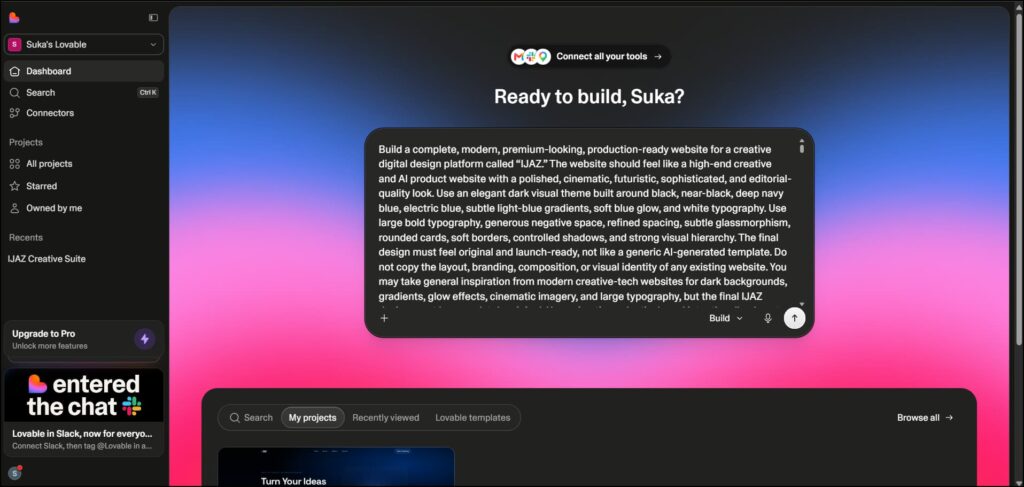
Lovable AI vibe coding tool interface

My Experience

The user interface is really simple and easy to use. We just need to enter our prompt in the prompt box and click enter. It took around 11 minutes and 6 seconds to generate the output and used 10.1 credits.

The first attempt itself was impressive. Lovable followed the prompt instructions really well and didn’t miss anything important. We can also easily edit the output. I made a few changes, and they were completed within a few minutes.

Overall, Lovable is quick and easy to use. It also creates a subdomain for us, so we can quickly publish the website. Even after making edits, we can update the live website easily. I’m sharing the actual output link below, so you can check it out.

Lovable also provides analytics and SEO options, which makes it even more useful for building and managing websites.

You can create and publish a website for free, make a few edits and update it as well. Beyond that, you’ll need to move to a paid plan, but I think it’s worth it.

Real Output Linkhttps://ij-spark-studio.lovable.app/

Screen recording of creating a web page using the vibe coding tool Lovable AI

Lovable: Pros and Cons 

ProsCons
Strong prompt accuracyFree usage is limited
Impressive first-generation outputPaid plan is needed for extended usage
Easy to edit generated websites
Quick publishing with a subdomain
Analytics and SEO options

2. Rocket

Rocket is an AI vibe coding tool that helps you build websites and web apps just by describing what you want. You can turn a simple prompt into a working website without needing to write everything from scratch. It’s a good option if you want to build and test ideas quickly with AI.
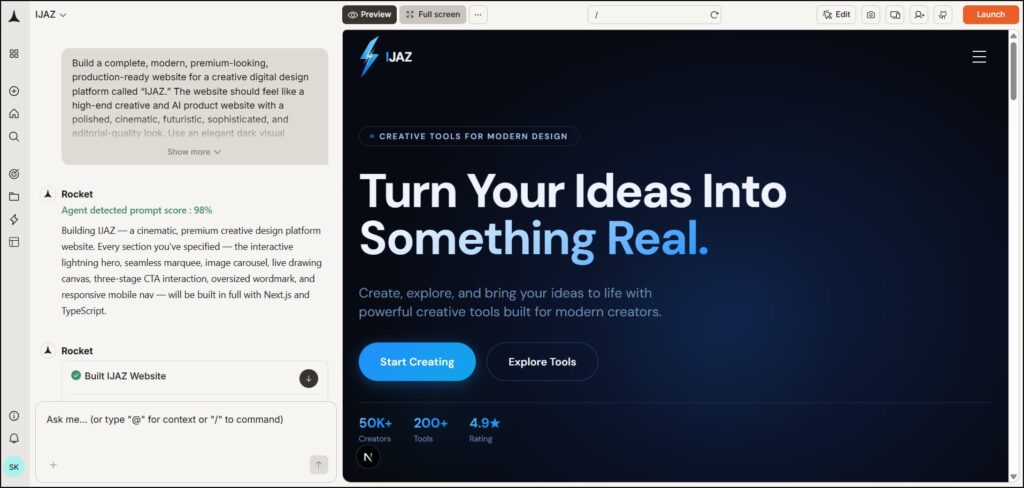
Rocket.new AI vibe coding tool interface

My Experience

This one is also very user-friendly. As soon as you sign up, the prompt box is ready, so you can simply enter your prompt and hit Enter. Within a few minutes, the website is ready, and you can easily publish it.

It also provides editing options, analytics, connectors, and page performance insights. It shows you what issues the page has and gives you options to fix them. You can also make changes by simply giving another prompt.

Real Output Linkhttps://ijaz-zg7166.public.builtwithrocket.new/

Screen recording of creating a website using Rocket AI

Rocket.new: Pros and Cons 

ProsCons
Very easy to useSome pages showed slight scrolling lag
Quickly generates websitesDesign output was below Lovable. 
Easy publishingHero lightning effect could be better
Prompt-based editing
Analytics and page performance insights
Connectors available

3. bolt.new

Bolt.new is an AI-powered vibe coding tool that lets you build websites and web apps using simple prompts. You can describe what you want, and Bolt turns your idea into a working project without much manual coding. It’s useful for quickly creating, testing and editing web projects with AI.
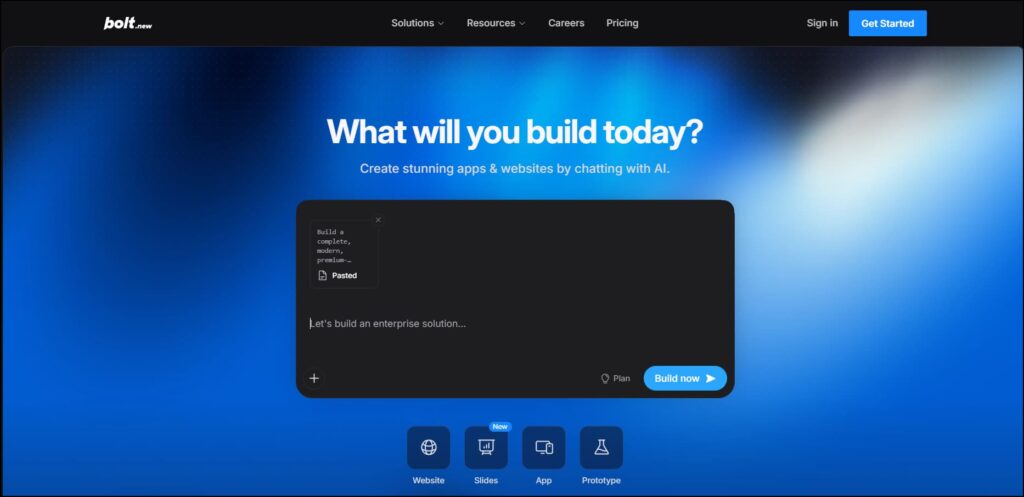
Bolt.new AI vibe coding tool interface

My Experience

It’s easy to use, quick to publish, and follows the prompt well. It’s not bad at all, although I think the lightning effect in the hero section could have been better. Overall, it did a nice job.

It also provides analytics, Skills, and the option to connect different connectors. One thing I noticed is that Bolt doesn’t show a direct pencil or edit option on the page. Instead, there’s a selection option with an arrow in the chat panel on the left. After clicking it, you can hover over an element on the page, and the edit option will appear.

From there, you can easily edit the element directly or simply give another prompt to make the changes.
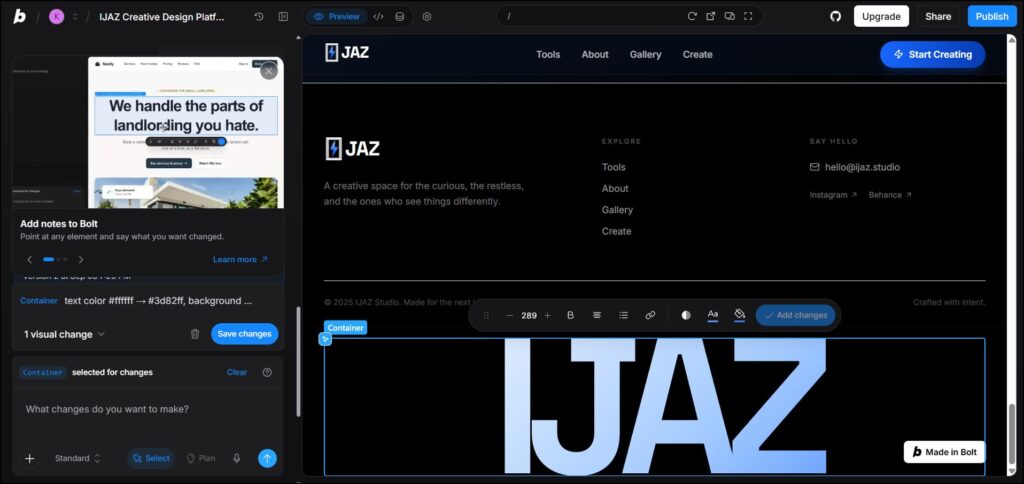
Bolt.new website editing interface

Real Output Link –  https://ijaz-creative-design-pqfo.bolt.host

Screen recording of creating a web page using Bolt new

Bolt.new: Pros and Cons 

ProsCons
Easy to useHero lightning effect could be better
Quick to publishNo direct pencil/edit option on the page
Follows prompts wellEditing requires selection mode first
Analytics available
Skills and connectors available
Easy prompt-based editing

Final Conclusion

Honestly, I really enjoyed vibe coding because these tools make building websites so much easier. With just a prompt, we can create a complete website in a few minutes and even publish it without needing much coding knowledge.

I tested a total of 10 vibe coding tools, and I’ve shared the outputs that impressed me the most. Among them, Lovable was my top pick because it gave me an extraordinary, premium, and professional-looking output on the very first try.

Rocket came in second. It followed my prompt really well, although I noticed a little lag when scrolling through some pages. Bolt.new also performed really well and created a solid output.

I’ll be testing more vibe coding tools in the future and adding them to this list. So, bookmark or subscribe to this blog if you want to build websites with AI without needing much coding knowledge.

Frequently Asked Questions (FAQs)

Based on your testing, Lovable is the best overall vibe coding tool. It produced the strongest first-time output and followed the prompt particularly well.

Lovable and Rocket.new are strong beginner-friendly options based on your experience. Both provide simple prompt-based workflows without requiring much coding knowledge.

Yes. Lovable has a $0/month Free plan with limited build, Cloud, and AI credits.

Yes. Bolt.new offers a $0/month Free plan with 300K tokens per day and 1M tokens per month.

For your test, Lovable came first, Rocket.new second and Bolt.new third. Lovable stood out for output quality and prompt accuracy, while Rocket and Bolt also performed well for quickly creating and publishing websites.
Tags:

AlloyPress Team

AlloyPress Team combines SEO, AI, digital marketing, web management & deep research to simplify tech and empower creators, marketers, and businesses with actionable insights.

You May Also Like

0 Comments

Submit a Comment

Your email address will not be published. Required fields are marked *