What Is an AI Browser?
An AI browser is a normal web browser with AI built directly into it. You do not need a separate extension. It can understand what you are viewing and help you summarize pages, answer questions, translate content, compare information and complete tasks.
Some advanced AI browsers can even take action for you, such as filling out forms, comparing multiple tabs, booking things and completing several steps with less input from you.
There are three main types of AI browsers right now:
- AI native browsers: Built around AI from the start, such as Perplexity Comet and ChatGPT Atlas (now discontinued).
- Regular browsers with AI: Popular browsers that added AI features, such as Chrome with Gemini, Edge with Copilot, Opera with Aria and Brave with Leo.
- AI built into mobile browsers: AI features added directly to a phone’s default browser, such as Samsung Internet’s Browsing Assist.
What Browser Do Most People Actually Use Right Now?
This matters because it tells you how much friction you’re signing up for. If you switch to a brand-new AI-native browser, you’re leaving the browser most of the internet already runs on.
Per StatCounter’s 2026 data (numbers shift slightly month to month, but the order is consistent):
Chrome still owns roughly two thirds of the entire web. That number has actually been sliding slightly, down about 1.9 points year over year, as Edge and Safari pick up share. Chromium's Blink engine, meanwhile, powers around 78% of all browser sessions on Earth, since Comet, Edge, Opera and Brave are all built on top of it.
On the AI adoption side, a McKinsey study cited across several 2026 browser roundups found that close to half of consumers now say they prefer AI powered search over traditional keyword search. That is exactly the gap AI browsers are trying to fill.
Quick AI Browser Comparison Table
Browser | Perplexity Comet | Brave (Leo) | Google Chrome (Gemini) | Microsoft Edge (Copilot) |
|---|---|---|---|---|
Best For | Research + hands off task automation | Privacy focused browsing | AI without switching browsers | Windows + Microsoft 365 users |
Standout AI Feature | Comet Assistant, an autonomous agent that clicks, scrolls, and completes tasks | No login AI sidebar + Bring Your Own Model (BYOM) | AI Mode side panel + Auto Browse agent | Copilot Journeys, which summarizes what you were working on across sessions |
Platforms | Windows, macOS, Android | Windows, macOS, Linux, Android, iOS | Windows, macOS, Android, iOS | Windows, macOS, Android, iOS |
Pricing | Free | Free tier; Leo Premium $14.99/mo | Free; Auto Browse may require a paid tier | Free |
AI Browser Features Comparison
Feature | Comet | Brave (Leo) | Chrome (Gemini) | Edge (Copilot) |
|---|---|---|---|---|
Autonomous task execution (agent mode) | ✅ Strong | ⚠️ Early testing since May 2026, not broad yet | ⚠️ Auto Browse, paid tier | ⚠️ Limited, permission-gated |
Cross-tab summarization | ✅ | ❌ Single page/doc at a time | ✅ | ✅ |
Voice interaction | ✅ | ➖ Not available | ✅ | ✅ |
Chrome extension support | ✅ Chromium based | ✅ Chromium based | ✅ Native | ✅ |
Built in ad blocker | ✅ | ✅ Strongest of the group | ➖ | ➖ |
Works without an account/login | ➖ Needs Perplexity account | ✅ No account required | ➖ Needs Google account for full features | ➖ Needs Microsoft account for full features |
Mobile app | ✅ Android (iOS pending) | ✅ Android + iOS | ✅ Android + iOS | ✅ Android + iOS |
#Comet (Perplexity)
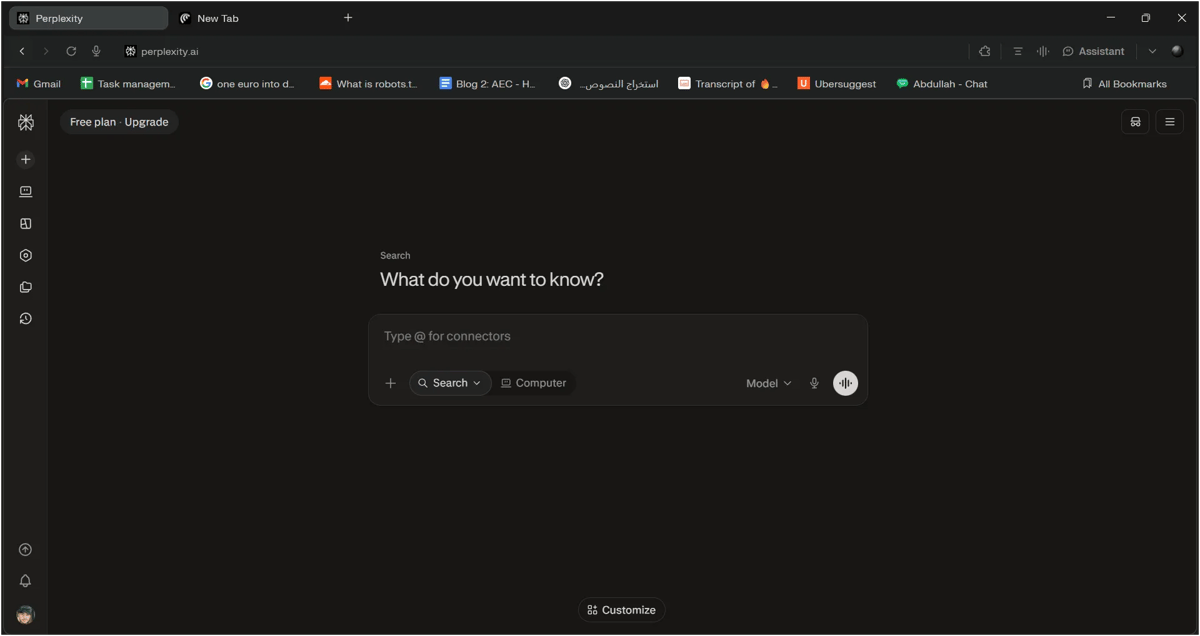
Comet is an AI-powered web browser developed by Perplexity. It works much like a regular browser, but it has AI built into the browsing experience. Instead of opening a separate AI tool whenever you need help, you can ask Comet to summarize a webpage, explain information, compare different tabs, find key details, or help with everyday tasks while you browse.
What are the best features of Comet Browser?
One of the most useful features is its AI assistant, which lets you interact with the webpage you are currently viewing. You can ask it to summarize a long article, explain a difficult section, extract important points, or answer questions based on the page without constantly switching between tabs.
Comet is also useful for research and comparing information across multiple tabs. For example, if you are researching different AI tools, you can open their websites in separate tabs and ask Comet to compare their features, pricing, or limitations. This can save a lot of time when working with large amounts of information.
Another useful feature is its ability to summarize content quickly. If you come across a lengthy article, Comet can help you understand the main points without having to read every line. This can be especially helpful when researching topics or looking for specific information online.
Comet also includes AI-powered browser actions, which can help with certain repetitive tasks. Depending on the task and website, it can navigate pages, enter information and assist with workflows. This makes it more than just an AI search tool and gives it some of the capabilities of an AI assistant that works directly inside your browser.
For writers, the inline assistant can also be useful. You can select text on a webpage and ask Comet to explain, rewrite, translate, or summarize it. This makes it convenient when researching and creating content at the same time.
Comet Browser: Pros and Cons
Perplexity Comet
Pros
- Built-in AI assistant helps with browsing and research.
- Dark mode makes browsing more comfortable, especially at night.
- Built-in ad blocker provides a cleaner browsing experience.
- Can instantly summarize the webpage you are currently viewing.
- Makes it easier to research and compare information across multiple tabs.
- Useful for writing, research, and content creation.
- Can automate some repetitive browser tasks.
- Supports many Chrome extensions because it is Chromium-based.
Cons
- AI features may feel unnecessary for simple browsing.
- AI-generated answers can sometimes be inaccurate.
- Some AI features may not work perfectly on every website.
- AI-powered actions may need manual checking.
- Privacy settings need to be reviewed carefully.
- Can feel more complex than a traditional browser.
Should You Use Comet?
Use it if you are:
- A student or researcher who regularly has 15+ tabs open and needs to compare different sources quickly. Comet can read and summarize them for you.
- Someone who wants AI to take action, such as sending messages, booking appointments, or comparing prices, instead of simply answering questions.
- A Chrome extension user who does not want to lose their extensions when switching browsers. Comet is Chromium based, so most Chrome extensions work.
- An Android user who wants an AI browser right now instead of waiting for a mobile release.
Skip it if you are:
- Someone who just wants a simple, fast browser without AI features running in the background.
- Not comfortable with an AI that can see and interact with your browser, even though confirmations are required for many actions.
- Using a work computer with strict IT policies that do not allow installing new browsers.
- An iPhone user, since Comet is not currently available on iOS.
What People Are Saying
Comet has received strong user feedback, especially for its built-in assistant and Gmail and Calendar integration. Many users like it because it does more than a typical browser, although credit limits can be frustrating for some. There are also legitimate security concerns around agentic browsers. Researchers have highlighted prompt injection risks that can affect browsers like Comet, so it is worth keeping those risks in mind before letting an AI agent handle sensitive tasks.
What Do You Get With a Perplexity Pro or Max Plan in Comet?
If you have a Perplexity Pro plan, Comet becomes more powerful with access to advanced AI models, deeper research and higher limits for AI-powered browser tasks. You can also use Comet’s AI assistant for complex research, webpage summaries and everyday browser tasks. Max goes a step further with higher usage limits, Background Assistants, advanced models and early access to new features. For most users, Pro offers the best balance of features and price, while Max is mainly useful for heavy AI users.
#Google Chrome (with Gemini)
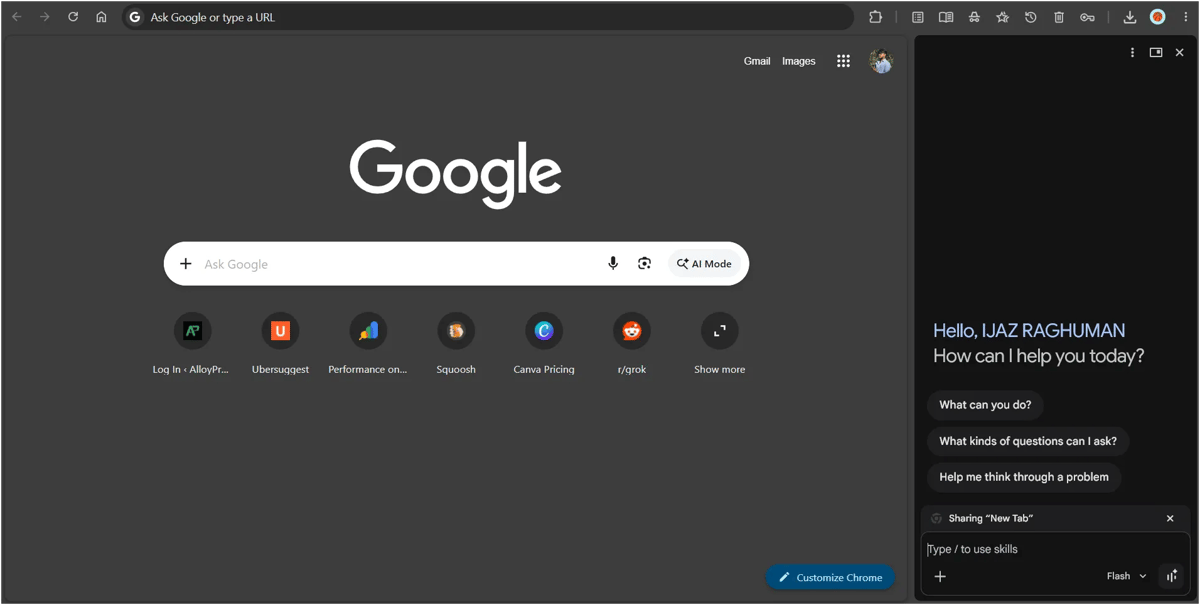
Chrome doesn't need an introduction. It is already used by roughly two thirds of the internet. What is new is Gemini being built directly into the browser, with an AI Mode side panel and an experimental Auto Browse feature that can take actions on webpages for you. Chrome also includes tools like Nano Banana for quick image edits while browsing.
What are the best features of Google Chrome?
One of Chrome's biggest strengths is its large collection of extensions. You can add extensions for SEO, writing, productivity, security, shopping, research and many other tasks, making the browser easy to customize.
Chrome also offers useful tab management options, including tab groups and tab search, which can make it easier to manage multiple webpages while working or researching.
Another useful feature is the built-in password manager, which can save and autofill passwords and help you create stronger passwords. Chrome also provides built-in security features that warn you about potentially dangerous websites, downloads, and files.
Chrome's Sync feature is helpful if you use more than one device. Once you sign in with your Google Account, you can sync bookmarks, passwords, settings, and other browser information across supported devices.
You can also use Incognito Mode when you want to browse without saving the browsing history from that session to your regular Chrome history.
Google Chrome Browser: Pros and Cons
Google Chrome with Gemini
Pros
- No switching needed because you probably already use Chrome.
- Huge extension library with years of stability.
- Available on desktop, Android, and iOS.
- Works closely with Google's search and services.
Cons
- AI features can feel added on compared to Comet.
- Auto Browse is limited or paid on some platforms.
- Simple tasks like summarizing a page can take a few extra clicks.
- It is not always clear how your data is used by Gemini.
Should You Use Chrome + Gemini?
Use it if you are:
- Someone who doesn't want to switch browsers. You can use Gemini without downloading a new browser.
- A heavy Gmail, Google Calendar, or Google Workspace user who wants AI features alongside the tools you already use.
- An Android user who wants AI features in the browser you already have.
Skip it if you are:
- Looking for the most capable AI agent. Comet is currently better at handling tasks for you.
- Privacy conscious and uncomfortable with Google's AI having access to more of your browsing and account context.
- Looking for an AI browser that was built around AI from the start, rather than adding AI to an existing browser.
What People Are Saying
Since Gemini is part of Chrome rather than a separate browser, there is no single review score to rely on. Most 2026 coverage agrees that the integration is useful, but it still does not feel as deeply integrated as AI native browsers like Comet. Auto Browse is one of the more promising features, but it is still early and not as reliable or widely available as the more established AI browser agents.
#Microsoft Edge (Copilot)
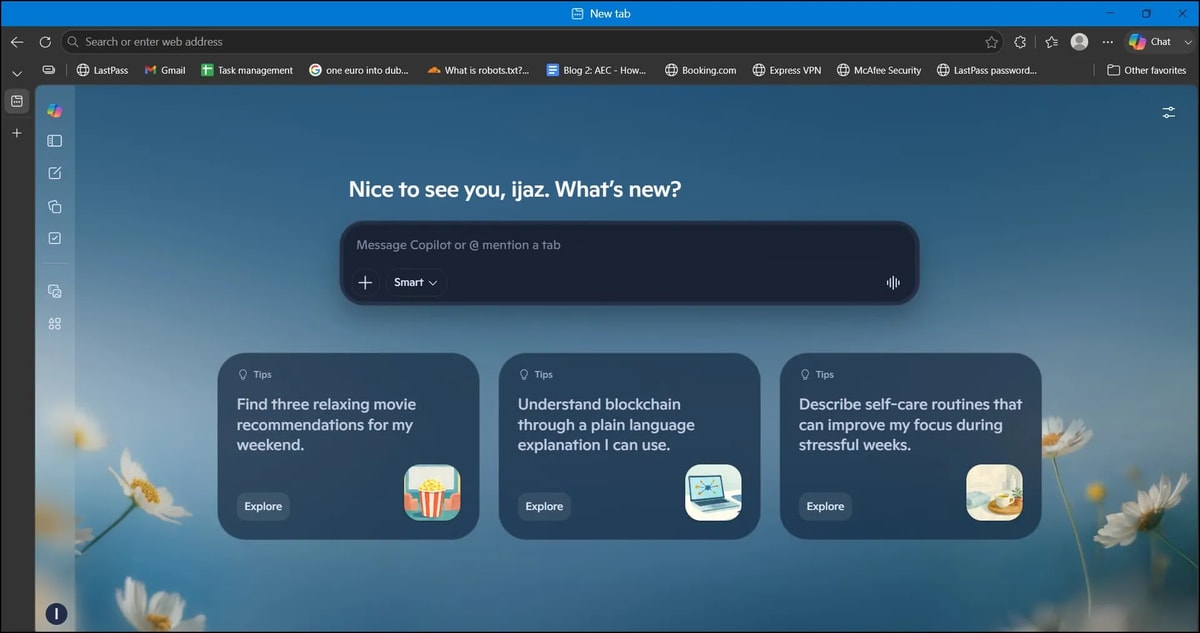
Edge is the most traditional browser on this list, but it also comes with a strong set of AI features. Copilot is just a click away and can read your open tabs to help you find information quickly. It also powers Journeys, an experimental feature that helps you pick up where you left off from a previous browsing session.
What are the best features of Microsoft Edge?
One of Edge's most useful features is Microsoft Copilot, which brings AI assistance directly into the browser. You can use it to ask questions, summarize webpages, understand information, and get help while browsing without opening a separate AI tool.
Edge also has a built-in ad and tracker blocking option through its tracking prevention settings, which can help provide a cleaner and more privacy-focused browsing experience.
Another useful feature is Collections, which lets you save and organize webpages, images, text and other content in one place. It can be particularly helpful when researching a topic or planning something online.
Edge also includes vertical tabs, making it easier to manage a large number of open tabs without taking up too much horizontal space. For people who regularly work with many tabs, this can be a convenient feature.
If you use Windows devices, Edge also works well with the Microsoft ecosystem. Features such as syncing, Microsoft 365 integration and Windows integration can make it convenient for users who already rely on Microsoft services.
Microsoft Edge Browser: Pros and Cons
Microsoft Edge with Copilot
Pros
- Free, fast, and works across platforms.
- Strong Windows and Microsoft 365 integration.
- Journeys helps you pick up where you left off.
- Lets you control what Copilot can access and do.
Cons
- Advanced AI features are still early and can be inconsistent.
- Copilot can be slower than Comet.
- Can feel a little heavy compared to simpler browsers.
- The mobile app can feel cluttered with Microsoft promotions.
Should You Use Edge + Copilot?
Use it if you are:
- A Windows or Microsoft 365 user who wants your browsing and sessions to stay connected across devices.
- Someone who wants AI help without changing browsers. Copilot is built right into Edge and is easy to access.
- Looking for a fast everyday browser where AI is useful but not the main reason you use it.
Skip it if you are:
- Looking for the fastest and most capable AI agent. Comet is better at handling complex tasks.
- A minimalist who prefers a clean browser without extra Microsoft features and promotions.
- A Mac first user with little connection to Windows or Microsoft 365. You can still use Edge, but you lose much of its ecosystem advantage.
What People Are Saying
Edge gets generally positive reviews, especially for its speed, Microsoft 365 integration, and built in Copilot. Some users even say Copilot was a reason they moved from Chrome. The main criticism is that Edge's more advanced AI features still feel like they are being developed and Copilot can be slower or less reliable than Comet when handling complex tasks.
#Brave (with Leo)

Brave takes the opposite bet from Comet: instead of chasing autonomous agents, it leads with privacy. Leo, its built-in AI sidebar, answers questions and summarizes pages without an account, without logging your conversations and without using your chats to train its models.
What Are the Best Features of Brave?
One of Brave's biggest strengths is Leo, its built in AI assistant. You can use it without creating an account or signing in, which makes it a good option if you care about privacy. Open the sidebar, ask a question, and get an answer without the usual signup process.
Brave is also well known for its built in ad and tracker blocking. It blocks ads and trackers by default, which can make websites load faster and reduce the amount of data being collected while you browse. You can also see how many trackers Brave has blocked as you browse.
Another useful feature is Bring Your Own Model (BYOM). Leo can connect to local AI models through Ollama, giving you more control over where your AI requests are processed. This is a feature you will not find in most browser AI assistants.
Brave also includes Brave Search, its own search engine, along with optional VPN and firewall protection. It also has Brave Wallet for users who want a crypto wallet built directly into their browser.
For everyday browsing, Brave feels familiar because it is Chromium based, so most Chrome extensions work with it. You get the usual browser experience while having privacy tools and AI features built in.
Brave Browser: Pros & Cons
Brave with Leo
Pros
- No account or login required, with a strong privacy focus.
- Free to use with Brave.
- Built into Brave's fast browser with ad blocking.
- Supports local AI models through Ollama.
- Paid plan gives access to more advanced models and works across 5 devices.
Cons
- No persistent memory, so each chat starts fresh.
- Can struggle with long or complex documents.
- Cannot click, fill forms or complete tasks for you.
- The free version uses a smaller model.
- Only available inside the Brave browser.
Should You Use Brave + Leo?
Use it if you are:
- Someone who wants AI help but puts privacy first.
- Already using Brave and want AI without adding another tool.
- Working with sensitive research and do not want your chats stored on a company's servers.
- Interested in local AI models and want to connect models through Ollama.
Skip it if you are:
- Looking for an AI agent that can complete tasks for you. Comet is better suited for that.
- Happy with Chrome, Safari, or Firefox and do not want to switch browsers.
- Regularly working with long documents or PDFs.
- Looking for memory across conversations like ChatGPT or other AI assistants.
What People Are Saying
Users generally like Leo for its privacy and simplicity, especially people who already use Brave. The biggest criticism is its limited capabilities. It can handle everyday questions well, but long documents, outdated information and occasional inaccurate answers can be frustrating. Overall, Leo makes more sense as a private everyday AI assistant than as a full AI agent.
#Atlas
ChatGPT Atlas was OpenAI’s AI-powered browser that brought ChatGPT directly into the browsing experience. It allowed users to summarize webpages, ask questions, understand content, remember browsing context and even help with browser-based tasks. I was planning to try Atlas myself but unfortunately, Atlas was discontinued by OpenAI on August 9, 2026 & OpenAI moving its browser-agent capabilities to ChatGPT and Codex instead.
For reference, you can check below.
https://x.com/JamesZmSun/status/2075290224327057644
X Post about Atlas
AI Browser vs. Traditional Browser vs. Agent Browser
Aspect | Traditional Browser | AI Browser | Agent Browser |
|---|---|---|---|
What it does | Shows websites and lets you navigate manually | Understands webpages and helps you find answers | Plans and completes tasks across websites for you |
Who does the thinking | You | You and the AI | Mostly the AI |
Automation | None | Low to moderate | High |
Examples | Chrome, Firefox, Safari | Chrome with Gemini, Edge with Copilot, Brave with Leo | Perplexity Comet |
Best for | Full control and simple browsing | Research, summaries and quick answers | Repetitive tasks, comparisons and multi step workflows |
Control vs. convenience | More control, more effort | Good balance between control and help | More convenience, but less control over each step |
Final Verdict: Which AI Browser Should You Actually Use?
There is no single best AI browser for everyone. Perplexity Comet is the best choice if you want the most capable AI features and do not mind trying something new. Brave with Leo makes more sense if privacy is your priority, while Chrome with Gemini is the easiest option if you do not want to switch browsers. If you use Windows or Microsoft 365, Edge with Copilot is a practical choice that fits naturally into your existing setup.