What is Vibe Coding?
Vibe coding means building websites or apps by simply telling AI what you want in plain language. The AI writes the code and creates the product for you, while you can ask it to make changes, fix issues or add new features. In short, you describe what you want and AI handles most of the coding.
Quick Comparison: Vibe Coding Tools
Tool | Free Plan | Starting Price | Free Usage | Best For |
|---|---|---|---|---|
Lovable | $0/month | $25/month | 5 build credits/day, up to 30/month + 20 Cloud credits + 4 AI credits/month | Best overall output |
Rocket.new | $0/month | $25/month | 20 credits | Quick website & app building |
Bolt.new | $0/month | $25/month | 300K tokens/day + 1M tokens/month | Fast AI-powered development |
How I Tested These Vibe Coding Tools
I used the same detailed IJAZ website prompt in all the tools and compared their output quality, prompt accuracy, ease of editing, speed and publishing experience. I tested 10 tools and shortlisted the ones that performed best.
I tested the prompt by specifying multiple details, such as the expected animations, exact colors, overall theme and engaging sections. I also checked how well each tool presented and implemented those sections, whether the scrollable section worked as requested, whether the image slider was included properly and whether the footer had the requested logo. I included several specific requirements in the prompt like these and tested which tools followed them most accurately.
Common Prompt Used Across All Vibe Coding Tools
Website Creation Prompt
Build a complete, modern, premium-looking, production-ready website for a creative digital design platform called "IJAZ."

The website should feel like a high-end creative and AI product website with a polished, cinematic, futuristic, sophisticated, and editorial-quality look.

Use an elegant dark visual theme built around black, near-black, deep navy blue, electric blue, subtle light-blue gradients, soft blue glow, and white typography.

Use large bold typography, refined spacing, subtle glassmorphism, rounded cards, soft borders, controlled shadows, and strong visual hierarchy.

The final design must feel original and launch-ready, not like a generic AI-generated template.

Do not copy the layout, branding, composition, or visual identity of any existing website.

Create:

1. Premium responsive navigation
2. Cinematic hero section
3. Interactive thunder/lightning visual
4. Seamless Trusted By logo marquee
5. IJAZ brand introduction
6. Premium image carousel
7. Fully functional drawing canvas
8. Cinematic CTA section
9. Premium footer
10. Oversized IJAZ final wordmark

IMPORTANT FUNCTIONALITY:

All navigation links must work.
Smooth scrolling must work.
Hero buttons must work.
Thunder interaction must trigger on hover, focus, and tap.
Lightning animation must not autoplay.
Respect prefers-reduced-motion.
Logo marquee must loop seamlessly.
Marquee must pause on hover and resume from the same position.
Image carousel arrows must work.
Carousel must support touch/swipe on mobile.
Drawing canvas must support mouse, touch, and pointer input.
Brush, eraser, colors, brush size, and clear controls must actually work.
Canvas must remain sharp on high-DPI screens.
Mobile navigation must work.
CTA interaction must follow the requested three-stage movement.
Footer links must work.
No fake buttons or dead controls.
No broken image assets.
No console errors.
No unwanted horizontal overflow.

RESPONSIVE REQUIREMENTS:

Desktop:
Large two-column hero
Large thunder visual
Horizontal logo marquee
Image carousel
Responsive drawing canvas
Oversized IJAZ typography

Tablet:
Adjust typography, spacing, card sizes, and proportions while preserving functionality.

Mobile:
Stack hero content vertically.
Place thunder visual below hero text.
Use a hamburger navigation.
Make buttons touch-friendly.
Make carousel swipe-friendly.
Make drawing canvas comfortable for finger drawing.
Keep all controls accessible.
Prevent horizontal overflow.

VISUAL DIRECTION:

Use a premium black, near-black, deep navy, electric-blue and white palette.

Use cinematic gradients, subtle glow, refined borders, controlled glassmorphism and sophisticated typography.

Avoid excessive animation, excessive glow, random movement, aggressive bouncing, or generic AI-template styling.

The final result should feel like a polished creative technology product that could realistically launch publicly.

Before finishing, perform a complete quality check.

Verify every requested section, interaction, responsive behavior, accessibility requirement, animation, navigation control, carousel behavior, canvas control, CTA behavior, and mobile interaction.

The final website must be functional, polished, responsive, accessible, performant, and free from console errors.
Quick Verdict: How the Tools Performed
| Tool | Output Quality | Prompt Accuracy | Ease of Editing | Speed | Publishing |
|---|---|---|---|---|---|
| Lovable | |||||
| Rocket.new | |||||
| Bolt.new |
Vibe Coding Tools: Plans & Pricing Compared
Pricing Details | Lovable | Rocket.new | Bolt.new |
|---|---|---|---|
Free Plan | $0/month | $0/month | $0/month |
Free Usage | 5 build credits/day, up to 30/month + 20 Cloud credits/month + 4 AI credits/month | 20 credits | 300K tokens/day + 1M tokens/month |
Entry Paid Plan | Pro – $25/month | Pro – $25/month | Pro – $25/month |
Paid Usage | 100 credits/month | 100 credits/month | 10M tokens/month |
Higher Plans | Business – $50/month | Rocket – $50/month; Booster – $250/month | Teams – $30/member/month; Enterprise – Custom |
Usage Rollover | Paid credits roll over for a limited period | Credits never expire | Unused paid tokens roll over for 1 month |
Custom Domain | Pro+ | Available | Pro+ |
Team Members | Unlimited | Unlimited | Teams plan is per member |
Main Free Limit | Daily build credits are limited | 20 credits only | Token usage is limited |
1. Lovable
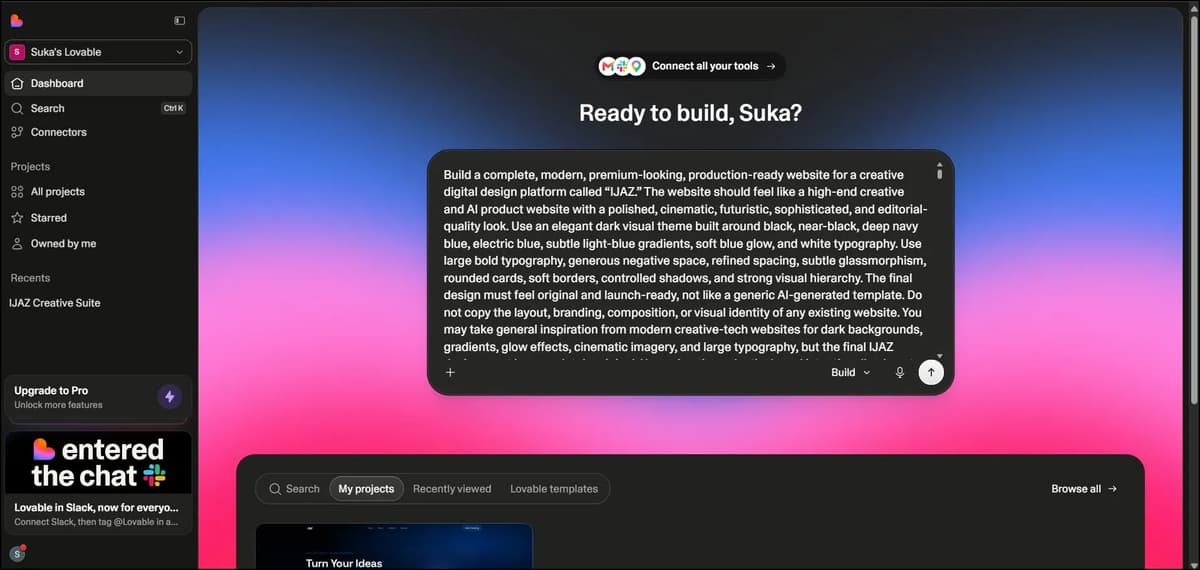
Lovable is an AI vibe coding tool that lets you build websites and apps just by describing what you want. You don't need much coding knowledge to get started and it can turn your ideas into working projects quickly. I tested Lovable to see how well it follows prompts and how good the final output actually is.
My Experience
The user interface is really simple and easy to use. We just need to enter our prompt in the prompt box and click enter. It took around 11 minutes and 6 seconds to generate the output and used 10.1 credits.
The first attempt itself was impressive. Lovable followed the prompt instructions really well and didn’t miss anything important. We can also easily edit the output. I made a few changes, and they were completed within a few minutes.
Overall, Lovable is quick and easy to use. It also creates a subdomain for us, so we can quickly publish the website. Even after making edits, we can update the live website easily. I’m sharing the actual output link below, so you can check it out.
Lovable also provides analytics and SEO options, which makes it even more useful for building and managing websites.
You can create and publish a website for free, make a few edits and update it as well. Beyond that, you’ll need to move to a paid plan, but I think it’s worth it.
Real Output Link - https://ij-spark-studio.lovable.app/
Lovable: Pros and Cons
2. Rocket
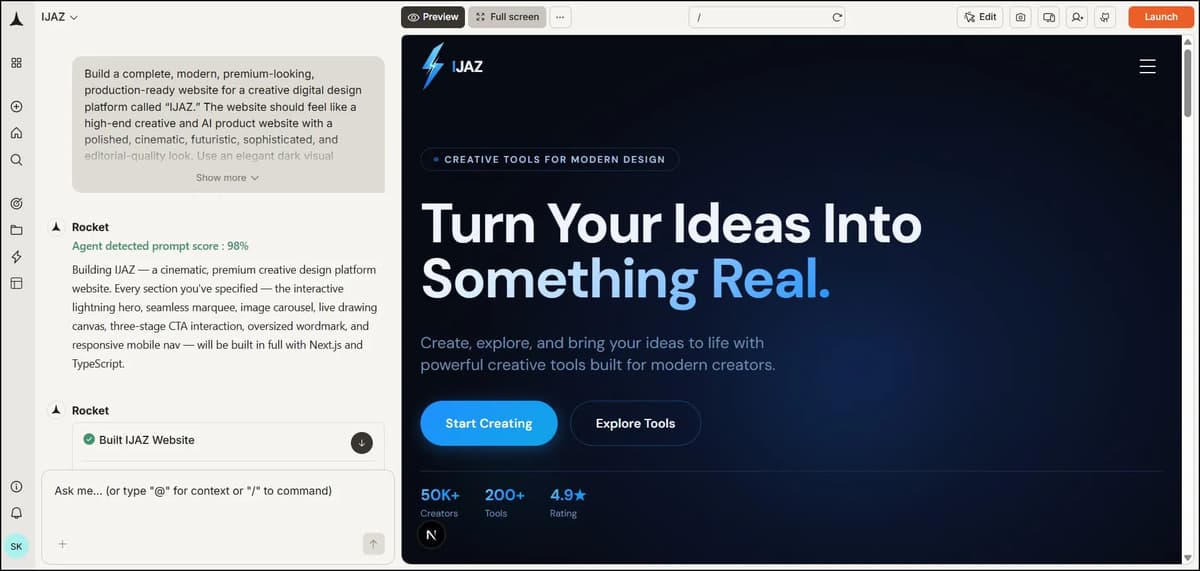
Rocket is an AI vibe coding tool that helps you build websites and web apps just by describing what you want. You can turn a simple prompt into a working website without needing to write everything from scratch. It’s a good option if you want to build and test ideas quickly with AI.
My Experience
This one is also very user-friendly. As soon as you sign up, the prompt box is ready, so you can simply enter your prompt and hit Enter. Within a few minutes, the website is ready, and you can easily publish it.
It also provides editing options, analytics, connectors, and page performance insights. It shows you what issues the page has and gives you options to fix them. You can also make changes by simply giving another prompt.
Real Output Link - https://ijaz-zg7166.public.builtwithrocket.new/
Rocket.new: Pros and Cons
3. bolt.new
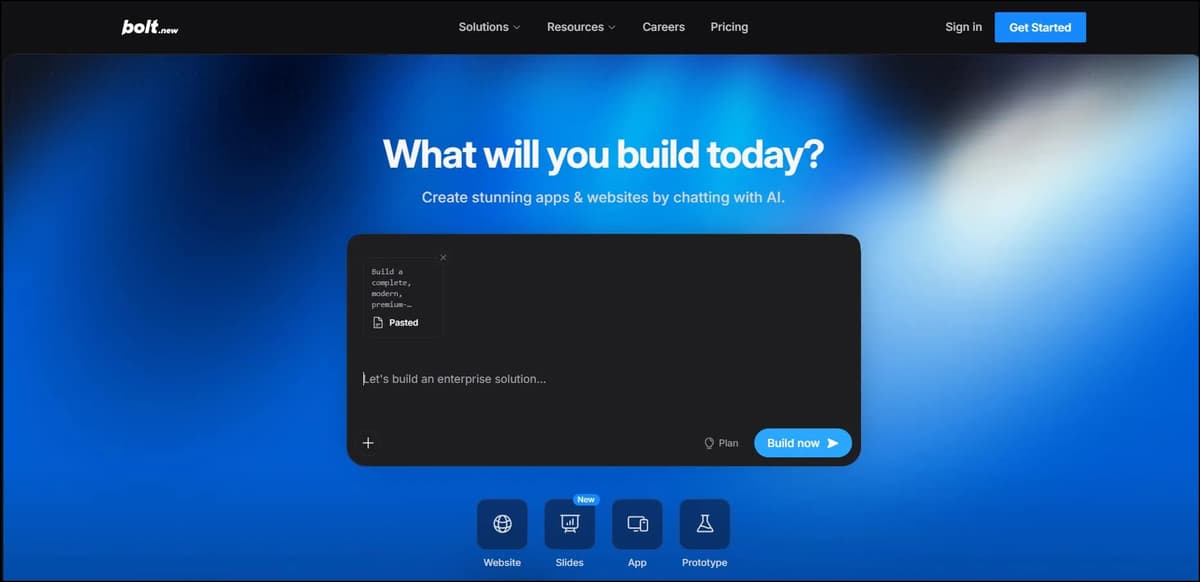
Bolt.new is an AI-powered vibe coding tool that lets you build websites and web apps using simple prompts. You can describe what you want and Bolt turns your idea into a working project without much manual coding. It’s useful for quickly creating, testing and editing web projects with AI.
My Experience
It’s easy to use, quick to publish, and follows the prompt well. It’s not bad at all, although I think the lightning effect in the hero section could have been better. Overall, it did a nice job.
It also provides analytics, Skills, and the option to connect different connectors. One thing I noticed is that Bolt doesn’t show a direct pencil or edit option on the page. Instead, there’s a selection option with an arrow in the chat panel on the left. After clicking it, you can hover over an element on the page, and the edit option will appear.
From there, you can easily edit the element directly or simply give another prompt to make the changes.
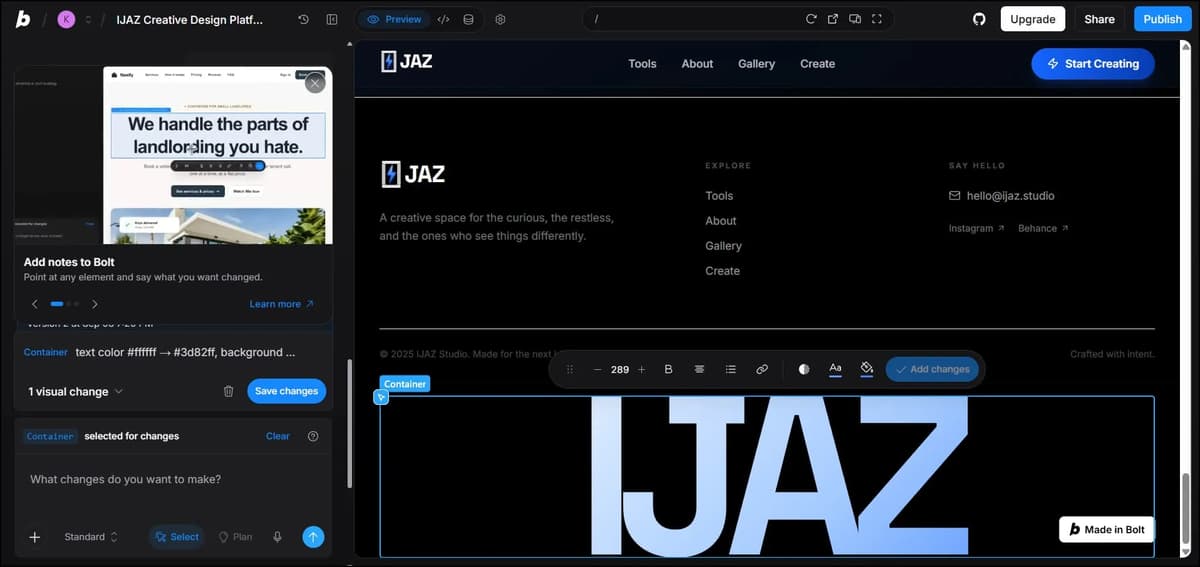
Real Output Link – https://ijaz-creative-design-pqfo.bolt.host
Bolt.new: Pros and Cons
Landing page outputs: Lovable vs. Rocket vs. Bolt
Tips for Picking the Right Tool
- Choose Lovable if you want a polished website with strong prompt accuracy and easy editing.
- Choose Rocket.new if you want a fast workflow while still getting a good-quality result.
- Choose Bolt.new if you want more flexibility to build and modify your website.
- Always test with your own prompt before choosing a tool, because the output can vary a lot depending on what you need to build.
If you use AI tools for browsing and research, see our guide to the best AI browsers to compare the available options.
Why I Didn’t Include other 7 Tools
I tested 7 other tools as well, but I left them out of the final list because their outputs were too simple compared to what I was looking for. They didn't follow my detailed prompt as accurately as I expected, and several of them had noticeable mistakes in the final output. Since I wanted to compare tools that could actually handle a detailed prompt and deliver a polished website, I decided not to include those 7 tools in the final list.
Final Conclusion
Honestly, I really enjoyed vibe coding because these tools make building websites so much easier. With just a prompt, I can create a complete website in a few minutes and even publish it without needing much coding knowledge.
I tested a total of 10 vibe coding tools and I’ve shared the outputs that impressed me the most. Among them, Lovable was my top pick because it gave me an extraordinary, premium and professional-looking output on the very first try.
Rocket came in second. It followed my prompt really well, although I noticed a little lag when scrolling through some pages. Bolt.new also performed really well and created a solid output.
I’ll be testing more vibe coding tools in the future and adding them to this list. So, bookmark or subscribe to this blog if you want to build websites with AI without needing much coding knowledge.
Frequently Asked Questions
What is the best vibe coding tool in 2026?
Based on my testing, Lovable is the best overall vibe coding tool. It produced the strongest first-time output and followed the prompt particularly well.
Which vibe coding tool is best for beginners?
Lovable and Rocket.new are strong beginner-friendly options based on your experience. Both provide simple prompt-based workflows without requiring much coding knowledge.
Is Lovable free to use?
Yes. Lovable has a $0/month Free plan with limited build, Cloud, and AI credits.
Is Bolt.new free?
Yes. Bolt.new offers a $0/month Free plan with 300K tokens per day and 1M tokens per month .
Which is better: Lovable, Rocket.new, or Bolt.new?
For your test, Lovable came first, Rocket.new second and Bolt.new third . Lovable stood out for output quality and prompt accuracy, while Rocket and Bolt also performed well for quickly creating and publishing websites.