

Ask AI which software may suit your team
If you just want the best AI voice generator, my top pick is ElevenLabs. After testing multiple tools with the same prompts, it consistently delivered the most natural and human-like voices.
However, the best choice depends on your needs. This guide compares the top AI voice generators based on voice quality, features, pricing, free plans and real-world testing to help you choose the right one quickly.
Finding a realistic AI voice generator is easy. Choosing the right one for your budget, content type and workflow is where things get difficult.
To make that easier, I tested the most popular AI voice generators side by side and compared their voice quality, features, pricing and real-world performance so you can confidently choose the one that fits your needs.
Table of Contents
My Testing Setup
I tested all tools using the same conversational script, emotional prompts, multi-speaker conversations and multilingual voice generation. I also compared voice realism, generation speed, customization features and pricing value based on real usage.
Hey everyone, welcome back to the channel. In today's video, we are going to talk about a simple way to stay more productive and manage your daily tasks more efficiently. Whether you are a student, creator or working professional, these tips can help you save time and stay organized without feeling overwhelmed.
Hey everyone! Ahh, welcome back to the channel! Haha, hope you're all doing great today. So, in this video, we're gonna talk about a really simple way to stay productive and manage your daily tasks a whole lot better. You know, sometimes our to-do list just keeps growing and growing... uh, yeah, we've all been there. (chuckles) But don't worry! Whether you're a student, a creator, or a working professional, these tips can help you save time, stay organized, and get more done without feeling overwhelmed. Alright, sounds good? Awesome! Let's jump right in!
Quick AI Voice Generators Comparison Table
| Tool | Try Now | Rating | Best For | Why I Rated It This Score | Unique Features | Paid Plan Value | Free Access |
|---|---|---|---|---|---|---|---|
| ElevenLabs | Try Now | 4.9/5 | YouTube voiceovers, voice cloning, storytelling, podcasts and dubbing | The most realistic human-sounding voice output during my testing with strong emotion handling and advanced cloning capabilities. |
✓ Audio tags ✓ Voice cloning ✓ Multi-speaker conversations ✓ Huge voice library ✓ AI video & image tools | Best overall value for serious creators and professional-quality output. | ✅ Yes |
| Google AI Studio | Try Now | 4.6/5 | Realistic text-to-speech testing, multi-speaker conversations and fast AI voice generation | Very natural-sounding voices and excellent speed, but voice cloning remains limited for many users. |
✓ Scene setup ✓ Sample context controls ✓ Voice templates ✓ Multilingual support | Good for testing and experimentation, but advanced usage requires paid Google AI plans. | ✅ Yes |
| xAI Console | Try Now | 4.4/5 | Conversational AI voices, expressive speech and storytelling-style content | Fast generation and strong conversational flow, though realism felt slightly behind ElevenLabs. |
✓ Emotion tags ✓ Pause effects ✓ Conversational voices ✓ Fast generation | More affordable for larger text generation compared to some competitors. | ✅ Yes |
Which AI Voice Generator Should You Choose?
The best AI voice generator mainly depends on the type of content you create.
If you want the most realistic human-sounding voices with advanced voice cloning and customization features, ElevenLabs is easily one of the best options for YouTube videos, podcasts, storytelling and professional voiceovers.
If you want a simpler tool for realistic text-to-speech and quick testing, Google AI Studio gives very natural-sounding output and is easy to use with different voice styles and multi-speaker support.
xAI Console is also a decent option, but based on my testing, ElevenLabs and Google AI Studio felt more complete and polished overall.
Pricing & Free Plan Comparison (All Tools)
| Tool | Free Plan Available | Free Plan Details | Starting Paid Price | Highest Plan Price | Pricing Model |
|---|---|---|---|---|---|
| ElevenLabs | Yes | 10,000 free credits for new users; usage based on character count (up to 5,000 characters per generation) | $6/monthStarter | $330/monthScale · Business = custom pricing | Monthly subscription tiers (Starter → Creator → Pro → Scale → Business) |
| Google AI Studio | Yes | ~30 free audio generations; daily usage limits apply | $19.99/monthGoogle AI Pro | $249.99/monthGoogle AI Ultra | Monthly subscription, bundled with Google AI storage/usage perks |
| xAI Console | Yes | Limited free credits for testing; up to 15,000 characters per generation | $0.015per 1,000 characters | $15per 1 million characters | Pure pay-as-you-go (no fixed monthly tiers) |
Quick takeaway: ElevenLabs gives the most generous one-time free credit pool, Google AI Studio's free tier resets daily and xAI is the most budget-friendly for high-volume/bulk text since it's priced per character with no subscription lock-in.
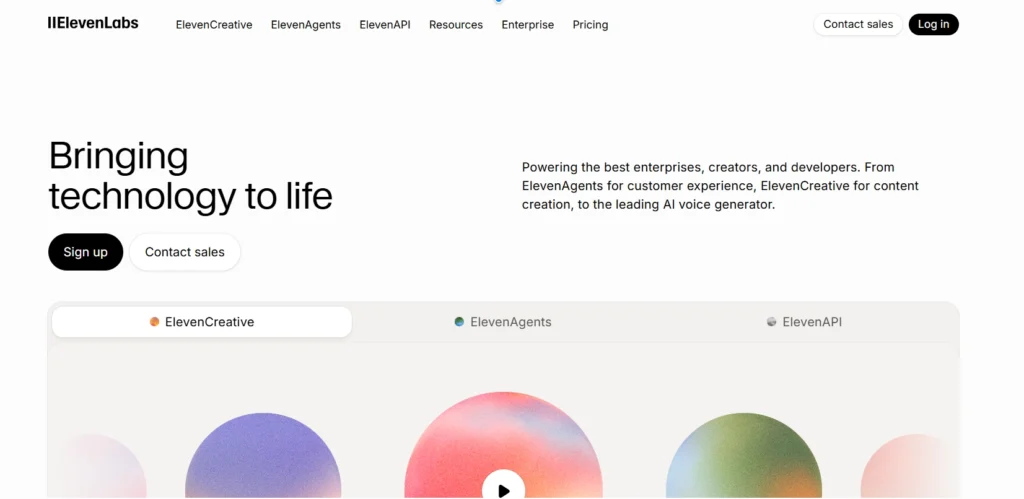
1. ElevenLabs - Best Overall AI Voice Generator
If you want the most realistic AI voice possible, ElevenLabs is currently the best option available. The voices sound extremely natural and human-like. Unlike many other AI tools, the speech includes realistic breathing, pauses and emotions.
ElevenLabs currently provides 10,000 free credits for new users. During my testing, I noticed the platform allows up to 5,000 characters per generation and the credit usage mainly depends on the number of characters in your script. Shorter scripts used fewer credits, while longer voiceovers consumed more.
One of the most useful features in ElevenLabs is its Audio Tags support. You can add simple text tags inside square brackets to control how the AI voice sounds and reacts.
For example, you can use tags like [cheerful], [calm], [excited], or [sad] to change the emotion of the voice. It also supports human-style reactions such as [laughs], [sigh], [whispers] and [pause], which helps the output sound more natural and expressive.
You can even control speaking speed, volume and delivery using tags like [slow], [fast], [soft] or [dramatic pause]. The platform also supports accent and character style tags such as [British accent], [robotic tone] or [pirate voice].
These controls give creators more flexibility to generate voiceovers that sound less robotic and more human-like without editing the audio manually.
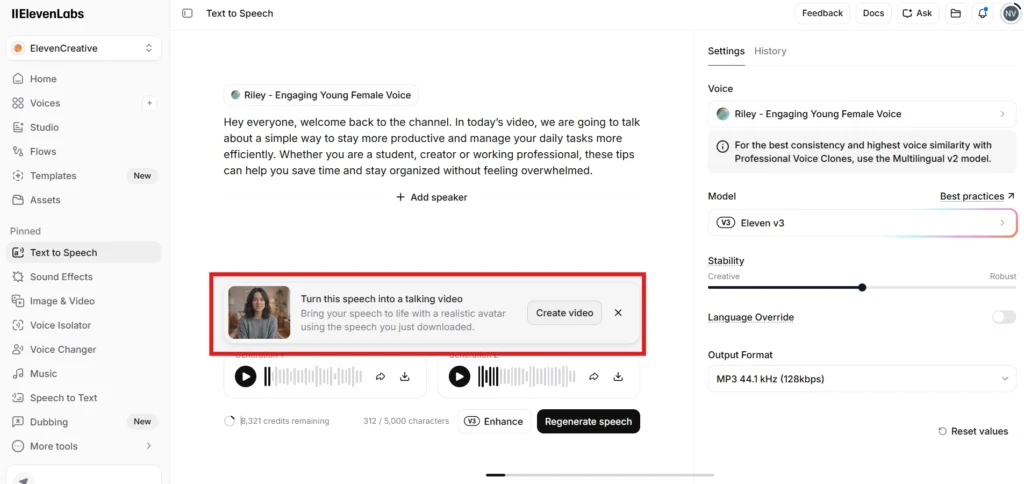
Another special feature is that after generating the voice, you can also create a talking video with it, just like a real human speaking. They provide ready-made image templates, or you can upload your own image as well. The platform also has integrated video models and everything works on a credit-based system. One more thing I liked is that the voice generation is very fast, and it usually provides two output variations for the same script.
How to Generate an AI Voice Using ElevenLabs
Generating AI voiceovers with ElevenLabs is quite simple, and the platform gives a lot of control over how the final voice sounds.
Step 1: Open ElevenLabs Text to Speech
First, log in to ElevenLabs and open the “Text to Speech” section from the dashboard.
Step 2: Paste Your Script
Now paste your script into the text editor. Writing in a natural conversational style usually gives better-sounding results compared to robotic or overly formal text.
Step 3: Choose a Voice
Next, select the AI voice you want to use. ElevenLabs provides many ready-made voices with different personalities, tones, and speaking styles.
You can also use your own cloned voice if voice cloning is enabled on your account.
Step 4: Adjust Voice Settings
On the right side, you can customize settings like speed, stability, similarity, and style exaggeration.
For example, increasing stability makes the voice more consistent, while increasing style exaggeration can make the voice sound more expressive and emotional.
Step 5: Use Audio Tags for More Expression
ElevenLabs also supports audio tags like [pause], [laughs], [whispers] and [excited]. These tags help make the voice sound more natural and human-like.
Step 6: Generate the Audio
Once everything is ready, click the “Generate Speech” button. During my testing, the voice generation was quite fast and the output sounded very realistic in most cases.
You can preview the generated audio and download it afterward if needed.
Step 7: Create Multi-Speaker Conversations
If you want to create conversation-style audio, you can add multiple speakers with different voices and personalities. This is useful for podcasts, storytelling, interviews and dialogue-based content.
My Real Output
What I Liked
I really liked the Enhance button in ElevenLabs V3 because it automatically adds audio tags that make the speech sound more natural and human-like. Users also get 10,000 free credits initially, along with a huge voice template library. The platform includes useful filter options, allowing you to easily choose voices based on age, gender, accent, language and category.
Another useful feature is multi-speaker support. You can add multiple speakers, choose different personalities for each voice and even use different languages in the same conversation.
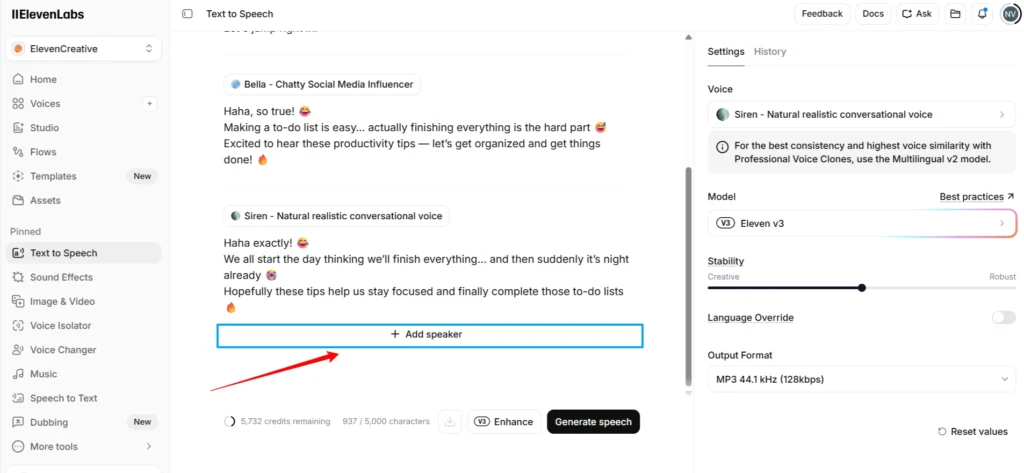
During my testing, the tool generated multi speaker conversations quite fast in a single attempt without much delay. I have also shared my sample output below so you can check the overall voice quality and conversation flow.
What I Didn’t Like
The Starter and Creator plans may not be enough for users who generate voiceovers regularly because the monthly credits can run out quite quickly with heavy usage. The Pro plan provides much better credit limits for consistent content creation but it can feel slightly costly for some users.
Best For: Ideal for YouTubers, content creators, podcasters, audiobook creators, voice cloning, AI dubbing and anyone who needs professional-quality AI voice generation.
Key Features: It offers ultra-realistic AI voices, voice cloning, multi-speaker conversations, emotion control using audio tags like [cheerful], [laughs] and [whispers], support for 30+ languages, a large voice library, AI dubbing, speech-to-text, voice design tools and the ability to create talking avatars, images, and videos.
| ✅ Pros | ❌ Cons |
|---|---|
| ✓ Excellent, most natural human-like voice quality | ✕ Advanced features like higher-quality voice cloning require paid plans |
| ✓ Advanced voice cloning capabilities | ✕ Beginners may feel confused by the number of customization settings |
| ✓ Natural emotional expression via audio tags | ✕ Starter/Creator plan credits can run out fast with heavy usage |
| ✓ Large, filterable voice library (age, gender, accent, language) | ✕ Pro plan can feel costly for casual users |
| ✓ Strong multilingual support |
Another feature worth mentioning is that ElevenLabs is not limited to AI voice generation. The platform also includes AI image and AI video generation tools, allowing you to create visuals and videos alongside your voiceovers from a single dashboard.
2. Google AI Studio - Best for Realistic Human-Sounding Speech
Google AI Studio includes several ready-made voice templates, which makes testing different voice styles much easier. Instead of manually changing multiple settings, you can quickly switch between options designed for storytelling, podcasts, ads, training content, and educational videos.
This helps users experiment with different speaking styles and find a voice that better matches their content type.
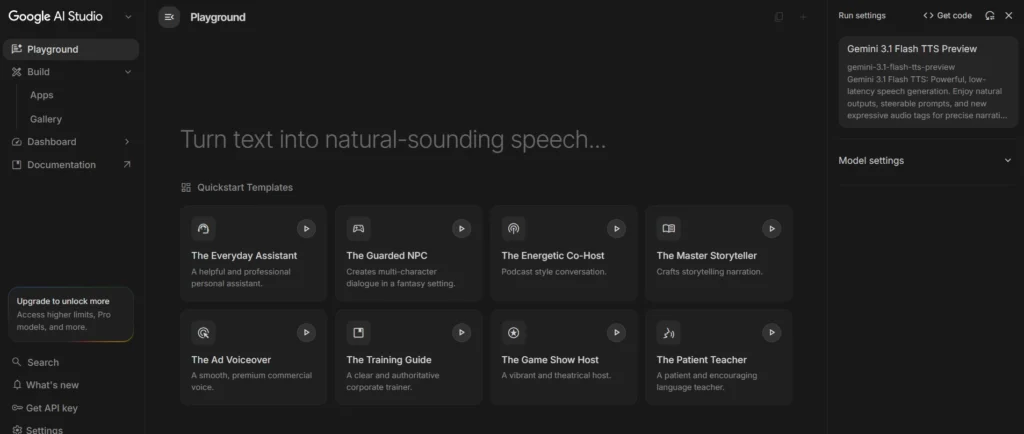
It currently allows you to generate around 30 audio outputs for free. In most cases, the voice generation process was quite fast, usually taking around 15 to 30 seconds to generate an audio clip.
After testing multiple AI voice generators, this was one of the few tools that gave me a more natural and realistic-sounding voice output instead of the typical robotic AI voice.
How to Generate an AI Voice Using Google AI Studio
Generating AI voiceovers with Google AI Studio is actually very simple. The interface may look slightly advanced at first, but once you understand the basic settings, it becomes easy to use.
Step 1: Open Google AI Studio
First, open Google AI Studio and go to the Text to Speech playground, where you can create AI voiceovers.
Step 2: Add the Scene
In the “Scene” box, describe the type of content you are creating. For example, you can write something like “YouTube productivity video” or “Professional podcast conversation.” This helps the AI understand the overall situation and content style.
Step 3: Add the Sample Context
Next, use the “Sample Context” section to explain how you want the voice to sound. You can write sentences like “The tone should sound exciting and engaging” or “The voice should feel calm, friendly and natural.” This mainly controls the emotion and speaking style of the AI voice.
Step 4: Paste Your Script
Now paste your actual script inside the speaker box. This is the text the AI will convert into speech. Writing in a natural conversational style usually gives better results than overly formal or robotic sentences.
Step 5: Customize the Voice
Google AI Studio also allows you to change voice styles, accents, speaking pace, pitch and different AI voices. You can test multiple combinations to find the voice that sounds best for your content.
Step 6: Generate the Voice
Once everything is ready, click the “Run” button. The AI will generate the voiceover within a few seconds, and you can preview or download the audio afterward.
My Real Output
What I liked
One thing I liked about Google AI Studio is how easily it handles conversation style voice generation. Using the “Add Speech Block” option, you can create multi speaker conversations without much setup. During my testing, the tool generated longer conversation scripts quite fast, usually within about a minute. I also tested multiple languages and the overall voice quality sounded natural in most cases. Another useful feature is the regenerate option, which lets you quickly generate a new version if the output does not sound good enough.
What I didn't like
One thing I did not like is that Google AI Studio still does not properly offer a public voice cloning feature for everyone. The platform provides very realistic text to speech voices, but the “Create Your Voice” option currently seems limited or still under testing.
So if you specifically want to clone your own voice and use it for AI voice generation, this tool may not fully support that yet for all users.
Best For: Ideal for YouTubers, content creators, podcasters, educators and anyone who wants to generate realistic AI voices for free or during the testing phase.
Key Features: It includes natural-sounding AI voices, multi-speaker conversations through Speech Blocks, voice style and accent controls, Scene and Sample Context settings for better voice consistency, pace and pitch customization, multilingual support and a regenerate option to quickly create alternative voice outputs.
| ✅ Pros | ❌ Cons |
|---|---|
| ✓ Realistic voice quality | ✕ Voice cloning is still limited for most users |
| ✓ Fast generation speed (~15–30 sec per clip) | ✕ Higher usage limits require a paid Google AI plan |
| ✓ Multiple voice customization options | ✕ No fully public "Create Your Voice" cloning feature yet |
| ✓ Free access for testing (~30 free generations) |
3. XAI Console (Text to Speech)
xAI Console Text-to-Speech (TTS) is a new AI voice generation tool from Elon Musk’s xAI platform. It helps creators and developers convert text into realistic human-like speech with support for natural pauses, emotions, and multiple voice styles. In this comparison, we’ll see how xAI TTS works, its features, pricing and finally, you can listen to the real output I generated and shared below.
How to Generate an AI Voice Using xAI Console
Generating AI voiceovers using the xAI Console is quite simple, especially if you want more expressive and emotional AI voices.
Step 1: Open the Voice Section
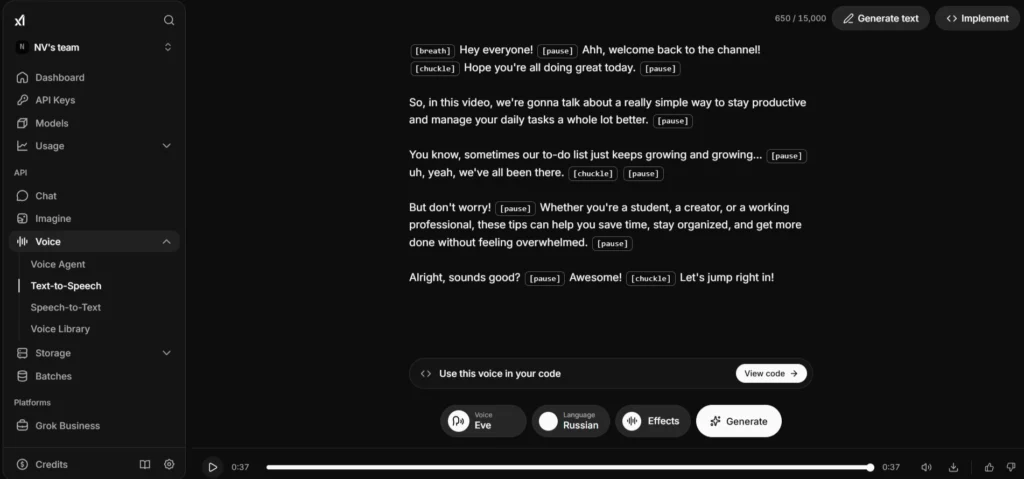
First, open the xAI Console dashboard and go to the “Voice” section. Then click on the “Text to Speech” option.
Step 2: Paste Your Script
Now paste your script inside the text editor. The platform also supports emotion style tags like [pause], [chuckle] and [breath], which help make the AI voice sound more natural and human-like.
For example, adding small pauses or laughter between sentences can make the output feel less robotic.
Step 3: Choose the Voice
Next, select the AI voice you want to use. xAI provides different voice options with different tones and speaking styles, so you can test multiple voices based on your content type.
Step 4: Select Language and Effects
You can also change the language and apply voice effects directly from the bottom settings panel. This makes it easier to customize the overall speaking style without changing the script too much.
Step 5: Generate the Audio
Once everything is ready, click the “Generate” button. During my testing, the generation speed was quite fast and the voice output sounded expressive and more conversational compared to many basic AI voice generators.
If the output does not sound right, you can edit the script, adjust the emotion tags or regenerate the voice again easily.
My Real Output
What I liked
In a single attempt, you can enter up to 15,000 characters to generate voice audio. Compared to Google AI Studio, xAI Console generates audio much faster and currently allows free voice generation. It also includes unique voice effects and expression options that make the output sound more natural and realistic.
What I didn't like
To get a more natural human feel, you need to manually add effects and pauses wherever needed in the text. The output sounds better when the emotions and sound effects sync properly. Compared to Google AI Studio, the voice still feels slightly less realistic in some situations.
Best For: Ideal for YouTubers, storytellers, podcasters and anyone who wants natural, conversational-style AI voice generation.
Key Features: It offers expressive AI voices with emotion tags like [pause], [chuckle] and [breath], built-in pause and timing controls, laughter effects, multiple voice options, multilingual support and the ability to generate up to 15,000 characters in a single session.
| ✅ Pros | ❌ Cons |
|---|---|
| ✓ Fast generation speed | ✕ Needs manual effort to add pauses/effects for a natural feel |
| ✓ Affordable pay-as-you-go pricing (no subscription lock-in) | ✕ Slightly less realistic than ElevenLabs in some cases |
| ✓ Free credits available for testing | ✕ Fewer built-in customization presets vs. ElevenLabs/Google AI Studio |
How Should Your Text Be Written for AI Voice Generation?
The quality of the AI voice does not only depend on the tool. The way you write your script also makes a huge difference.
AI voices usually sound more natural when the text is written like a real human conversation instead of formal or robotic sentences. Using simple words, proper punctuation, shorter sentences and natural pauses can make the output sound much more realistic and engaging.
For example, instead of writing:
“Today we will discuss productivity improvement techniques for efficient task management.”
You can write:
“Today, let’s talk about some simple ways to stay productive and manage daily tasks more easily.”
The second version sounds more natural, conversational and human-like when generated using AI voice tools.
What are the common mistakes to avoid while generating an AI voice?
- One mistake many people make is writing scripts that sound too formal or robotic. AI voices usually sound much better when the text feels natural and conversational.
- Another common mistake is ignoring punctuation. Small things like commas and full stops actually help the AI create more realistic pauses and smoother voice flow.
- Some users also pick random voices without matching them to their content style. For example, an energetic voice may not fit calm educational videos.
- And finally, many people use the first generated output immediately without testing different voices or regenerating the audio, even though small changes can improve the final result a lot.
AI Voice Generator vs Human Voiceover: Which Is Better?
| Scenario | AI Voice Generator | Human Voiceover |
|---|---|---|
| Creating a YouTube video | Generate a realistic voice in minutes by simply pasting your script. | Record the script manually and edit any mistakes afterward. |
| Fixing a single sentence | Edit the text and regenerate only that sentence. | Re-record the sentence and match the original tone and pacing. |
| Working late at night | Create voiceovers anytime without needing a microphone or quiet room. | Requires a quiet recording environment, which isn't always possible. |
| Creating content in multiple languages | Convert the same script into several languages with just a few clicks. | Usually requires separate voice actors for each language. |
| Cost | Much more affordable for regular content creation and frequent updates. | Costs increase with script length, revisions, and additional languages. |
| Speed | Most voiceovers are ready within a few minutes. | Recording, editing, and revisions can take hours or even days. |
| Best Use Cases | YouTube videos, podcasts, online courses, audiobooks, faceless channels, product demos, and explainer videos. | Movie dubbing, emotional storytelling, character acting, commercials, and projects where authentic human emotion is essential. |
Bottom Line
If your goal is to produce content quickly, update scripts often, or create voiceovers in multiple languages, an AI voice generator is usually the smarter choice. However, for projects where emotional delivery, acting or storytelling is the main focus, a professional human voice actor still delivers the most natural performance.
Final Author Opinion
Based on my experience, ElevenLabs is the AI voice generator I would most recommend. It offers many useful features, including fast voice generation, realistic voice quality, voice cloning support and even custom voice creation options.
If voice quality and natural human-sounding output are your main priorities, ElevenLabs is easily one of the best AI voice generators available right now.
And honestly, if you are confused about which AI voice generator to choose, you can confidently go with ElevenLabs. In my testing, it felt like the most complete and worth it tool overall.
FAQs
1. What is an AI voice generator?
An AI voice generator is a tool that converts text into realistic speech using artificial intelligence. You simply type your script and the AI generates a voiceover automatically.
2. Which AI voice generator sounds the most realistic?
During my testing, tools like ElevenLabs, Google AI Studio and xAI Console produced some of the most natural and human-like voice outputs compared to many other AI voice generators.
3. Is AI voice legal for YouTube?
Yes, using AI voices for YouTube is generally allowed as long as you follow copyright rules and do not clone someone’s voice without permission.
4. Can AI voices be monetized?
Yes, many creators monetize AI voice content on YouTube, podcasts, reels and other platforms. The content quality and originality matter more than whether the voice is AI-generated.
5. Which AI voice generators support multiple languages?
Tools like ElevenLabs, Google AI Studio, and xAI Console support multilingual AI voice generation. During my testing, ElevenLabs supported more languages and accent options compared to many other AI voice tools, which made it more useful for multilingual content creation, dubbing, and international audience targeting.
6. Can AI voice generators replace voice actors?
AI voice generators are useful for fast content creation and basic voiceovers, but human voice actors still perform better for emotional storytelling, acting and highly expressive content.
7. How can I clone my voice using an AI voice generator?
Yes, most AI voice cloning tools ask you to upload or record a few minutes of your voice. The AI then analyzes your voice and creates a custom AI version that can speak any text you type.
8. Which AI voice generators offer a free plan?
Many popular tools, including ElevenLabs, Google AI Studio and xAI Console, currently offer free plans or free credits for testing AI voice generation features.
9. Which AI voice generator works best?
It mainly depends on your needs. ElevenLabs works well for realistic voice cloning and emotional voiceovers, Google AI Studio is good for free high-quality voice generation and xAI Console is useful for expressive conversational style audio.
0 Comments