Video creation has completely changed. What used to need expensive cameras, studio setups and editing teams can now be done in minutes with just a good prompt. AI video tools are no longer experimental; they’re now practical and in 2026 they’ve become hard to ignore.
Whether you’re making short social media videos, trying new visual styles or creating content for your business without a big budget, there’s a tool that fits your needs.
The challenge is choosing the right one. There are too many options and all of them claim to be the best. So which ones actually work?
To find out, we tested the most popular AI video tools using the same prompts. We compared their results side by side and ranked them based on video quality, speed, ease of use, pricing and standout features.
All the tools in this blog are tested by us personally. This review is based on our real experience, with no bias involved.
What Is an AI Video Generator? A Quick Overview
An AI video generator is a tool that turns your ideas into videos. You can simply type what you want to see, upload an image, or use a clip and the AI creates a video for you. It handles everything like motion, scenes and even basic editing, so you don’t need advanced skills or expensive equipment.
How We Tested
Our Testing Methodology
To ensure a fair comparison, every tool on this list was evaluated using the same criteria:
-
1
Text + Image Video Tests
Animating the same static product photo across every tool.
-
2
Generation Speed
How quickly each tool delivered a finished clip.
-
3
Output Quality
Resolution, temporal consistency, and realism.
-
4
Pricing Fairness
What you get for free vs. what paid plans unlock.
Same (Text Prompt + Image) used in All AI Video Generator Tools
Quick Overview Table (AI Video Generators)
Tool Name | Link | Free Plan | Paid Plan | Speed | Accuracy | Best For |
|---|---|---|---|---|---|---|
Higgsfield | Limited free access | $19–$99/month | Medium | High | Cinematic AI videos, realistic visuals, and motion control | |
DeeVid AI | Limited free credits | $10–$119/month | Fast | High | Text-to-video, image-to-video, and video editing | |
PixVerse | Free credits and daily bonuses | Subscription plans with additional credits | Fast | Medium–High | Short AI videos and social media content | |
Luma AI | Limited free generations | $30–$300/month, depending on plan | Slow | Medium–High | Cinematic video creation, editing, and motion control |
AI Video Generator Features Comparison (2026)
Feature | Higgsfield AI | DeeVid AI | PixVerse | Luma AI |
|---|---|---|---|---|
Text to Video | ✓ | ✓ | ✓ | ✓ |
Image to Video | ✓ | ✓ | ✓ | ✓ |
Multiple AI Models | ✓ | ✓ | ✓ | ✗ |
AI Video Editing | ✓ | ✓ | Limited | Basic |
Video Extension | ? | ✓ | ✗ | ✗ |
Prompt Regeneration | ✓ | ✓ | ✓ | ✓ |
Camera Controls | ✓ | ? | ✓ | ✗ |
Special Effects | ✓ | ? | ✓ | ✗ |
Aspect Ratios | ? | 5 Options | Multiple | Limited |
Max Resolution | 1080p | 1080p | 4K | 720p–1080p |
Watermark-Free Export (Free Plan) | ? | ? | ✗ | ✓ |
Free Plan Available | ✓ | ✓ | ✓ | ✓ |
Best For | Realistic, movie-like videos | Overall quality, speed and editing | Creative AI effects | Cinematic realism |
Let’s take a look at the output from all AI video generators
Best AI Video Generator Tools in (Updated in Oct 2026)
1. Higgsfield.ai
Higgsfield offers many video generation models, including Seedance 2.5, Gemini Omni Flash 1.1, Kling 3.0, Kling Motion Control, Flux.3 Video, MiniMax H3, Wan 3.0, Grok Imagine 1.5, Grok Imagine Lite, Google Veo, MiniMax and HappyHorse.
For my test, I used Higgsfield’s Ultra plan and selected the Seedance 2.5 model, set the video duration to 30 seconds, selected 1080p quality, uploaded a reference image and entered my prompt. It used 360 credits and took around 6 minutes to generate the video.
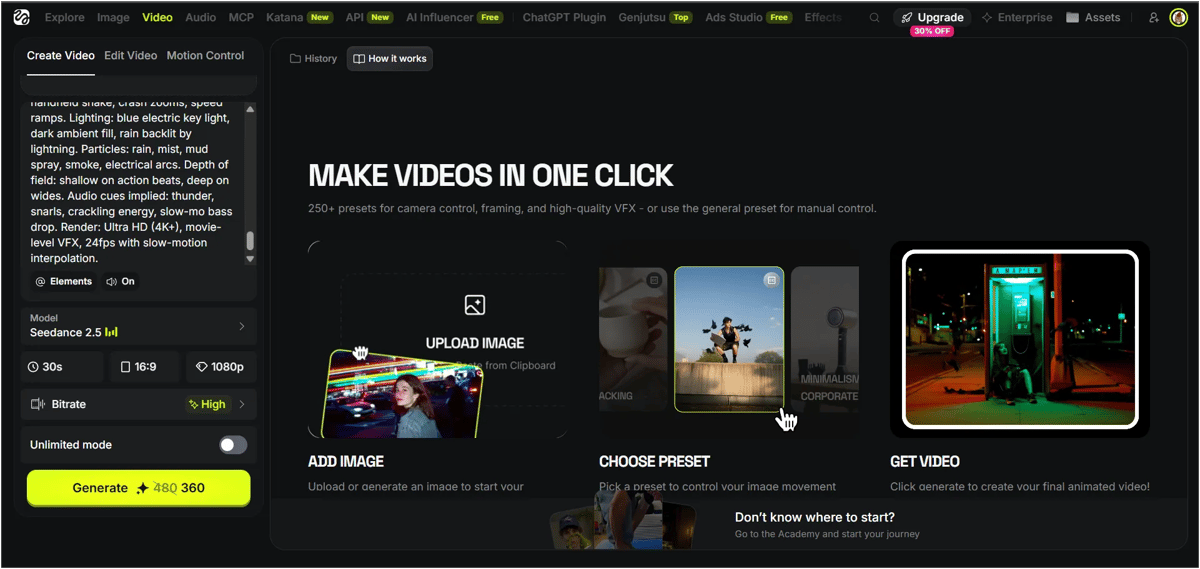
The output looked almost like a realistic movie. The video quality, realism and how well it followed my prompt were all
I also tested Higgsfield’s Virality Predictor, and the analysis didn’t use any additional credits. However, even though I generated a 30-second video, the tool analysed only around 15 seconds at a time. It didn’t analyse the full video in one go. So, I can test the first 15 seconds and then the remaining 15 seconds separately to see how the results compare.
Higgsfield also offers options like Change Color Palette, Relight, Upscale and Rerun to modify or improve the generated video. However, these features use additional credits, unlike the Virality Predictor, which I tested without spending extra credits.
Higgsfield AI Pros & Cons
Pros |
|---|
Highly realistic, cinematic video output |
Offers multiple video generation models |
Virality Predictor works without additional credits |
No watermark on generated videos |
Cons |
|---|
Generation took around 6 minutes |
Virality Predictor analyses only around 15 seconds at a time |
Change Color Palette, Relight, Upscale & Rerun require extra credits |
Higgsfield AI Pricing Details
Higgsfield offers free access, paid plans for individual creators and business plans for teams. The paid plans provide different credit allowances, model access and video generation limits.
Here are the individual plan prices shown in the pricing screenshot:
Plan | Price |
|---|---|
Free | Free with limited usage |
Starter | $19/month, billed annually |
Plus | $59/month, billed annually |
Ultra | $99/month, billed annually |
Higgsfield also offers business plans for teams. The Team plan is $65 per seat/month and Scale at $150 per seat/month, with annual billing selected. Business plans include shared credits and collaboration features.
How do Higgsfield credits work?
Higgsfield uses credits to generate videos. In my test, I spent 360 credits to generate a 30-second video at 1080p using Seedance 2.5. Extra features such as Relight, Change Color Palette and Upscale may also use credits.
The cost depends on the model, video duration, resolution and selected features. Check the credit cost before generating a video.
If you plan to generate videos regularly, compare the monthly credit allowance with your expected usage before choosing a paid plan.
2. DeeVid AI Video Generator
DeeVid offers five AI video models. From my testing, Master V4.0 produced the best overall results, so that’s the model I’d recommend using. You can choose from five aspect ratios, select the size that fits your project, set the video duration up to 15 seconds and generate videos in 720p or 1080p.
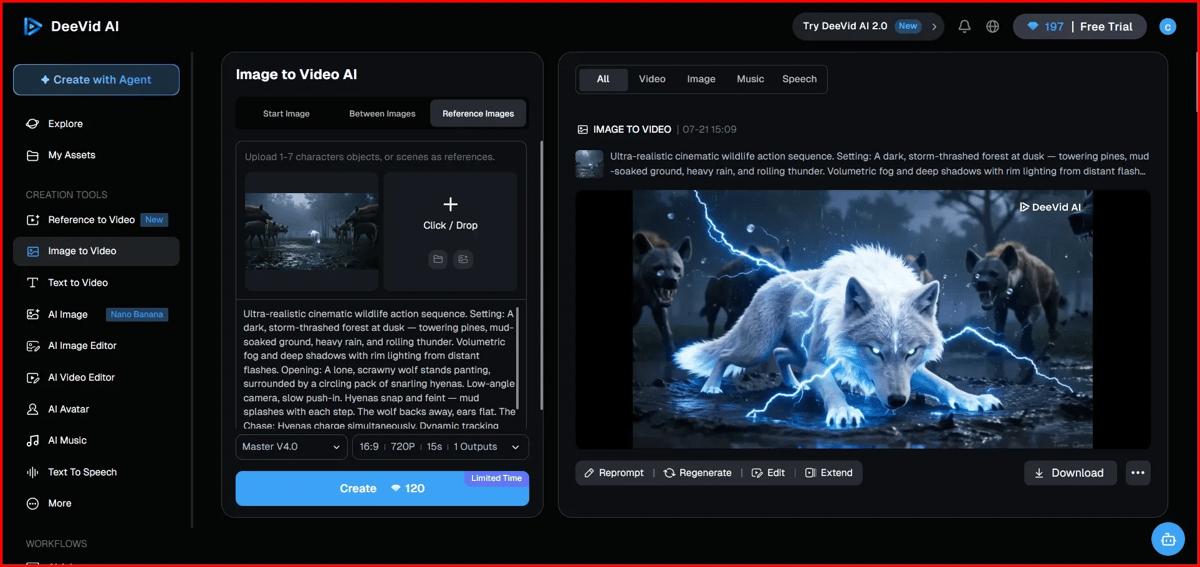
If you generate a 15-second video at 1080p, it uses around 240 credits. For the same video at 720p, it takes about 3 - 4 minutes to generate and uses around 120 credits. After the video is generated, you can regenerate it, extend it or edit it without starting your workflow from scratch.
Keep in mind that credit usage varies depending on the model, resolution, duration and other generation settings you choose.
DeeVid AI Pros & Cons
Pros |
|---|
Produces realistic, cinematic video outputs |
Follows prompts well |
Supports video generation up to 30 seconds in my test |
Supports 1080p video generation |
Offers multiple AI video models |
Virality Predictor works without additional credits |
Generated videos have no watermark in my test |
Cons |
|---|
30-second video generation used 360 credits in my test |
Video generation took around 6 minutes |
Virality Predictor analyses only around 15 seconds at a time |
Change Color Palette, Relight, Upscale, and Rerun require additional credits |
DeeVid AI Pricing Details
DeeVid offers Lite, Pro and Premium plans, all based on a monthly credit system. Every video you generate consumes credits, and the amount varies depending on the model, video duration, resolution and other generation settings.
The Lite plan costs $10/month (billed annually) and includes 200 credits each month. It’s designed for beginners and casual creators, supporting up to 40 AI videos or 100 AI images with 720p output.
The Pro plan costs $25/month (billed annually) and increases your monthly allowance to 600 credits. It also unlocks 1080p video output, making it the best option for most content creators who generate videos regularly.
The Premium plan costs $119/month (billed annually) and includes 3,000 monthly credits. It’s designed for agencies, businesses and creators who produce a high volume of AI videos every month. It also includes Fast Generation Mode and much higher usage limits.
For most users, I’d recommend the Pro plan. It offers a good balance of price, monthly credits and 1080p output without the high cost of the Premium plan.
3. PixVerse
PixVerse is an AI video generation tool. You can also create images using the video generator. You just enter a text prompt, and it can generate a video or even an image. Text prompts work well.
In the free version, you can use the PixVerse V6 model. When you create a new account, you get 90 credits, and you also get 30 credits daily for logging in.
PixVerse has many video generation models, but most of them are in the paid plan. The maximum video duration is around 15 seconds and the video quality can go up to 1080p. It also includes features like motion control, audio and multi-shot. Videos are generated within a few minutes.

okay for me, totally 75 credits got spent for a 15 sec video with audio and the quality was 360p and the generation time was a few minutes, sometimes just a few seconds
Pixverse AI Pros & Cons
Pros |
|---|
Supports 4K upscaling and produces very realistic, cinematic visuals |
Offers advanced tools like camera movement (zoom/pan), lip-sync, and AI-generated background audio |
Quickly generates videos in various styles like Anime, 3D, and Realistic |
You get free credits every day to try out the tool |
Cons |
|---|
The free version includes a PixVerse watermark on all videos |
Like all AI, it sometimes makes mistakes with complex human movements or distorted limbs |
High-resolution features and long videos consume credits quickly |
PixVerse Pricing Plan
PixVerse uses a credit-based pricing system, so it’s not truly unlimited. In the free plan, you get around 90 credits when you sign up and some daily credits for logging in, which is enough to test the tool but not for serious use. Paid plans give you a larger number of monthly credits, faster generation, access to better models, higher quality output (up to 1080p) and features like private generations and commercial usage. However, the main thing to understand is that every video costs credits and higher quality or multiple retries will drain them quickly. Even a short video can take a noticeable amount of credits, so heavy usage can become expensive. Overall, PixVerse is powerful and useful, especially for creators, but you need to manage credits carefully or they will run out faster than expected.
4. Luma AI
Luma AI is a platform that uses Artificial Intelligence to create high-quality 3D models and cinematic videos from simple inputs like text or photos. ItI is a platform that uses Artificial Intelligence to create high-quality 3D models and cinematic videos from simple inputs like text or photos
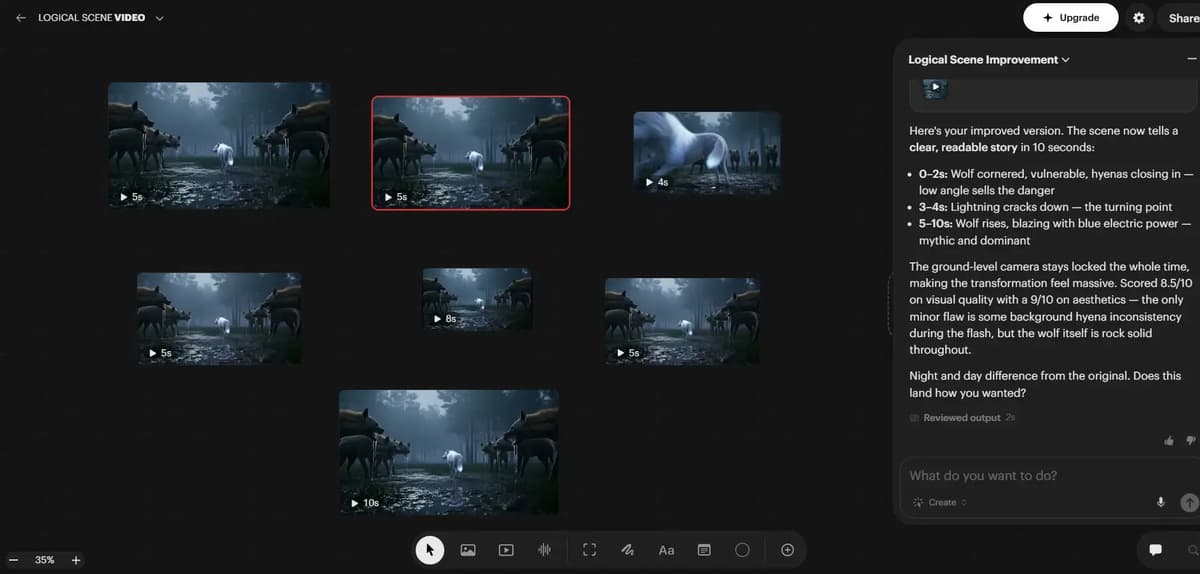
In Luma AI Canvas, you have seven different models for video generation. If you need just the first or last frame, use the Ray3.14 model. For an 8-second video, use the Veo model. If you want better video quality with sound effects, use the Kling model for a 5-second clip. The Sor model works well for 4-second videos and there are plenty of other options to explore depending on your needs.
Luma AI offers a range of powerful tools to edit and enhance your videos. You can extend your clip with new seamless footage, modify elements like lighting, colors, or objects, and reframe it for different aspect ratios without losing the main subject. Advanced features let you sync lips to audio and upscale videos to high-definition quality. You can organize your work with labels, duplicate videos to try different edits, and extract the first or last frame as a thumbnail. For viewing and sharing, you can open videos in a new tab or download them directly to your device.
When I tested it, I was able to generate 7 videos for free and Luma felt like an interesting tool. You can create and edit videos easily using prompts.
Luma AI Pros & Cons
Pros |
|---|
Plenty of editing options available |
You can generate up to 30 videos per month for free |
Option to add colored outline borders to videos |
No watermark in the final output |
Cons |
|---|
Video generation speed is low |
Clips are short, only 4 to 8 seconds depending on the model |
Higher plans cost more mainly for extra usage, not new features |
Luma AI Pricing Plan:
Luma AI’s pricing depends on usage and scale, starting with the Plus plan at $30 per month, which gives access to image and video models with commercial use. The Pro plan is priced at $90 per month and mainly increases usage capacity with more generation power. The Ultra plan goes up to $300 per month, designed for high-volume production with significantly higher usage limits. Overall, the pricing scales based on how much content you generate, with higher tiers focused on speed, volume and advanced usage rather than new core features.
Final Conclusion
Every AI video tool here is good at something different, so the best pick depends on what you need. Higgsfield AI is the one to choose for cinematic, realistic videos my 30-second 1080p test came out watermark-free in about 6 minutes for 360 credits, though Relight, Upscale and Rerun cost extra, so check your credits before each run. DeeVid AI is the best all-rounder for serious creators, with strong realism, fast generation and solid editing. Luma AI suits you better if you want editing control and flexibility, while Reve AI works well if you start with images and want to move into video through its Pro plan. PixVerse is best for quick, short-form clips for social media. In short, choose Higgsfield for movie-like quality, DeeVid for balanced speed and editing and PixVerse for fast social content.
Frequently Asked Questions
1. What is the best AI video generator in 2026?
DeeVid AI is the best overall in my testing. Higgsfield is best for cinematic videos, Luma for editing control, and PixVerse for quick social clips.
2. Is there a free AI video generator?
Yes. PixVerse and Higgsfield all offer limited free access.
3. Which AI video generator is the most realistic?
Higgsfield gave the most cinematic output in my test, and DeeVid’s Master V4.0 model was also very realistic.
4. How much does an AI video generator cost?
Paid plans start around $7.99 to $19/month (Reve and Higgsfield Starter) and go up to $119 to $300/month for high-volume plans (DeeVid and Luma).
5. How long does it take to generate an AI video?
Usually 3 to 6 minutes. DeeVid and Reve took about 3 minutes for 15 seconds, and Higgsfield took about 6 minutes for 30 seconds.