What Is Jasper AI
Jasper AI is an AI-powered content platform built specifically for marketers. Instead of being a general-purpose chatbot, it’s designed around brand voice, structured workflows and content produced at scale. It can write blog posts, social captions, ad copy, email campaigns and more, while pulling in your company’s tone, audience and style so the output actually sounds like you instead of a generic AI. In short, it’s less “AI writing assistant” and more “AI content operations system” for teams that publish a lot.
Note: This review is based on hands-on testing, not a sponsored post or affiliate content.
Quick Overview
Feature | Details |
|---|---|
Best for | Marketing teams, agencies, content creators |
Core tools | Chat, Agent Library (118+), Canvas, Grid |
Brand memory | Jasper IQ (brand voice, knowledge base, audiences) |
Content types | Blog posts, ads, emails, social, SEO/GEO content |
Bulk content | Yes, via Grid (spreadsheet-style workflows) |
Free trial | 7 days |
Starting price | Around $59 to $69/month per seat |
Learning curve | Moderate (four tools to learn) |
First Impressions
The moment you log in, you get a clean welcome screen asking “What do you want to work on?” It doesn’t feel cluttered or overwhelming. More like a simpler, friendlier Notion.
On the left sidebar, there are four main sections:
- Home: your dashboard
- Projects: everything you’ve worked on
- Agent Library: 118+ ready-made AI agents
- Jasper IQ: where you store your company/brand knowledge
Right away, it’s clear this isn’t just another chatbot. It’s built more like a proper content system.
Chat vs Agents vs Canvas vs Grid: The Part That Confused Me
Honestly, this is where I got stuck at first. There are four different ways to create content and each one has a different job.
1. The Chat Box
On the home screen, there’s a simple “Ask Jasper anything” box. You type your request and get a response, which feels a lot like ChatGPT. The difference is Jasper pulls in your brand voice automatically (if you’ve set that up in Jasper IQ). Good for quick, one-off answers.
2. Ready-Made Agents
This is where the real value is. Things like “AI Readiness Score,” “SEO/AEO/GEO Rewriter” and “Blog Post” are all specialized agents. Each one is built for exactly one job, the Blog Post agent doesn’t know or care about anything except writing blogs. I tried it and it asked me for keywords, audience and tone, then gave me a properly structured draft. Way more polished than what the plain chat box gave me.
3. Canvas
Think of Canvas as a Google Docs editor with AI baked right in. You write, highlight a paragraph and ask the AI to “improve this.” It rewrites it on the spot. For long-form content like blog posts or articles, this felt like the best fit. If you’ve set up a Style Guide, it sticks to it, so your brand tone stays consistent.
4. Grid
This is a spreadsheet-style interface. If you’ve ever used Excel, you’ll get the hang of Grid instantly. You fill one row with a topic, keyword and audience, then repeat that across 50 or 100 rows, and it auto-generates content for every single row. Great for bulk work like product descriptions or a batch of blog topics. I tested it with 5 topics and had 5 drafts ready in about two minutes. That part genuinely impressed me.
How to create a full Blog in Jasper AI
Test 1: Without Agent
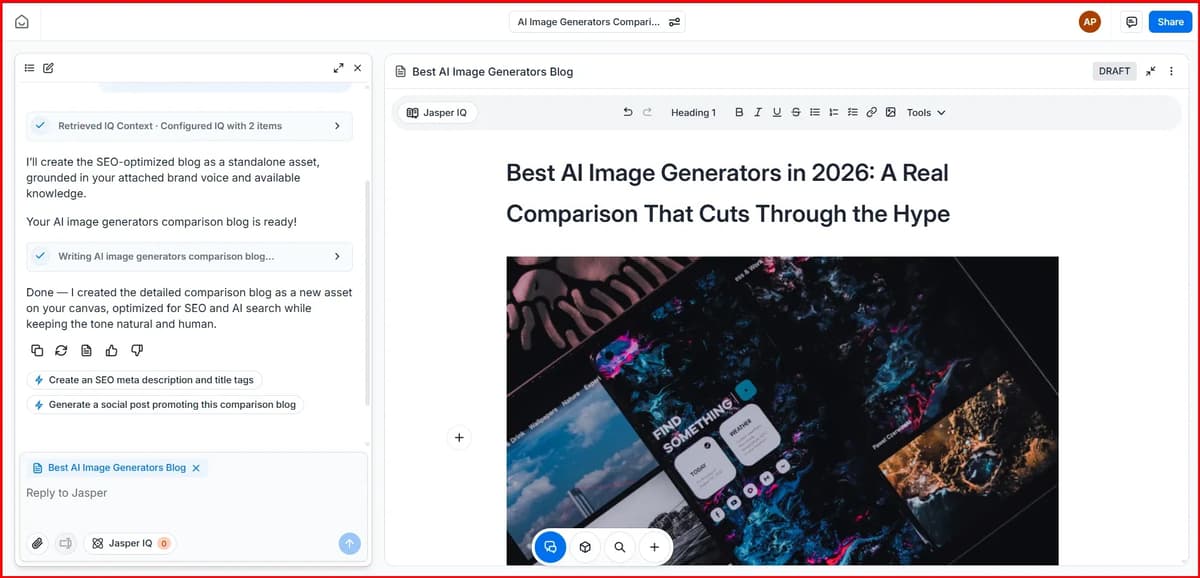
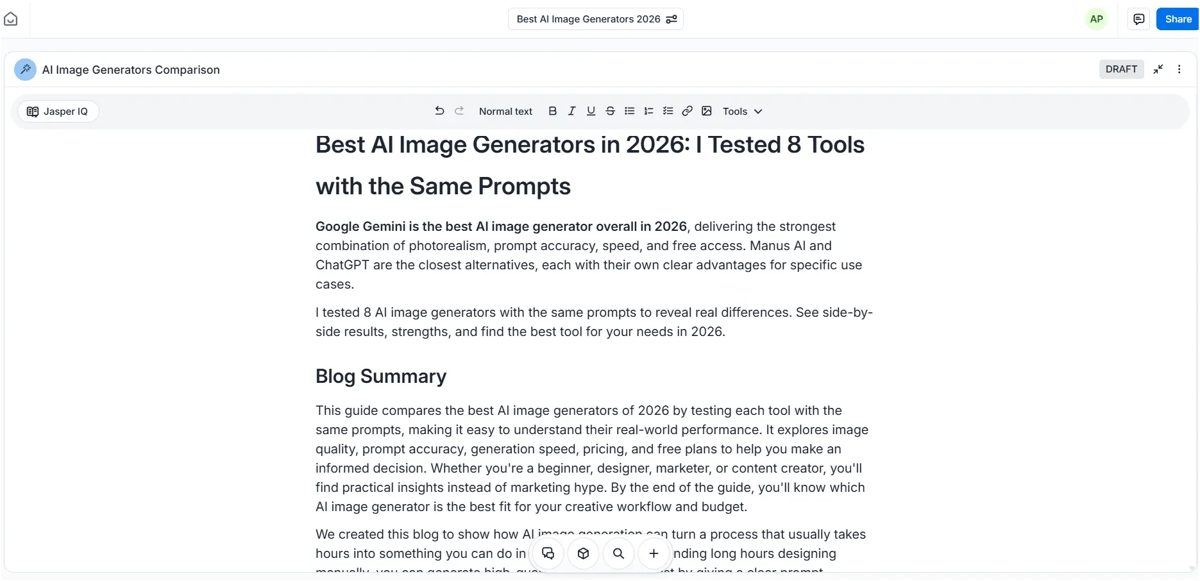
The content structure doesn’t feel like typical AI-generated writing. It follows a more natural format, similar to how a human would organize and write the content.
The editor feels somewhat similar to Google Docs and gives you plenty of editing options. You can rewrite sections, regenerate content, create AI images, or upload your own images. Jasper also provides stock images that you can add if they fit your content.
If you’re working with a team, you can share projects and collaborate. There are also status options to track whether a blog is in draft, in progress, or completed. You can even add links directly inside the editor when needed.
Test 2: Using Agent
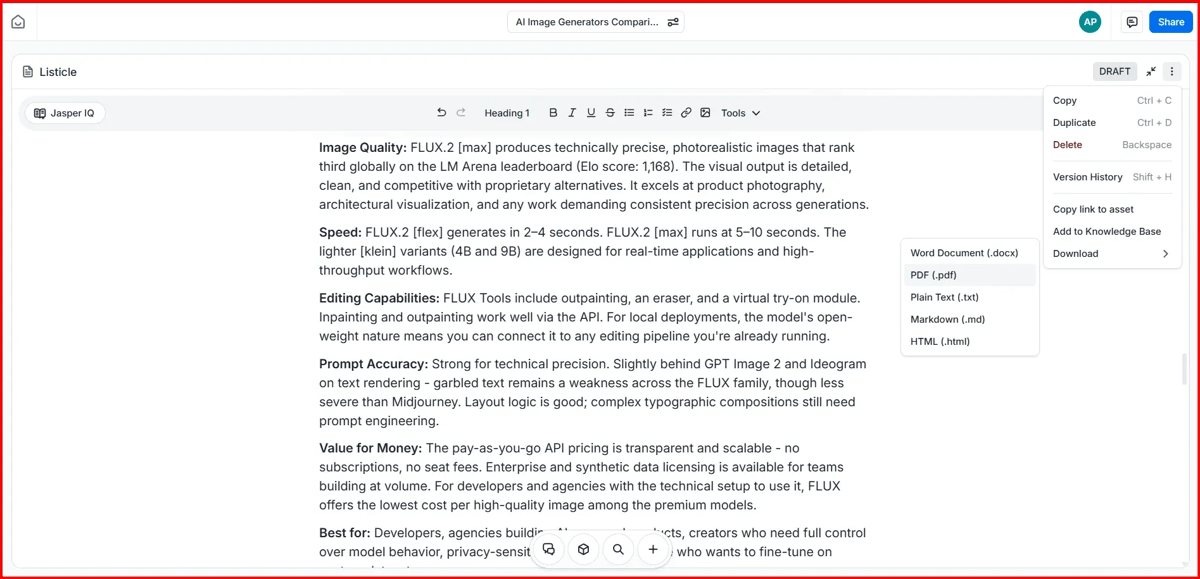
This method works a little differently. You simply enter your prompt in Chat and Jasper analyzes it before suggesting the most suitable AI agents for your request. In my case, it recommended agents like the Comparison Agent, Blog Post Agent and Listicle Agent.
Since my article was about multiple AI image generation tools, I chose the Listicle Agent because it seemed like the best fit for that type of content. After selecting it, Jasper showed me the proposed title and outline first, which gave me a chance to review and confirm everything before generating the article.
Once I approved it, Jasper started creating the blog post. The output was more detailed than the first test and followed a natural listicle structure. It even added relevant tables automatically where they made sense. Overall, the result was better because I used an agent specifically designed for list-style articles.
The final content was easy to edit and Jasper also lets you export it in multiple formats, including PDF, Word documents, plain text, Markdown, HTML and more.
How to Generate AI Images using Jasper AI
Jasper also includes an AI image generator built right into the platform, which I tested by generating product ad visuals.
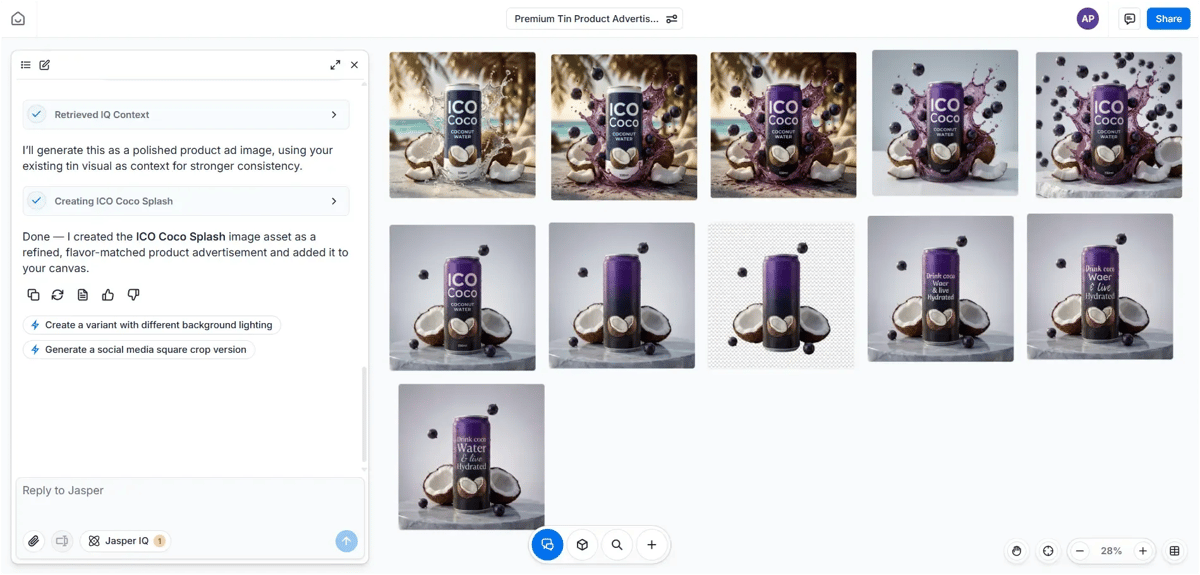
Using it feels very similar to ChatGPT’s image tools. You enter a prompt, and the image generates within seconds. Image quality was good in my testing and there are several one-click editing options available.
You can remove the background from an image using its built-in AI background remover, erase text using the text removal tool, change the background, or upscale the image for better quality. If you want other changes, you can simply describe them with a prompt and Jasper will handle the edits, similar to what you’d expect from a dedicated AI image editor.
You can also duplicate generated images, copy them, and download them without any watermark. Here are a few of the outputs I generated:




Hands-On Test: The SEO/AEO/GEO Rewriter
The SEO/AEO/GEO Rewriter helps you update your content for search engines, AI search results and AI answer engines. It rewrites your content to improve visibility across Google Search, AI Overviews and chatbots. It's useful if you want one article to work better across both traditional search and AI platforms.
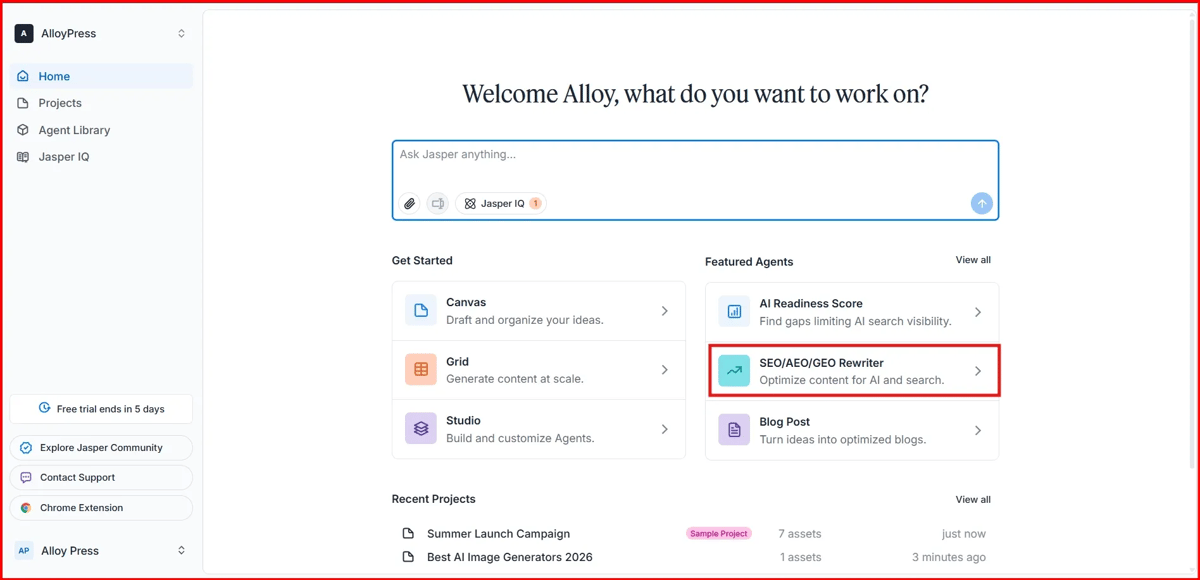
This feature rewrites your content to make it better suited for SEO, AEO and GEO. To use it properly, you first need to set up Jasper IQ and configure your brand voice. Once that's done, you can enter your URL, title and any other details you want to include and Jasper will quickly start rewriting the content for you.
How the Output Actually Held Up
To test Jasper properly, I used the same topic: "AI tools for small business marketing." I tried it across different parts of the platform to see how the output changed.
The content generated in Chat was decent, but it felt a bit generic and needed editing before I would use it. The Blog Post Agent delivered much better results with a clear structure, natural subheadings and a proper conclusion. It also included keywords in a way that didn't feel forced.
I then moved the draft into Canvas and asked Jasper to make it more conversational. The difference was noticeable. The content felt more natural and less like typical AI-generated writing.
Overall, I wouldn't publish the raw output without reviewing it first, but it provided a strong starting point. Most of the work was already done and I mainly needed to refine the details and add a human touch. For that final human-touch pass, our best AI humanizer tools guide is a useful next step.
What I Liked
What stood out to me most was how consistent Jasper was with brand voice. After setting up Jasper IQ with my company information, the content felt much closer to my usual writing style and messaging. I also liked the range of AI agents available because there was usually a tool ready for whatever marketing task I wanted to do. The Grid feature saved a lot of time when creating similar content in bulk and the AI search visibility feature was useful for checking how content appeared in tools like ChatGPT and Perplexity.
What Could Be Better
Jasper does take some time to learn because it has multiple workspaces like Chat, Agents, Canvas and Grid. At first, I wasn't always sure which one I should use for a specific task. The large number of agents is helpful, but it can also make finding the right one a bit slower. I also felt the free trial ended too quickly to properly explore everything. And while Jasper IQ improves the output a lot, setting it up properly does take some effort in the beginning.
Jasper AI Pricing
Jasper's pricing has been simplified down to two main plans, with per-seat costs depending on billing cycle.
Plan | Price | Best For |
|---|---|---|
Pro | $69/month billed monthly, or $59/month billed annually (per seat) | Individuals, freelancers and small teams needing long-form content and brand voice |
Business | Custom pricing (varies by seats, usage and support needs) | Larger teams needing Agents, Studio, API access, SSO and dedicated support |
A few things worth knowing before you commit:
- Both plans include unlimited word generation
- A 7-day free trial is available
- Some advanced features like GEO Hub reports and certain Agents run on a separate credit system, on top of seat pricing
- Business pricing is not published and requires talking to their sales team
Jasper AI Pros and Cons
Pros | Cons |
|---|---|
Strong brand voice consistency across all content | Four different tools (Chat, Agents, Canvas, Grid) mean a real learning curve |
Large library of purpose-built agents for specific tasks | With 118+ agents, finding the right one takes time at first |
Grid makes bulk content genuinely fast | Pricing is on the higher end compared to general AI chat tools |
Built-in AI search visibility tools (GEO) | Some advanced features run on separate credits, adding complexity to pricing |
Good for teams needing consistency at scale | Free trial (7 days) isn't quite enough to explore everything |
Canvas makes editing and polishing drafts easy | Raw output still needs a human editing pass before publishing |
Frequently Asked Questions
1. Is Jasper AI a chatbot like ChatGPT?
Not exactly. It has a chat interface, but it's built around brand context, agents and workflows rather than general-purpose conversation. The chat is just one entry point into a larger system.
2. Do I need to set up my brand voice before using it?
You don't have to, but the output is noticeably better once you do. Setting up Jasper IQ with your brand voice, audiences and knowledge base helps every tool (Chat, Agents, Canvas, Grid) stay consistent with how your brand actually sounds.
3. Is Jasper good for solo content creators or just teams?
It works for solo creators, but its real strength is scale. If you're writing one or two posts a month, it might feel like more tool than you need. If you're producing content regularly across channels, it starts to pay off.
4. Can I use Jasper for bulk content production?
Yes. Grid is built specifically for this. You set up one workflow with your topic, keyword and audience structure, then run it across dozens or hundreds of rows to generate content at scale.
5. Does Jasper AI replace human writers and editors?
No. In testing, raw output was a strong starting point but still needed editing before publishing. Think of it as cutting down 70-80% of the work rather than fully replacing the writing and editing process.
My Final Take
Jasper isn't just a content generator. It's a full marketing content system built around brand context, structured workflows and scale.
Worth it if: you run a team or agency publishing regularly, need brand voice consistency across writers, or produce 10+ pieces of content a month.
Not worth it if: you write one or two pieces a month, you're a solo creator on a tight budget, or you just want a simple chat box without a learning curve.
If you're in the first group, don't judge Jasper by the chat box alone. Start with the Blog Post agent or Canvas, that's where you'll actually see what it's capable of.