ChatGPT can write, code, analyze files, generate images, research topics, build websites and handle plenty of everyday tasks. But if ChatGPT can do almost everything, why use another AI tool?
We tested Claude, Gemini, Bluehost AI, Perplexity, Grok, DeepSeek and Meta AI on real-world tasks and compared what they actually produced.
Some are general AI assistants, while others focus on specific workflows. Bluehost is different too, combining multiple major AI models with tools for websites and business tasks.
So we’re not here to declare one chatbot the winner. We want to see what each ChatGPT alternative actually does better, differently or worse when you put it to work.
Let’s get into the results.
ChatGPT Alternatives: Quick Comparison
Before getting into the individual tests, here’s the quick overview. That’s what we wanted to test. We tested Claude, Gemini, Perplexity, Grok, DeepSeek, Meta AI and Bluehost AI.
Tool | Best Use Case | Why Consider It Instead of ChatGPT? | Free Access | Starting Paid Price* |
|---|---|---|---|---|
Claude | Writing & coding | Strong workflow for long-form work, projects and coding | Yes | $20/mo |
Gemini | Google ecosystem | Deep integration with Google services and multimodal workflows | Yes | $9.99/mo |
Bluehost AI All-Access Pack | AI + websites | All-in-one access to ChatGPT + Claude + Gemini + Grok | Paid plan only | $20/mo |
Perplexity | Research | Search-first workflow with cited answers | Yes | $20/mo |
Grok | Real-time information | Real-time web and X search, plus image/video creation | Yes | $30/mo |
DeepSeek | Coding & reasoning | Strong focus on reasoning and technical tasks | Yes | Free |
Meta AI | Everyday & creative AI | AI integrated into Meta’s ecosystem | Yes | Free |
How We Tested These AI Tools
Tests | What We Checked |
|---|---|
Content Writing | Can it write good content and follow our instructions? |
Image Generation | Can it create the image we asked for? |
Image Editing | Can it edit an image without changing things we didn’t ask for? |
Deep Research | Can it understand the task and provide accurate, useful research? |
Website Building | Can it turn our idea into a working website? |
How We Compared Them
We used the same or similar prompts for each tool whenever possible. If a tool didn’t support a specific test, we simply marked it as unavailable.
This helped us see what each AI tool can actually do in real-world use.
Test 1: Content Writing
Test Prompt
Write a complete SEO-friendly blog post about [What is AI]. Use a natural, human tone, short paragraphs, clear headings, practical examples, and avoid generic AI-sounding language. Make sure the article satisfies the search intent instead of simply repeating keywords. Also include relevant tables, images or image suggestions, data sheets, statistics, bullet points, and other useful visual elements where they add value and make the content easier to understand.
Tool | How It Performed in the Test |
|---|---|
Claude | The writing felt the most natural and human. Explanations were simple, the flow was smooth, and the output was close to publish-ready. |
Gemini | Produced a good content result, but the writing did not feel as natural as Claude's. |
Meta AI | Produced detailed and engaging content, but some technical explanations were simplified more than expected. |
DeepSeek | Clear and practical writing. Useful to work with, although it lacked Claude's natural flow. |
Grok | Readable and usable, but the content felt more generic and needed more editing. |
Perplexity | Strong research support and citations, but the citation-heavy output made it less ready to publish directly. |
Bluehost AI | Provided a good SEO structure, but the actual writing felt more generic than Claude. |
Overall, Claude delivers the most natural, polished and publish-ready content.
We’ve added the outputs from all 7 tools to this document, so you can compare the results yourself: All tools output
Test 2: Image Generation
Test Prompt
Create a premium commercial product photograph of a modern Korean fashion outfit against a dark black and emerald green studio background. Use realistic fabric texture, natural folds, cinematic lighting, accurate proportions, realistic shadows, luxury editorial photography, sharp product details, 4:5 portrait composition, no people, no text, no watermark.
This test used five tools: Gemini, Grok, Perplexity, Meta AI and Bluehost AI.
Tool | How It Performed in the Test |
|---|---|
Perplexity | Followed the prompt most accurately and produced a clean, polished, commercial-looking fashion image. |
Gemini | Produced a strong visual, but added accessories that were not included in the prompt. |
Grok | Produced a premium-looking image, but added a visible watermark despite the prompt asking for none. |
Meta AI | Generated a good-looking image, but the framing was too tight for the desired full product shot. |
Bluehost AI | Followed the general direction of the prompt, but the image looked less polished overall. |
Claude | No native image generation |
DeepSeek | No native image generation |
Test 3: Background Removal & Image Editing
Test Prompt
“Remove the background from the reference image while keeping the subject completely unchanged. Preserve the original shape, color, texture, edges, proportions and small details. Do not redesign or regenerate the subject.”
The test focused on removing the background while keeping the subject unchanged, including its shape, colour, texture, edges and proportions.
Tool | How It Performed in the Test |
|---|---|
Claude | Completely removed the background and produced a transparent result while keeping the subject intact. |
Meta AI | Completely removed the background and produced a transparent result. |
Bluehost AI | Completely removed the background and produced a transparent result. |
Gemini | Removed the original background but replaced it with a plain white background. |
Grok | Removed the original background but replaced it with a plain white background. |
Perplexity | Removed the original background but replaced it with a plain white background. |
DeepSeek | DeepSeek doesn’t have an image generation model, So We couldn’t use it for background removal. |
Best-performing group in this test: Claude, Meta AI and Bluehost AI were the tools that produced transparent backgrounds.
Test 4: Deep Research
Test Prompt
“Research how AI-powered search and answer engines are changing SEO in 2026. Investigate how platforms such as Google AI Overviews/AI Mode, ChatGPT, Perplexity, Gemini and other major AI search experiences are affecting how people discover information online.Use recent and reliable sources published primarily in 2025–2026. Prioritize official documentation, company announcements, research studies, reputable industry publications and original data over generic blogs or AI-generated articles.”
Tool | How It Performed in Our Deep Research Test |
|---|---|
Perplexity | Delivered detailed research with strong sources, citations and well-connected findings. |
Claude | Covered adoption, CTR, zero-click searches, AI referrals and platform differences, although some statistics needed verification. |
DeepSeek | Included research studies, statistics, platform comparisons and practical SEO insights. |
Bluehost AI | Completed the research with sources and provided a well-structured overview with practical SEO takeaways. |
Meta AI | Covered platform updates, SEO changes, zero-click searches and AI traffic, but some statistics needed checking. |
Grok | Covered major AI search platforms and included plenty of data, but some figures needed verification. |
Gemini | Explained the main SEO changes clearly but didn't go as deep as the top-performing tools. |
For this test, Perplexity gave the strongest deep-research experience, especially when it came to sources and supporting evidence.
We’ve added the code outputs from all 7 tools to this document, so you can compare the results yourself: All tools output
Test 5: Website Building
Test Prompt
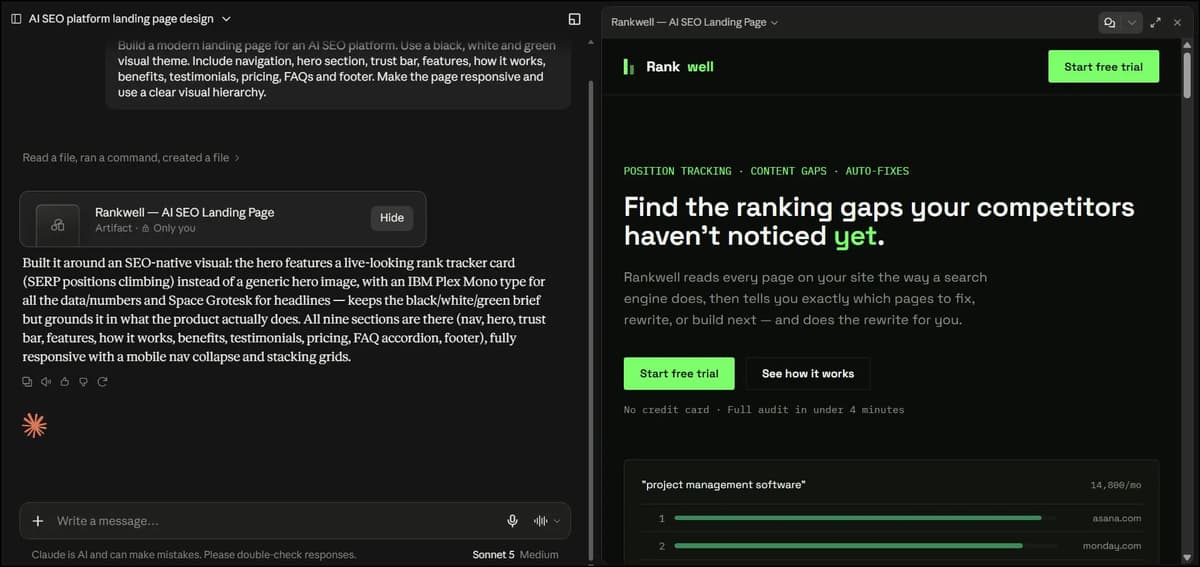
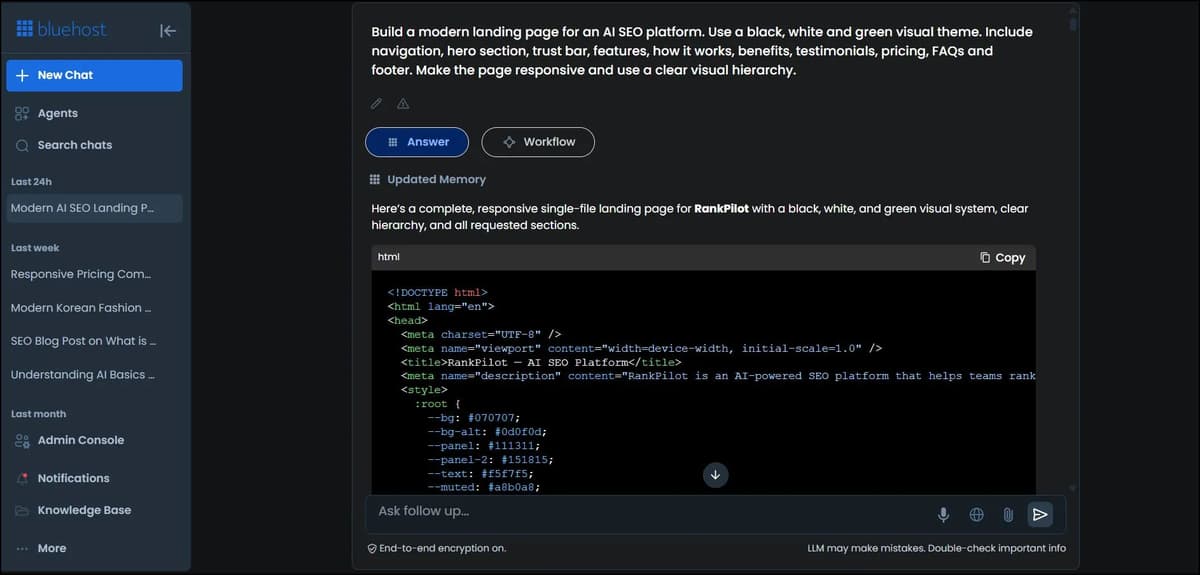
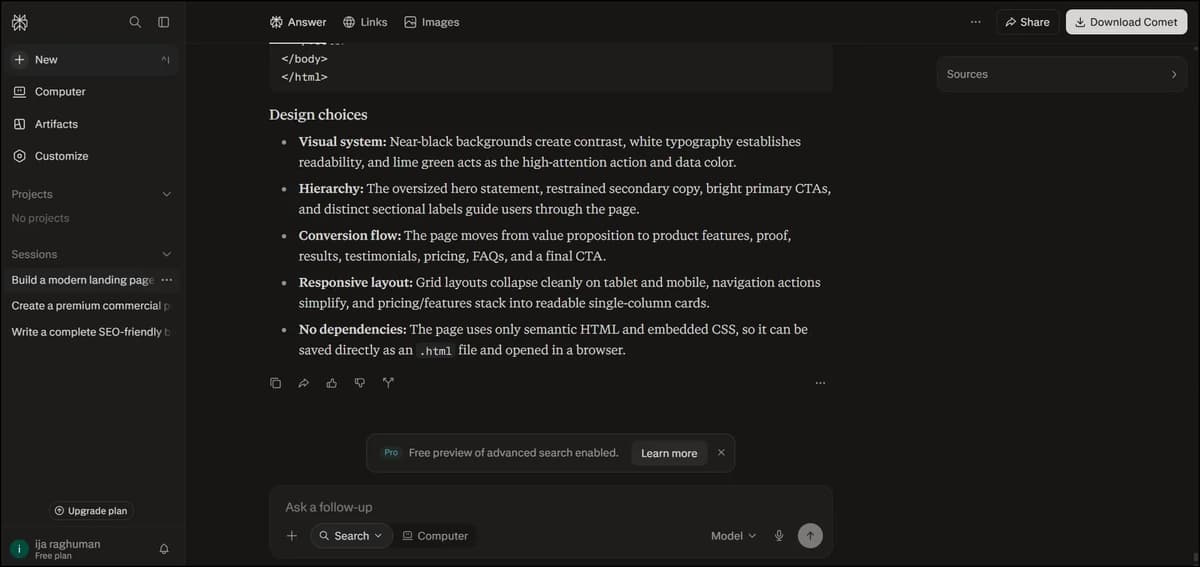
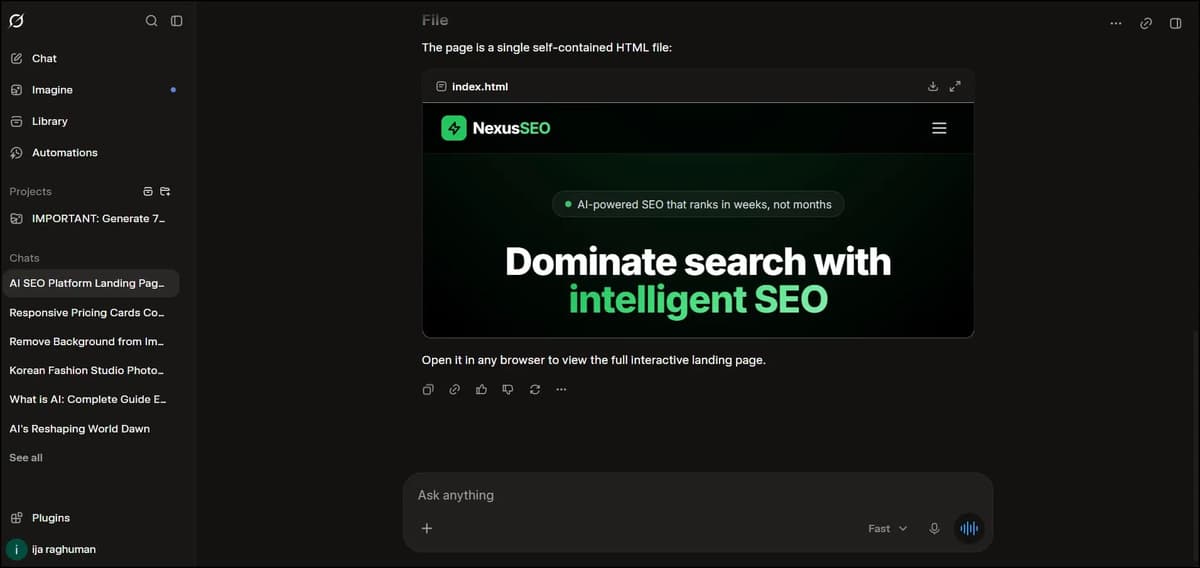
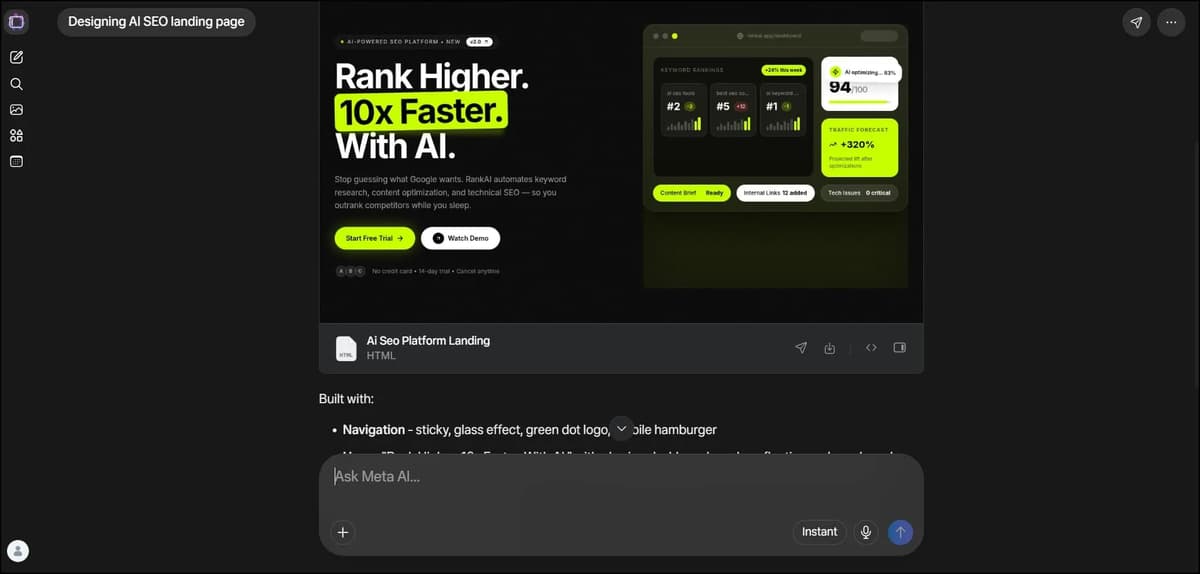
“Build a modern landing page for an AI SEO platform. Use a black, white and green visual theme. Include navigation, hero section, trust bar, features, how it works, benefits, testimonials, pricing, FAQs and footer. Make the page responsive and use a clear visual hierarchy.”
The website test asked the tools to create a complete AI SEO platform landing page with navigation, hero, trust bar, features, how-it-works, benefits, testimonials, pricing, FAQs and footer.
Tool | How It Performed in the Test |
|---|---|
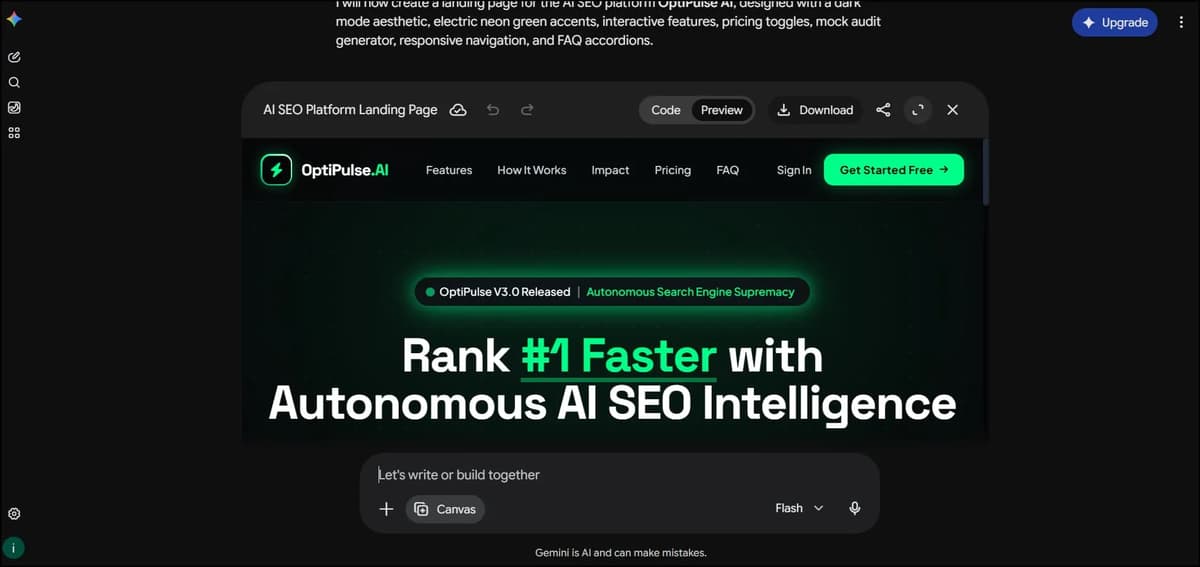
Gemini | Generated the page, allowed previewing, editing, downloading and accessing the code in one workflow. The overall process felt the most complete. |
Claude | Created a clean, neat landing page and the functions worked well |
Bluehost AI | Generated HTML quickly and the result worked reasonably well in an online HTML viewer, although it was less polished than Gemini. |
Grok | Generated a good-looking page and allowed the HTML to be downloaded and tested locally, but generation took around five minutes. |
Meta AI | Generated a good-looking result, with downloadable HTML and source-code access. |
DeepSeek | Generated the page quickly, with preview, HTML download and code access. The final design was good and the workflow was straightforward. |
Perplexity | Generated HTML and provided download/source-code access, but the expected preview did not work in the HTML viewer. |
Best-performing workflow in this test: Gemini - mainly because preview, editing, downloading and code access were all available in one place.
After testing all of these tools ourselves, we found that the best ChatGPT alternative isn't just about how good the final design looks. Preview, editing, downloading, code access and the overall workflow all make a difference.
For our team, Gemini stood out because it brought all of these things together in one place. We could generate the webpage, preview it, make edits and download the final result without having to depend on another tool.
So, based on our hands-on testing, Gemini gave us the best overall website-building experience among the tools we tested. Claude also generated fully editable websites with easy preview options and allowed us to download them as HTML, PDF and PNG files.
And one more thing, We don't think we need to do a separate coding test because website building requires code anyway. So, based on this test, we can see which tool performs best at coding. Gemini seems to perform the best in this test.
1. Claude
Claude is an AI assistant from Anthropic designed for tasks such as content writing, coding, research, analysis and document-based work. It is particularly known for handling detailed instructions and long-form tasks.

Claude Pros
Pros |
|---|
Most natural writing in our test |
Strong long-form content |
Clean, practical coding |
Strong research and editing |
Excellent background removal |
Claude Cons
Cons |
|---|
Opus can be slow |
No native image generation in our test |
Higher-level models take longer |
Who should use Claude?
Best for: Content writers, SEO teams, marketers, developers and anyone who values polished output over speed.
Our Experience
We tested Claude using the Opus 5.5 model to see how it performed with content writing. The generation took around 10 minutes, but the final output was impressive.
The content was detailed, engaging, and well researched, with sources, tables, widgets, and graphs. Everything was presented in a way that made the content more interactive and engaging.
Another thing we liked was that the output was editable. We could edit the content directly, add code blocks, and even choose different heading styles. It felt almost like working inside a document editor.
Claude also provided several download options in different formats, which made it easier to use the final content outside the tool.
We couldn't test image generation because Claude doesn't currently support it in the same way as the other tools we tested. However, we did test its background removal feature, and it worked very well. The main downside was the time it took, especially when using the higher-level models. But the final result was very accurate, with the background removed cleanly without noticeable mistakes.
Claude used code to remove the background from the original image instead of regenerating the image, so the subject itself remained unchanged.
We also tested Deep Research with Claude, and it took around 3 minutes to complete the research.
One thing we noticed is that Opus is designed more for deeper and more detailed work, so it can take longer to generate results. If we needed something quickly, we could switch to a lower model for a faster response.
Our takeaway: Claude Opus 5.5 is a strong choice when quality, detailed research, editing, and polished output matter more than speed.
2. Gemini
Gemini is Google's AI assistant designed for writing, research, coding, image generation and other multimodal tasks. It also works closely with Google's ecosystem and can handle more complex workflows.
Gemini Pros
Pros |
|---|
Best website-building workflow in our test |
Preview, edit and download in one workflow |
Strong Deep Research |
Good multimodal capabilities |
Strong Google ecosystem integration |
Gemini Cons
Cons |
|---|
Writing wasn't as natural as Claude |
Image result wasn't as polished |
Added Gemini logo in our image test |
Background removal didn't produce transparency |
Who should use Gemini?
Best for: Google users, website builders, marketers, researchers and people who want to create and edit webpages in one workflow.
Our Experience
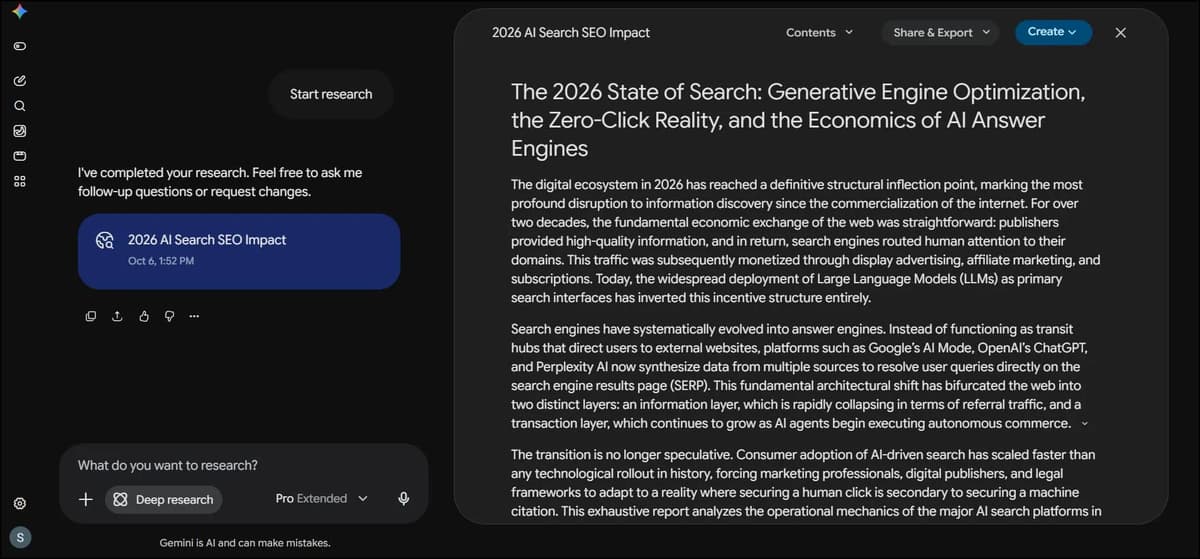
For Gemini, we used the 3.1 Pro model with Extended Thinking enabled. We also used the Deep Research option and gave it a content writing prompt to see how well it could handle detailed research-based content.
The Deep Research process took around 9 minutes to complete. After that, Gemini generated a long and detailed piece of content with sources and tables. The output was useful, but compared with Claude, we wouldn't say it was the best writing result we tested.
We also tested image generation using Nano Banana 2.1. It generated the image within a few seconds, but the Gemini logo was included in the result. The image quality wasn't as good as we expected. It followed the overall prompt, but the colours looked a little dull and the final result didn't feel as polished as we wanted.
We also tested the background removal feature. Gemini removed the original background, but replaced it with a white background instead of giving us a transparent background. So, based on our test, it didn't give us the transparent result we were looking for.
We tested Deep Research separately as well. After enabling the Deep Research option, it took around 8 minutes to complete the research and generate the output, along with sources.
Our takeaway: Gemini is useful for detailed research and long-form content, but in our tests, the writing and image results were not as strong as some of the other tools we tried.
3. Bluehost AI
Bluehost AI is an AI platform that brings ChatGPT, Claude, Gemini and Grok together in one place, along with AI tools for research, content creation, presentations and business workflows. It also puts a strong focus on privacy and security through its Privacy+ plan, which adds prompt sanitization, end-to-end encryption, Incognito Mode, privately hosted AI and user-specific PIN protection.
Bluehost Pros
Pros |
|---|
Multiple AI models in one subscription |
Good content-writing workflow |
Supports image generation |
Transparent background removal |
Deep Research with sources |
Useful for website/business workflows |
Bluehost Cons
Cons |
|---|
Website builder felt basic |
No live preview in our test |
Limited content editing |
Website needed external checking/editing |
Who should use Bluehost AI?
Best for: Website owners, small businesses, marketers and users who want top AI models in one place.
Our Experience
When it comes to Bluehost, safety and privacy seem to be a major focus. For our testing, we mainly used the Auto Route model.
We started with a content writing prompt, and the result came within a few seconds. It included SEO details, tables, visual graphs, paragraphs, and bullet points. Overall, the content was well structured and felt more like something written by a person.
We also liked the option to change the AI model based on the task. You can choose models like BluehostGPT, Claude, GPT, Gemini, Grok, and more.
We tested the image generation feature as well. It can generate images and remove backgrounds, including creating transparent-background images.
Next, we tried Deep Research. There was a small delay of a few seconds before the generation started, but after that, it completed the research and provided the results with sources.
We also tested the website-building feature. We gave it a simple prompt, and within about a minute, it generated an HTML file. We downloaded the file and checked the website. The result was very simple. It worked for a basic website, but we wouldn't say it was an impressive website.
One thing we felt was missing was a live preview option. There was also no proper content editing option, so we had to download the HTML file and check or edit it separately.
Overall, our experience with Bluehost AI was good for content writing, model selection, image generation, background removal and Deep Research. However, the website-building feature could be improved with a live preview and easier editing options.
4. Perplexity
Perplexity is an AI-powered search and answer engine designed primarily for finding information and answering questions with supporting sources. Its workflow focuses more on research and citations than traditional chatbot-style conversations.
Perplexity Pros
Pros |
|---|
Strong research workflow |
Excellent source support |
Strong citations |
Best image result in our test |
Good for source-backed answers |
Perplexity Cons
Cons |
|---|
Citation-heavy writing needs cleanup |
Background removal didn't create transparency |
Website preview didn't work as expected |
Not ideal for ready-to-publish articles |
Who should use Perplexity?
Best for: Researchers, journalists, SEO professionals, students and anyone who needs sources and evidence quickly.
Our Experience
The research workflow was the main reason we would consider using Perplexity.
The answers had strong research support and useful citations, but there was a trade-off. Because the output included a lot of citations, it didn't always feel ready to publish as it was. We would still need to clean it up and make it sound more natural before using it as an article.
The image-generation test was where Perplexity surprised us.
We gave five different tools the same product photography prompt, and Perplexity followed the instructions most accurately. The final image looked clean, polished, and suitable for commercial use.
Background removal was less successful in our test. It removed the original background, but instead of giving us a transparent background, it replaced it with plain white.
Website building was also less reliable. Perplexity generated the HTML, but when we opened it in an HTML viewer, we couldn't get the expected output. It did provide a download option and access to the source code.
Our takeaway: Perplexity is a tool we would consider when research and citations are more important than getting ready-to-publish content.
5. Grok
Grok is an AI assistant from xAI that can help with conversations, research, reasoning, coding, content creation and image generation. Its access to real-time information and content from X makes it particularly useful for following current events, trending topics and fast-changing information. It also includes creative AI capabilities, making it useful beyond simple question answering.
Grok Pros
Pros |
|---|
Useful for real-time information |
Web and X search |
Strong creative generation |
Good-looking website output |
Good image quality |
Grok Cons
Cons |
|---|
Writing felt more generic |
Image included a watermark |
Website generation took around 5 minutes |
Content needs more editing |
Who should use Grok?
Best for: Users who need current information, social/web trends, creative image generation and quick exploration of live topics.
Our Experience
For content writing, Grok produced readable content, but compared with Claude, it felt a little more generic. The structure was usable, but we would still want to edit it before turning it into a finished article.
The image-generation result looked premium and followed the overall visual direction of our prompt. However, we noticed one clear issue: it added a visible watermark even though we specifically asked for no watermark.
For website building, Grok produced a good-looking page. Once the generation was complete, we could download the HTML file and test it locally.
The main issue was the waiting time. In our test, it took around five minutes to generate the website.
Our takeaway: Grok is useful when we need current information or creative generation, but for polished long-form content, we preferred Claude.
6. Meta AI
Meta AI is Meta's AI assistant designed for everyday questions, creative tasks, content generation and other AI-powered experiences. It is also integrated into Meta's broader ecosystem.
Meta AI Pros
Pros |
|---|
Good everyday AI assistant |
Detailed content |
Strong background removal |
Transparent background output |
Good-looking landing pages |
Meta AI Cons
Cons |
|---|
Technical explanations can be simplified |
Image framing was too tight |
Generated code was long |
Code was harder to edit |
Less convenient for technical work |
Who should use Meta AI?
Best for: Casual users, creators, social media users and people looking for an easy AI assistant for everyday and creative tasks.
Our Experience
The writing output from Meta AI was detailed and engaging. However, when we tested it with more technical topics, some explanations felt more simplified than we wanted.
The image result looked good overall, but the framing was tighter than we expected for a product photograph. It didn't feel like a complete product shot compared with what we were looking for.
Background removal worked much better in our test. Meta AI completely removed the background and gave us a transparent result.
The coding experience was a little different. The preview looked good, but the generated code was quite long and harder to edit compared with the cleaner code we received from DeepSeek and Claude.
For website building, Meta AI generated a good-looking landing page. We could download the HTML file and view the source code, which made it easy to test outside the tool.
Our takeaway: Meta AI worked well for everyday and creative tasks, but we found other tools more convenient when working on technical tasks.
7. DeepSeek
DeepSeek is an AI platform focused on reasoning, technical problem-solving, and coding. It is particularly useful for developers who want help generating, understanding and debugging code.
DeepSeek Pros
Pros |
|---|
Strong coding performance |
Clean, editable code |
Working preview |
Fast website workflow |
Good reasoning and technical tasks |
DeepSeek Cons
Cons |
|---|
No native image generation |
Writing less natural than Claude |
More technical than general-purpose tools |
Who should use DeepSeek?
Best for: Developers, programmers, technical users and anyone who wants practical coding help without unnecessary complexity.
Our Experience
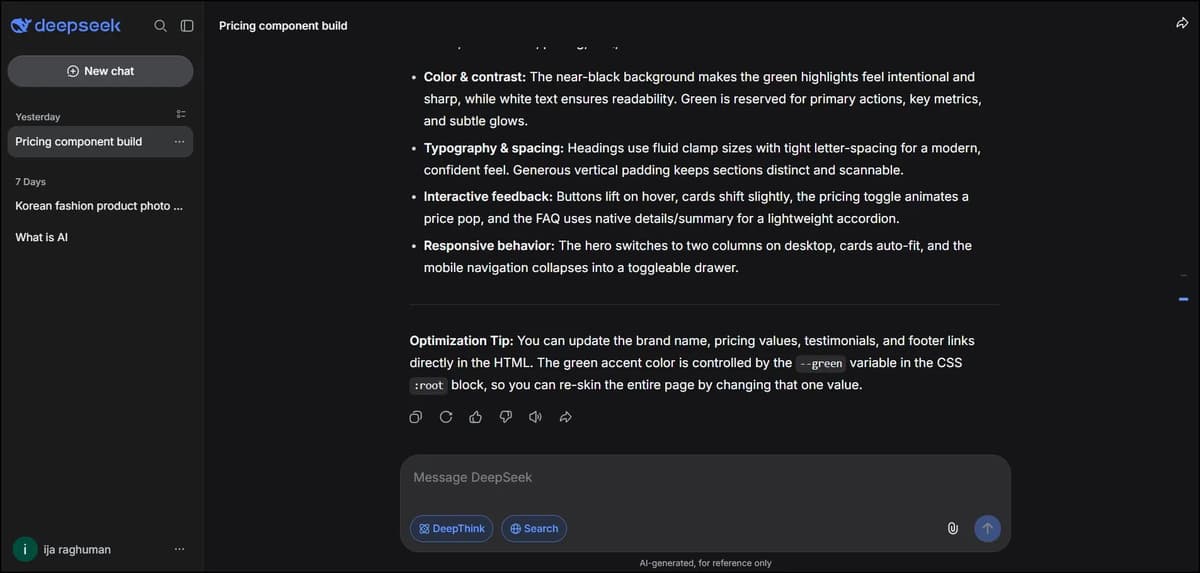
For the coding test, we asked the tools to create a responsive pricing comparison component using HTML, CSS, and JavaScript. It needed three pricing cards, a monthly/yearly toggle, hover states, and accessible buttons.
DeepSeek gave us clean and editable code, and the preview worked correctly.
That was one of the things that stood out to us. Generated code can look fine at first but still have problems when you actually run it. In our test, DeepSeek's code worked properly in the preview.
For content writing, DeepSeek was clear and practical. It didn't have the same natural flow we got from Claude, but the content was still useful and easy to edit.
We also found DeepSeek quick when building the website. We could preview the output, download the HTML file, and view the code. Overall, the process was simple and straightforward.
Our takeaway: For actual coding work, DeepSeek was one of the most practical tools we tested.
What These Tests Actually Showed Us
After using all seven tools, one thing became obvious to us: the differences only become clear when you actually give them work to do.
A feature list can tell you that an AI tool supports writing, images, coding, or websites. It doesn't tell you how well that workflow will actually feel.
In our content test, Claude produced the most natural writing, while DeepSeek was clear and practical and Grok felt more generic. Perplexity's research strength was useful, but its citation-heavy output needed more cleanup before publishing.
The image test showed something completely different. Perplexity followed the prompt most accurately, while Gemini produced a strong visual but added things we didn't ask for. Grok's image looked premium but included a watermark, and Meta's framing was tighter than we wanted.
Background removal also produced an interesting difference. Claude, Meta AI, and Bluehost gave us transparent backgrounds, while Gemini, Grok, and Perplexity replaced the removed background with white.
Coding was another separate story. DeepSeek gave us clean code with a correctly rendered preview. Claude was also practical, while Gemini's preview didn't display correctly in our test and Meta AI produced code that was much longer and harder to edit.
And then there was website building.
That's where workflow became just as important as the final design. Claude's page looked clean and its functions worked, but there wasn't a direct download option. Gemini allowed us to preview, edit, download, and work with the code. Grok and DeepSeek also provided downloadable HTML, while Perplexity's preview didn't give us the expected result in our test.
So after testing these tools, we wouldn't choose a ChatGPT alternative simply because it has more features.
We'd look at the specific job we need it to do.
Final Conclusion
After testing these seven ChatGPT alternatives on real tasks, we came away with a much clearer idea of where each one fits.
Claude worked particularly well for natural writing and practical coding. Gemini gave us the most complete experience when we actually wanted to build, preview, edit and download a webpage. Grok was useful for real-time information and creative generation. Meta AI worked well for everyday and creative tasks. DeepSeek stood out during our coding test. Perplexity was especially useful for research and gave us the most accurate image result in our image test. And Bluehost AI made more sense when website and business workflows were part of the job.
What we liked about this test is that the results weren't the same across every category.
The tool that gave us the writing experience we liked most wasn't the same tool that gave us the coding result we liked most. The tool that gave us the most accurate image wasn't the one that gave us the smoothest website-building workflow.
That's probably the most useful thing we learned from this comparison.
You don't necessarily need one AI tool to do everything. You need to know which tool works best for the particular job sitting in front of you.
Frequently Asked Questions
1. What are the best ChatGPT alternatives in 2026?
There isn't one tool that performs the same way across every test. In our testing, Claude, Gemini, Grok, Meta AI, DeepSeek, Perplexity and Bluehost AI each had different strengths across writing, images, editing, coding, and website building.
2. Which ChatGPT alternative was best for writing?
Claude produced the most natural and polished writing in our content test. We found its explanations simple, its flow smooth and the overall output closer to something we could actually work with.
3. Which ChatGPT alternative was best for website building?
Gemini gave us the most complete website-building workflow in our test. We could generate the page, preview it, edit it, download it and access the code without having to move between different tools.
4. Which ChatGPT alternative was best for image generation?
In our specific image-generation test, Perplexity followed the prompt most accurately and produced a clean, polished commercial-style image.
5. Which tools successfully removed the background?
In our background-removal test, Claude, Meta AI and Bluehost produced transparent backgrounds. Gemini, Grok and Perplexity removed the original background but replaced it with a plain white background.
6. Do I need to replace ChatGPT completely?
Not necessarily. Our testing showed that different tools were useful for different jobs. The more practical approach may be to use the tool that fits the task instead of expecting one AI assistant to handle every workflow in exactly the same way.
7. How were these ChatGPT alternatives tested?
We tested them across five areas: content writing, image generation, image editing/background removal, deep research and website building. We used the same or similar prompts wherever possible and compared the actual outputs.