

Google Search has been the go-to tool for finding information online for years. When you needed an answer, you typed a few keywords, opened several websites and searched for the information yourself. Right?
But Google AI Mode changes that experience.
Instead of showing only a list of links, Google AI Mode can provide direct answers, summaries, recommendations, comparisons and follow-up conversations right inside Google Search.
For many people, it feels like the difference between searching for information and talking to someone who already understands what you’re trying to achieve.
Whether you’re a student, employee, business owner or everyday internet user, understanding Google AI Mode can help you find information faster and make better decisions.
In this guide, you’ll learn exactly what Google AI Mode is, how it works, when to use it, when not to use it and how it compares to traditional search and popular AI tools like ChatGPT and Claude.
Table of Contents
What Is Google AI Mode?
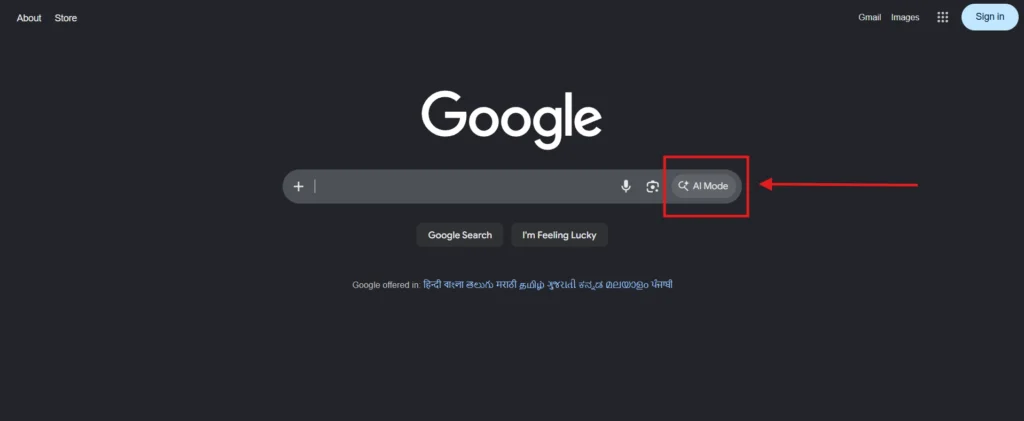
Google AI Mode is an AI-powered search experience integrated into Google Search.
Instead of only displaying web pages, Google AI Mode attempts to understand your question and provide a direct answer.
For example, a traditional search might show dozens of articles if you search for:
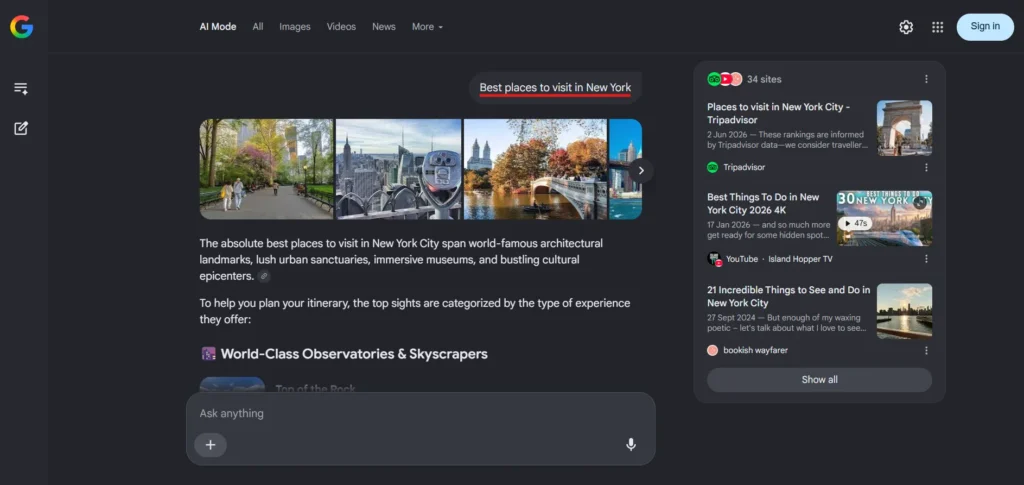
“Best places to visit in New York.”
Google AI Mode can go further and answer:
“The absolute best places to visit in New York City span world-famous architectural landmarks, lush urban sanctuaries, immersive museums, and bustling cultural epicenters.”
Rather than simply providing links, it can generate a complete recommendation and allow you to ask follow-up questions.
Think of it as a combination of Google Search and an AI assistant working together.
Why Did Google Add AI Mode to Search?
The way people search online has changed.
Many users no longer want to open multiple websites just to find a simple answer.
They want:
- Faster answers
- Better explanations
- Product recommendations
- Personalized suggestions
- Easier research
At the same time, AI tools such as ChatGPT, Claude, Perplexity and Grok have changed user expectations.
People have become comfortable asking questions naturally instead of typing short search keywords.
Google introduced AI Mode to adapt to this shift and make Search more conversational and useful.
Instead of helping users find information, Google is increasingly helping users understand information.
How Does Google AI Mode Work?
Google AI Mode isn’t just a chatbot added to Search. It combines Google’s search index with Gemini AI models to understand questions, analyze information from multiple sources and generate helpful responses.
When you enter a query, Google AI Mode first interprets what you’re actually trying to accomplish rather than focusing only on keywords. It then gathers relevant information from Google’s search ecosystem and creates a summarized answer.
What makes AI Mode different is its ability to handle follow-up questions. Instead of starting a new search every time, you can continue the conversation and refine your request.
For example, if you ask:
“Best places to visit in Japan”
you can immediately follow up with:
“Which destinations are best for families?”
Or
“Create a 10-day itinerary under $2,000.”
Google AI Mode uses context from previous questions to provide more relevant answers and recommendations.
Google Search vs Google AI Mode
Although they are connected, they solve different problems.
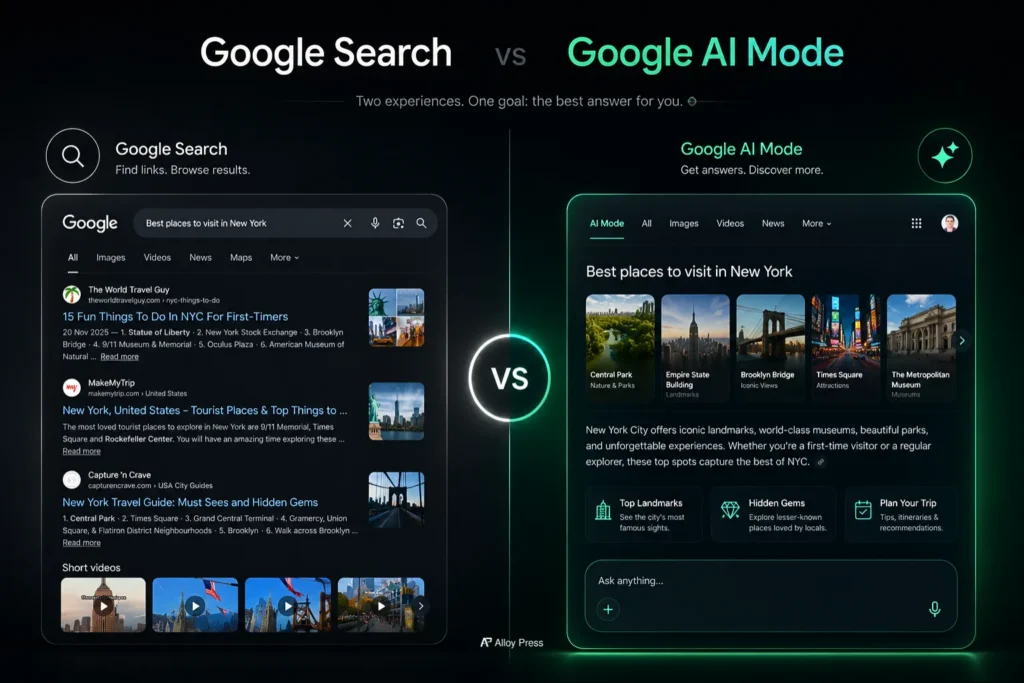
| Feature | Google Search | Google AI Mode |
|---|---|---|
| Website links | Yes | Limited |
| Direct answers | Basic | Advanced |
| Follow-up questions | No | Yes |
| Personalized recommendations | Limited | Better |
| Product comparisons | Moderate | Excellent |
| Research assistance | Moderate | Strong |
| Conversational experience | No | Yes |
| Best for source discovery | Excellent | Good |
A simple rule:
Use Google Search when you want websites.
Use Google AI Mode when you want answers.
Google AI Mode vs AI Overviews
Many people think Google AI Mode and AI Overviews are the same, but they are different features.
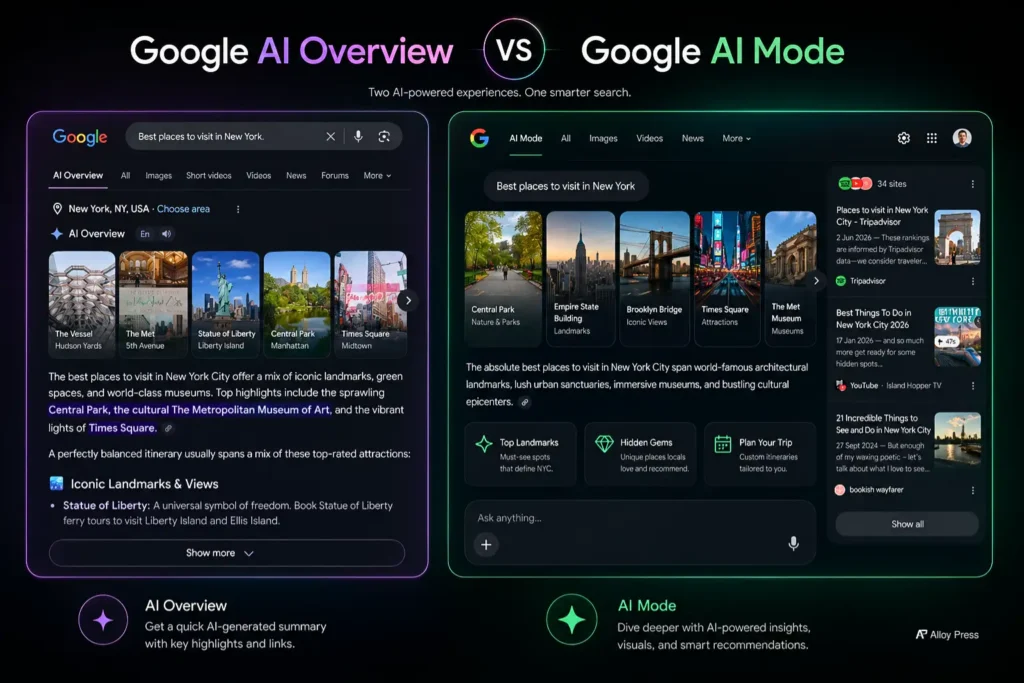
AI Overviews appear directly on Google Search results when Google thinks an AI-generated summary can help answer your query. It gives you a quick answer with important information, sources, and sometimes a “Show more” option for a deeper explanation.
Google AI Mode is a separate conversational search experience. It allows you to interact with AI more deeply, ask follow-up questions, compare options, and continue the conversation like a chatbot.
For example, if you search:
- Which is the best AI video generator for YouTube creators?
- What is the best AI background remover for product photos?
Google may show an AI Overview because the query needs recommendations or comparisons.
But if you search simple terms like:
- Image generator
- Video generator
- Background remover
You may only see normal search results because Google may not need to generate a summary.
In short:
- AI Overviews = AI summary shown inside Google Search results
- AI Mode = Full AI conversation experience for deeper searches
Google AI Mode vs ChatGPT
Since both tools use AI to answer questions, many users wonder whether Google AI Mode can replace ChatGPT.
The reality is that they serve different purposes.
Google AI Mode is designed primarily for search and research. Because it is connected to Google Search, it can access current information, discover sources and help users explore topics through follow-up questions.
ChatGPT, on the other hand, is often stronger for writing, brainstorming, coding assistance, content creation, image generation and long-form conversations.
Many content creators also use AI humanizer tools to make AI-generated text sound more natural and human-like before publishing articles, emails, or marketing copy.
For example, if you’re researching the best CRM software for your business, Google AI Mode can quickly gather information and compare available options.
Once you’ve completed your research, ChatGPT may be more useful for writing reports, creating marketing content, or organizing your findings into a structured format.
Many users will find that Google AI Mode and ChatGPT work best together rather than replacing one another.
Top Benefits of Google AI Mode
The biggest benefit of Google AI Mode is speed.
Instead of opening ten tabs and reading multiple articles, you can get a summarized answer in seconds.
It is also useful when learning new topics because it can explain complicated subjects in simple language.
Many people use Google AI Mode to:
- Compare products
- Plan trips
- Learn new skills
- Understand technical topics
- Research purchases
- Summarize information
- Explore unfamiliar subjects
For users who often feel overwhelmed by information, AI Mode can make research much easier.
Google AI Mode Pros & Cons
| Pros (Advantages) | Cons (Limitations) |
|---|---|
| Faster access to information | Can occasionally provide inaccurate information |
| Conversational search experience | May oversimplify complex topics |
| Useful product and service comparisons | Not suitable for professional medical or legal advice |
| Personalized recommendations | Some answers may lack important context |
| Reduces the need to open multiple tabs | Users should still verify critical information |
How to Use Google AI Mode Efficiently
The quality of your question directly affects the quality of the answer.
Many beginners make the mistake of using very short prompts.
Instead of asking:
“Best laptop”
Try asking:
“What is the best laptop under $1,000 for a college student who needs long battery life and occasional video editing?”
The second question gives Google AI Mode enough context to provide a useful recommendation.
The same principle applies to almost every topic.
The more context you provide, the better the answer becomes.
10 Real Google AI Mode Prompt Examples
Here are practical examples you can use immediately.
| Goal | Example Prompt |
|---|---|
| Travel Planning | Create a 7-day Japan itinerary for first-time visitors. |
| Shopping | Compare the best smartphones under $500. |
| Learning | Explain stock investing using simple examples. |
| Productivity | Help me organize my weekly schedule. |
| Career | How should I prepare for a project manager interview? |
| Fitness | Create a beginner-friendly workout plan. |
| Cooking | Give me a healthy high-protein meal plan. |
| Photography | Recommend camera settings for sunset photography. |
| Budgeting | Explain how to create a monthly budget. |
| Software Research | Compare ChatGPT, Claude and Gemini for content writing. |
Who Should Use Google AI Mode?
Google AI Mode can be useful for almost everyone.
Students can use it to understand difficult concepts, summarize notes and explore new subjects.
Employees can use it to research topics, prepare reports, understand industry trends and improve productivity.
Business owners can use it to analyze competitors, explore customer behavior and evaluate business tools.
Content creators can use it to research topics, understand trends and gather information before creating content. They can compare AI voice generators, evaluate AI blog writing tools or discover new AI website builders based on their specific requirements.
Even everyday users can benefit from it while planning vacations, comparing products, learning hobbies, or making purchasing decisions.
Real-Life Examples of Google AI Mode
For Students
Imagine you’re preparing for an exam and have a 50-page chapter to study.
Instead of reading everything immediately, you can ask Google AI Mode to explain the chapter in simple language and highlight the key concepts.
This won’t replace studying, but it can help you understand the topic faster.
For Employees
Suppose you have a meeting tomorrow about a topic you’re unfamiliar with.
Google AI Mode can provide a quick overview, explain important concepts and help you prepare questions before the meeting.
For Business Owners
A small business owner can ask Google AI Mode to compare CRM software, explain marketing concepts or identify emerging industry trends.
For Travelers
Instead of spending hours reading travel blogs, users can generate personalized itineraries based on budget, interests and travel duration.
Google AI Mode Tips and Tricks
Always provide context.
Specific questions produce better answers than generic questions.
Ask follow-up questions rather than starting a new search.
Request comparisons when evaluating products or services.
Ask Google AI Mode to explain complex topics using beginner-friendly language.
Most importantly, verify important information before making decisions.
AI tools are helpful assistants, not perfect sources of truth.
Common Mistakes People Make While Using Google AI Mode
One of the biggest mistakes is treating Google AI Mode like traditional search.
Many users type only two or three words and expect detailed answers.
Some users also forget to ask follow-up questions, which is one of AI Mode’s most useful features.
Understanding these limitations helps users get better results.
Limitations of Google AI Mode
Google AI Mode is powerful, but it is not perfect.
Like any AI system, it can occasionally provide inaccurate information.
It may misunderstand context or oversimplify complex subjects.
It also cannot replace experts in fields such as medicine, law, finance or engineering.
Users should always verify critical information from trusted sources.
AI should help you make decisions, not make decisions for you.
When You Should Not Use Google AI Mode
Avoid relying entirely on Google AI Mode for:
- Medical diagnoses
- Legal advice
- Financial investments
- Emergency situations
- Official government requirements
In these situations, professional guidance and official sources are still essential.
What Do People Think About Google AI Mode?
Public opinion is generally positive.
Many users appreciate how quickly they can get answers and understand new topics.
People enjoy being able to ask follow-up questions without starting a new search.
However, some users worry about accuracy and whether AI-generated answers might reduce traffic to websites.
Others believe AI Mode works best as a starting point for research rather than a final source of truth.
Also, some SEO professionals think that Google AI Mode is reducing website traffic and making it seem like SEO is not working anymore.
Google AI Mode and the Future of SEO
The rise of AI-powered search is changing how websites receive traffic.
In traditional search, users typically click multiple links before finding an answer. With Google AI Mode, many questions can be answered directly within the search experience.
This shift means website owners may need to focus less on ranking for keywords alone and more on creating content that provides unique insights, expertise, original information & satisfies the user intent.
As AI-generated answers become more common, content that demonstrates real experience and authority is likely to become even more valuable.
This is also why many publishers are paying closer attention to AI detection and content quality signals when creating AI-assisted content.
For businesses and publishers, the goal is no longer just appearing in search results. It is becoming a trusted source that AI systems reference when generating answers.
Does Google AI Mode Affect Website Traffic?
This is one of the biggest concerns among bloggers, publishers and SEO professionals.
The reality is that some informational searches may receive fewer clicks because users can get answers directly inside Google.
However, high-quality websites are still important.
Google AI systems rely on trusted sources, expert content, original research and unique insights.
Websites that provide genuine value are likely to remain important in search results.
The best example is that even AlloyPress receives SEO traffic significantly more than other sources of traffic.
The future of SEO is shifting from creating content for rankings alone to creating content people genuinely find useful.
Google AI Mode vs Other AI Tools
Yes, but only to a certain extent.
All of these tools help users find information and solve problems.
However, they have different strengths.
| Tool | Best For |
|---|---|
| Google AI Mode | Search and research |
| ChatGPT | Writing and productivity |
| Claude | In-depth research and coding. |
| Grok | Real-time discussions and social content |
Many users will likely use multiple AI tools depending on the task.
For example, someone might use Google AI Mode for research and ChatGPT for writing.
Frequently Asked Questions
Is Google AI Mode free?
Yes. Google AI Mode is available for free through Google’s search ecosystem.
Why can’t I see Google AI Mode?
Google releases features gradually. Availability may depend on your location, account and device.
Is Google AI Mode available worldwide?
Availability varies by country and Google’s rollout schedule.
Does Google AI Mode use Gemini?
Yes. Google’s AI experiences are powered by Gemini models.
Can Google AI Mode access real-time information?
In many situations, yes. Since it is connected to Google Search, it can often provide more current information than standalone AI chatbots.
Can Google AI Mode replace ChatGPT?
Not completely. Both tools have different strengths and are often used together. But Google’s Gemini is a good competitor for ChatGPT.
Can Google AI Mode replace SEO?
No. Recently, Google has said that SEO is still important. To appear in AI Overviews, your website should follow SEO fundamentals and provide helpful, high-quality content.
Our Experience Using Google AI Mode
After testing Google AI Mode, one thing became clear: it performs best when users provide detailed context.
For simple searches, normal search results will appear. However, for more complex questions that involve comparisons, planning, recommendations or learning, the AI overview will get triggered.
The biggest advantage is the ability to continue the conversation through follow-up questions rather than starting a new search each time.
Conclusion
Google AI Mode represents one of the most significant changes to Google Search in recent years.
Instead of simply helping people find information, it helps people understand information more quickly and naturally.
For students, professionals, business owners and everyday users, it can save time and simplify research.
At the same time, it is important to remember that AI Mode is a tool, not a replacement for critical thinking or professional expertise.
The best way to understand its value is simple: use it for a real task. Plan a trip, compare products, learn a new skill, or research a topic you’re curious about.
Once you start using Google AI Mode in everyday situations, you’ll quickly discover where it can help and where traditional search still works best.



0 Comments