


Most lists of the best AI agents tell you what each tool claims it can do. We wanted to see what actually happens when you give an AI agent real business work.
So we gave Agenta, ChatGPT and Claude the same job: read 20 invoices, build a payment tracker, send payment reminders, and handle customer replies. We picked these three because each one can connect to Gmail and Google Sheets and run scheduled tasks, which are the core features of AI workflow automation.
How We Tested These AI Agents
Each AI agent got the same PDF of 20 sample invoices for NV Digital, a fictional digital marketing agency. The invoices covered SEO, website maintenance, social media management, website design and other services. Of the 20 invoices, 17 were fully paid, two were partly paid and one was unpaid.
Test detail | What we used |
|---|---|
Invoices | 20 (17 paid, 2 partly paid, 1 unpaid) |
Outstanding balance | ₹65,000 in total: [Customer A, invoice no., ₹ amount] · Sunrise Organics [invoice no., ₹ amount] · [Customer C, invoice no., ₹ amount] |
Email accounts | One authorised sender Gmail account and three test customer Gmail accounts |
Apps connected | Gmail and Google Sheets (through Google Drive for ChatGPT and Claude) |
We asked every tool to ask for our approval before sending any email. This was a safety rule we set, so we don't count approval steps as a weakness in this review.
We also asked each tool to monitor replies for 24 hours. To find each tool's shortest monitoring interval, we requested five minutes from Agenta and 10 minutes from ChatGPT. We didn't request a specific interval from Claude.
Quick Comparison: Agenta vs ChatGPT vs Claude
Feature | Agenta | ChatGPT | Claude |
|---|---|---|---|
Invoice analysis | 20/20 correct | 20/20 correct | 20/20 correct |
Outstanding balance | ₹65,000, correct | ₹65,000, correct | ₹65,000, correct |
Google Sheets | Created; updated after an extra prompt | Created and edited | Created; couldn't edit |
Payment reminders | 3 sent after approval | 3 sent after approval | 3 sent after approval |
Reminder recipients | All correct | 1 wrong at first, then fixed | All correct |
Inbox placement | All 3 went to Spam | Not recorded | Not recorded |
Monitoring schedule | Every 15 minutes | Hourly | Hourly |
Reply handling | Processed after an extra prompt | Not tested | Processed during a manual run |
Scheduled runs | 9 runs recorded | Task showed "Running now" | Hourly task active |
Full automation verified? | No | No | No |
Working time recorded | Not recorded | 6m 08s (initial workflow) | Not recorded |
These results reflect our test setup, not every feature or integration each tool offers.
1. Agenta
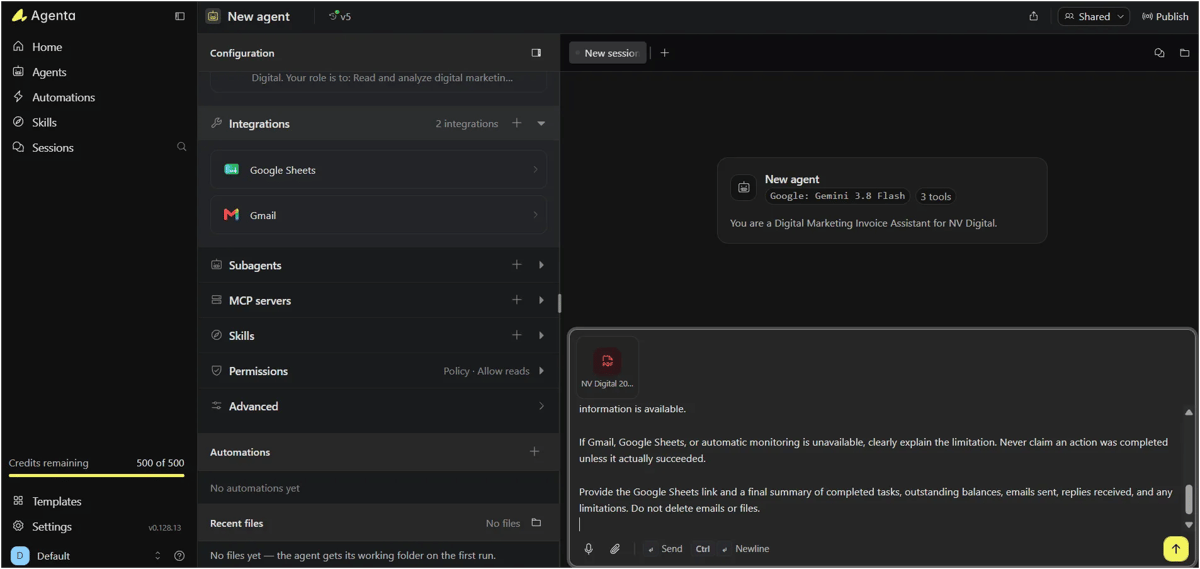
Agenta lets you create an AI agent, connect tools like Gmail and Google Sheets, and give it instructions to complete tasks. Its automation feature interested us most, because it lets an agent run on a schedule without repeated prompts. We tested that feature with our payment follow-up workflow.
How Agenta Automation Works
In Agenta, creating an agent and automating it are two separate steps.
First, we created an agent called NV Digital Invoice & Payment Assistant. We gave it the instructions above and connected Gmail and Google Sheets.
To automate the workflow, we opened Automations and set up the following:
- Agent: We selected our invoice assistant.
- Schedule: We set how often the agent should run.
- Instructions: We asked it to check Gmail for new replies from the three customers, update Google Sheets and prepare follow-up emails.
- Safety rules: We told it not to process the same reply twice, not to send emails without approval, and not to mark invoices as paid without verified payment confirmation.
- Run History: We used this section to check whether scheduled runs were actually starting.
Once we activated the automation, Agenta ran the instructions at the scheduled intervals. However, a successful scheduled run doesn't mean every task inside it was completed. We still had to check Gmail, Google Sheets and the run results ourselves.
Our Experience Testing Agenta
Agenta identified 17 fully paid invoices and three with outstanding balances. It calculated the total pending amount as ₹65,000, which matched our test data. It also created a Google Sheets tracker with customer details, invoice amounts, payment status and reminder status.
Next, we asked Agenta to send payment reminders to the three customers. It prepared the emails and sent them after our approval. We checked all three recipient accounts and confirmed the emails had arrived. However, all three reminders landed in Spam, so customers might not have seen them.
We then replied from the three customer accounts. At first, nothing changed in Google Sheets. This was before we had set up any automation, so we gave Agenta another prompt asking it to check for replies. It then processed the messages, added reply timestamps and summaries to the sheet, and prepared acknowledgement follow-ups.
This made us ask whether Agenta could do this work on its own, without a prompt each time.
Testing Agenta's Scheduled Automation
We first tried to schedule a Gmail check every five minutes for 24 hours. Agenta rejected this setting and explained that scheduled runs could occur at most once every 15 minutes.
We changed the interval to 15 minutes, and Agenta created the automation successfully. We then sent new test replies and waited without prompting Agenta again.
The Automations dashboard showed the status as Working. Run History listed nine scheduled runs, from 12:16 PM to 2:16 PM at 15-minute intervals. We also found three follow-up drafts in Gmail, created at about 1:41–1:42 PM.
This was encouraging: the agent was clearly running on schedule, and follow-up drafts appeared. However, the Google Sheet still showed the earlier reply timestamps. We couldn't confirm that the scheduled runs had detected and recorded the new replies.
So Agenta's scheduling worked, but we can't say our full automated follow-up workflow passed.
Can Agenta Send Emails Without Approval?
We also tried to let Agenta send follow-up emails without waiting for us. Agenta explained that our configuration required explicit approval for sending email, so it could only prepare drafts during scheduled runs.
This matched the safety rule we had set, so we don't count it against Agenta. It does mean we didn't test fully hands-free sending.
Agenta Pros
Pros | What we found |
|---|---|
Invoice analysis | Correctly identified the 3 invoices with pending balances out of 20 |
Google Sheets integration | Created a tracker and added reply details when prompted |
Gmail integration | Sent reminders and processed customer replies |
Multi-step workflows | Handled invoice analysis, spreadsheet creation and email drafting in one workflow |
Scheduled runs | Ran 9 times at 15-minute intervals with no extra prompts |
Run History | Showed exactly when the automation ran, so we didn't have to guess |
Agenta Cons
Cons | What we found |
|---|---|
Minimum interval | Couldn't schedule runs more often than every 15 minutes |
Spam delivery | All 3 payment reminders landed in Spam |
Manual prompting | Needed an extra prompt to process replies before we set up the schedule |
Unverified updates | Scheduled runs were recorded, but automatic Google Sheets updates weren't confirmed |
Variable token use | Some requests used far more tokens than others |
Agenta Usage, Cost and Time
Across 11 recorded requests, Agenta showed usage of about 2.64 million tokens, at a reported total cost of about $0.52. That averages about 240,000 tokens per request. Usage varied widely: the smallest request used 39,600 tokens and the largest used 667,000.
Our credit balance also dropped during testing. Our final screenshot showed 236 of 575 credits remaining, so 339 credits had been used. This was total account usage, not a separate cost for the invoice workflow alone.
The automation ran every 15 minutes, and we confirmed nine runs over two hours. We didn't record enough detail to calculate the end-to-end processing time for all 20 invoices.
2. ChatGPT
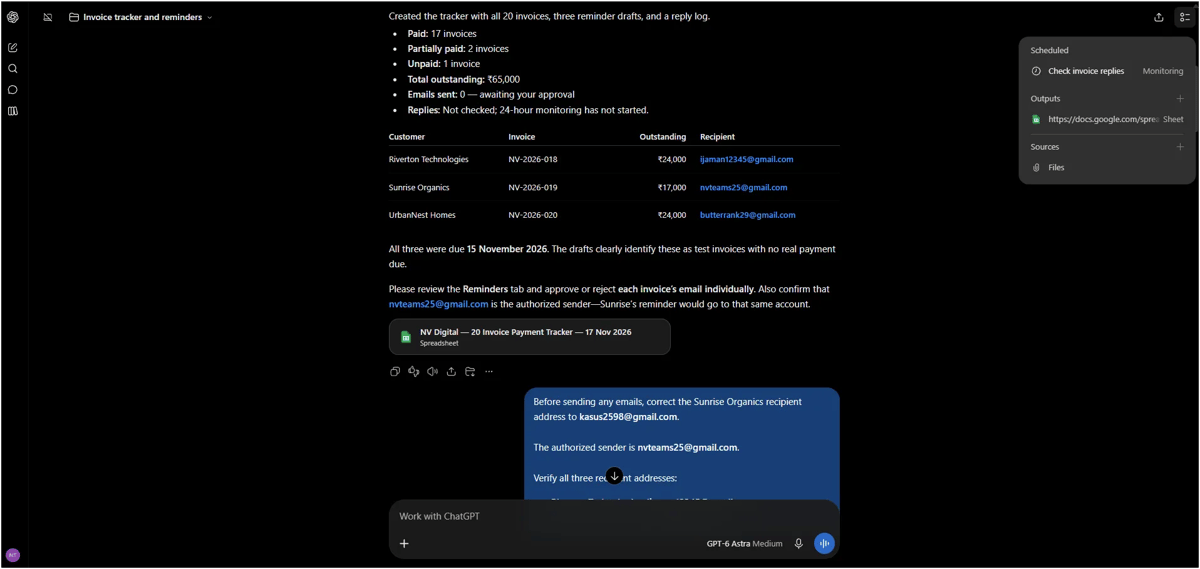
ChatGPT is an AI assistant that can work with uploaded files, connected apps and scheduled tasks. We tested whether it could handle the same office workflow, from reading invoices to sending payment reminders and monitoring customer replies.
How ChatGPT Automation Works
We connected Gmail and Google Drive, uploaded the invoice PDF and gave ChatGPT our prompt.
ChatGPT analysed the invoices, created a Google Sheets tracker, prepared emails and sent them after our approval. For recurring work, we used its Scheduled feature to check for customer replies automatically. In our test, the shortest monitoring interval it supported was one hour.
Our Experience Testing ChatGPT
ChatGPT analysed all 20 invoices in 3 minutes 23 seconds. It identified 17 fully paid invoices, two partly paid invoices and one unpaid invoice, and correctly calculated the total outstanding balance as ₹65,000.
It created a Google Sheets tracker and prepared three reminder drafts. However, the Sunrise Organics reminder had the wrong recipient: ChatGPT had used our sender email address instead of the customer's. We asked it to fix the mistake, and it corrected the draft in 51 seconds.
After checking the drafts, we approved all three reminders. ChatGPT sent them through Gmail in 1 minute 54 seconds and recorded the sent message IDs in the tracker.
We then sent replies from the three customer accounts and scheduled ChatGPT to monitor the inbox for 24 hours. We tried to change the interval to 10 minutes, but ChatGPT said the minimum was one hour. It kept the existing schedule instead of creating a duplicate.
The Scheduled dashboard later showed "Running now", which confirmed the monitoring task had started. However, we didn't verify whether it processed the replies or updated Google Sheets. Unlike Agenta and Claude, ChatGPT's reply handling was not tested in our run.
ChatGPT Pros
Pros | What we found |
|---|---|
Fast analysis | Analysed 20 invoices in 3m 23s |
Accurate calculations | Correctly identified ₹65,000 outstanding |
Google Sheets integration | Created and edited the tracker |
Gmail integration | Sent 3 approved reminders and logged their message IDs |
Error correction | Fixed the wrong recipient in 51 seconds |
Scheduled monitoring | Created an hourly monitoring task for 24 hours |
ChatGPT Cons
Cons | What we found |
|---|---|
Wrong recipient | One reminder first used our sender address instead of the customer's |
Manual review needed | We had to spot and report the mistake ourselves |
Minimum interval | Couldn't schedule checks more often than once an hour |
Unverified automation | Background reply processing wasn't confirmed |
ChatGPT Usage, Cost and Time
ChatGPT completed the initial workflow in about 6 minutes 8 seconds of reported working time: 3m 23s for analysis, 51s for the fix and 1m 54s for sending. This excludes our review and waiting time. We didn't record credit or token usage for ChatGPT.
ChatGPT worked well with Gmail and Google Sheets, but the wrong recipient shows why you should always check outgoing emails.
3. Claude
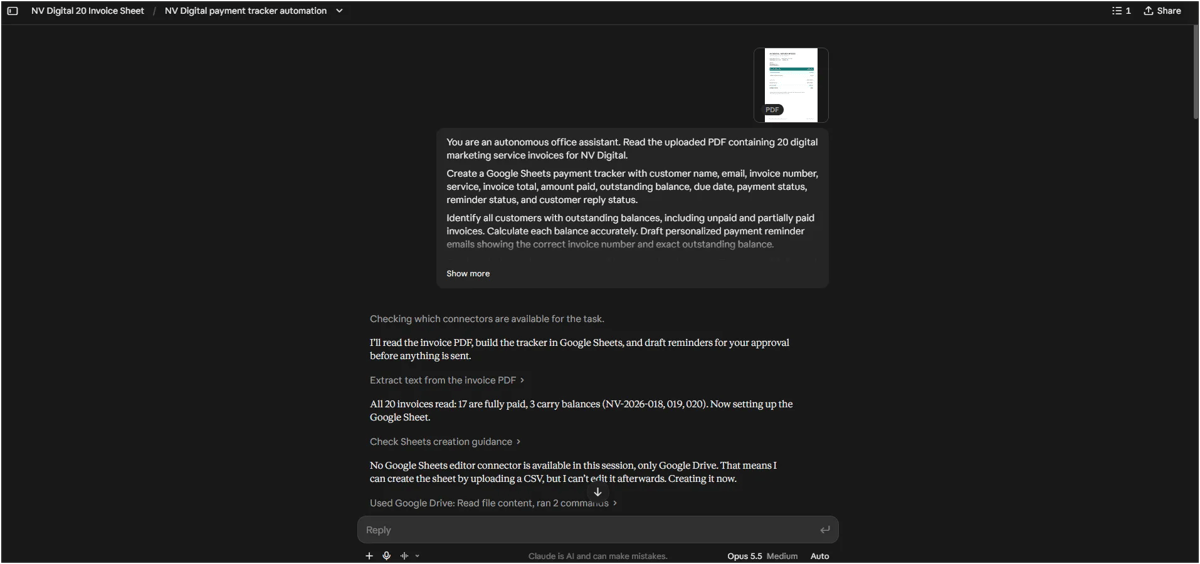
Claude is an AI assistant that can analyse documents, work with connected apps and run scheduled tasks. We tested it with the same 20 invoices to see how much of the payment follow-up workflow it could manage.
How Claude Automation Works
We uploaded the invoice PDF and connected Gmail and Google Drive. Claude analysed the invoices, created a spreadsheet and prepared payment reminders, which we approved before sending.
For monitoring, Claude created a scheduled task that runs every hour. We enabled Auto mode, so the task could run without us opening the chat each time. Claude also told us the task might not stop automatically after exactly 24 hours, so we would need to check that ourselves.
Our Experience Testing Claude
Claude correctly analysed all 20 invoices. It identified 17 fully paid invoices, two partly paid invoices and one unpaid invoice, with a total outstanding balance of ₹65,000.
It created a Google Sheets tracker and prepared three reminder drafts with the correct invoice details and customer addresses. After our approval, Claude sent all three reminders through Gmail.
The first problem came when we tried to update the tracker. Claude could create a Google Sheet through Google Drive, but it couldn't edit the existing sheet because the Google Sheets editing connector wasn't available in our session.
We then asked Claude to monitor customer replies for 24 hours. At first, it created four separate one-time check-ins instead of a recurring schedule. After we clarified what we needed, Claude cancelled those check-ins and created an hourly recurring task.
We sent replies from the three customer accounts. During a manual run at 5:26 PM, Claude read the replies and prepared follow-up emails. After we approved them, Claude reported that all three follow-ups were sent.
It still couldn't update the spreadsheet. Instead, it gave us the reply timestamps, summaries and follow-up statuses to enter by hand.
Claude also warned us that its next scheduled run might treat already-answered replies as new and create duplicate follow-up drafts. We had to ask for a change to prevent this.
The hourly task was active, but the reply processing we saw happened during a manual run. We couldn't confirm that the same process completed automatically in the background.
Claude Pros
Pros | What we found |
|---|---|
Accurate invoice analysis | Correctly calculated all outstanding balances |
Correct email details | Prepared reminders for the 3 intended customers |
Google Sheets creation | Created a tracker for all 20 invoices |
Gmail integration | Sent approved reminders and follow-ups |
Reply understanding | Read customer replies and prepared suitable responses |
Scheduled automation | Created an active hourly recurring task |
Clear about limits | Explained why spreadsheet editing wasn't available and flagged the duplicate-reply risk |
Claude Cons
Cons | What we found |
|---|---|
Spreadsheet editing | Couldn't update the existing Google Sheet |
Initial scheduling | Created separate check-ins instead of a recurring task |
Duplicate reply risk | Could have processed already-answered replies again |
Extra instructions | Needed more instructions to fix the monitoring setup |
Automatic stopping | Couldn't guarantee the task would stop after 24 hours |
Unverified automation | Background reply processing wasn't confirmed |
Claude Usage, Cost and Time
We didn't record a reliable total processing time or credit cost for Claude, so we've left those figures out rather than estimate them.
Claude handled invoice analysis, email drafting and customer replies accurately in our test. However, it couldn't edit the existing Google Sheet, which stopped it from completing the whole workflow.
Final Thoughts: Which of the Best AI Agents Should You Choose?
All three AI automation agents correctly analysed our 20 invoices, but each had limitations.
- Choose ChatGPT if you want quick invoice processing, Google Sheets editing and email reminders. It was the only tool we timed, at about six minutes for the initial workflow.
- Choose Agenta if frequent scheduled automation is your priority. It ran checks every 15 minutes, compared with hourly for the other two.
- Choose Claude for document analysis and handling customer replies, though it couldn't edit the existing spreadsheet in our test.
None of these tools completed the entire workflow automatically. Whichever of the best AI agents for automation you pick, test it with real tasks and check the results before trusting it with important business work.
Frequently Asked Questions
1. What is the best AI agent for business automation?
It depends on the work you want to automate. In our invoice test, ChatGPT finished the initial workflow in about six minutes and could edit Google Sheets. Agenta ran scheduled checks most often, every 15 minutes. Claude handled customer replies well during a manual run. None of these AI agents for business completed every part of the workflow automatically.
2. Can AI agents send emails automatically?
AI agents for email automation can work with connected email accounts, but sending permissions depend on the tool and setup. In our test, all three tools prepared payment reminders and sent them after we approved each message. We required approval as a safety rule, so we didn't test approval-free sending.
3. Can AI agents update Google Sheets?
Yes, but integration support matters. Agenta updated our tracker after an extra prompt, and ChatGPT could create and edit it. Claude created the tracker but couldn't edit the existing sheet because the required connector wasn't available in our session.
4. Can AI agents run tasks without keeping the chat open?
Some autonomous AI agents support scheduled background tasks. We confirmed nine scheduled Agenta runs at 15-minute intervals. ChatGPT and Claude also created hourly monitoring tasks, but we couldn't verify that their scheduled runs processed replies from start to finish.
5. Are AI agents reliable enough to handle business tasks without supervision?
Not completely, based on our test. ChatGPT first used a wrong email address, Claude couldn't update the existing spreadsheet and Agenta's scheduled runs didn't show clear evidence of automatic tracker updates. Human review is still important, especially when emails, payments or customer records are involved.