Disclosure: We tested all three tools ourselves in October 2026 and ranked them based on our results. No company paid us for placement
What Is an AI Text Summarizer?
An AI text summarizer turns long text into a shorter version while keeping the main ideas. Just paste an article, report, or paragraph, and it gives you the key points in seconds.
There are two types of summarizers. Extractive tools pick important sentences directly from the original text, while abstractive tools rewrite the ideas in their own words. All three tools we tested use the abstractive approach. Their summaries often read more naturally, but they can also miss important details or change the meaning. That's why we checked each summary against the original text, point by point.
How We Tested These AI Summarizers
We gave all three tools the same 488-word article about how businesses use AI and compared their summaries with the original text. We used the free version of each tool in Paragraph mode.
We checked how much useful information each summary retained and whether it missed any important details. We also looked at signup requirements, word limits, document upload options, and other useful features.
You can find the full article we used for testing at the end of this post.
Results at a Glance
Tool | Summary length | Share of original | Best for |
|---|---|---|---|
152 words (3 paragraphs) | 31% | Detailed summaries | |
129 words (8 sentences) | 26% | Free, no-signup summaries | |
128 words (8 sentences) | 26% | Long documents and other languages |
AI Text Summarizer Pricing Compared
All three have a free version; Scribbr is the only one with no paid summarizer at all.
Tool | Free Version | Paid Plan | What You Get With the Paid Plan |
|---|---|---|---|
Summarizer.org | Yes | From USD 5.60/month, billed yearly (USD 67/year) | Advanced AI, custom summaries, document, URL and image summarization, and higher word limits |
Scribbr | Yes, no signup required | No paid plan for the summarizer | Free to use, with a 600-word input limit per submission |
QuillBot | Yes, up to 1,200 words per summary | USD 8.33/month billed yearly (USD 99.95/year), or USD 19.95 month to month | Custom summaries and summaries of up to 6,000 words |
Prices as of October 2026. Plans change often, so check each official pricing page before you buy. Sources: QuillBot pricing, Summarizer.org pricing
1. Summarizer.org: best overall
Our Experience with Summarizer.org
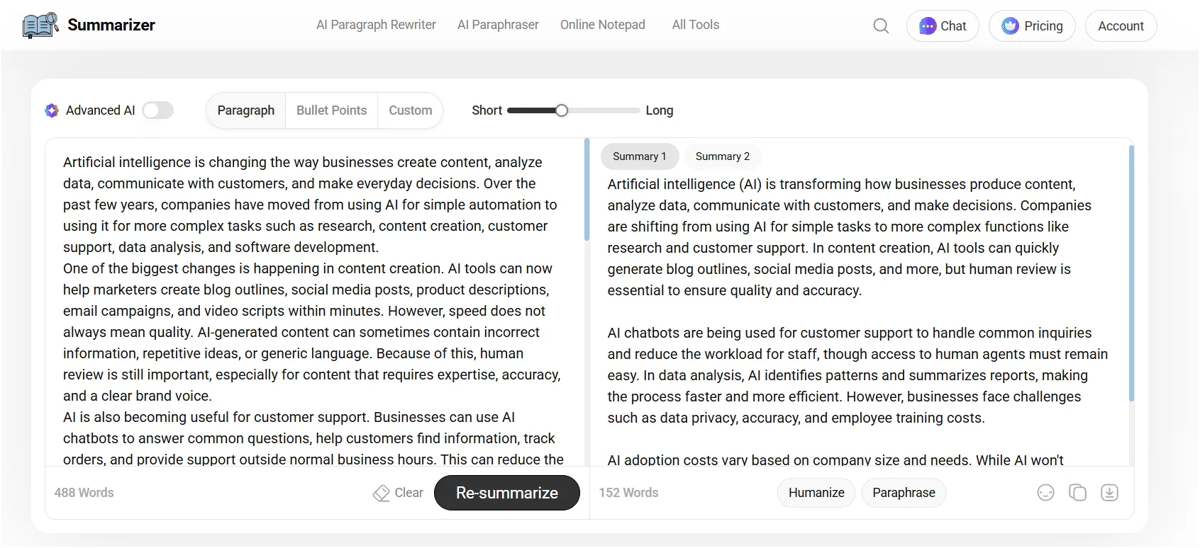
We tested Summarizer.org using the same 488-word text we used for Scribbr and QuillBot. It gave us a 152-word summary. That’s a little longer than the other two, but it kept more of the original information.
The summary covered almost all the major points from the original text. It included AI use in content creation, customer support, and data analysis, as well as challenges like data privacy, accuracy, employee training, and cost. It also kept the important point that AI is more likely to change jobs rather than completely replace people.
What we liked most was that it didn’t strip out detail just to look shorter. It was the only tool that kept concrete examples, like blog outlines and social media posts, and it ended with the practical advice: focus on real use cases, keep humans in the loop and evaluate regularly.
It wasn’t perfect, though. It dropped cybersecurity, merged two separate challenges into one phrase (“employee training costs”), and skipped the idea of starting small and expanding gradually.
Features worth knowing about:
- Paragraph, Bullet Points and Custom modes
- Short-to-long length slider
- Two summary versions per run (Summary 1 and Summary 2), so you can pick the better one
- Advanced AI mode (paid)
- One-click Humanize and Paraphrase on the output
- Copy and download buttons
Pros
- Kept the most information of any tool we tested
- Kept supporting examples the others cut
- Two versions of each summary to choose from
- Cheapest paid plan of the three
Cons
- Longest output, so not ideal for a quick skim
- Document, URL and image summaries need a paid plan
- The free version shows ads
Who it's for: students, researchers and anyone summarizing material where a missing point actually costs you something.
Summarizer.org Output
Artificial intelligence (AI) is transforming how businesses produce content, analyze data, communicate with customers, and make decisions. Companies are shifting from using AI for simple tasks to more complex functions like research and customer support. In content creation, AI tools can quickly generate blog outlines, social media posts, and more, but human review is essential to ensure quality and accuracy. AI chatbots are being used for customer support to handle common inquiries and reduce the workload for staff, though access to human agents must remain easy. In data analysis, AI identifies patterns and summarizes reports, making the process faster and more efficient. However, businesses face challenges such as data privacy, accuracy, and employee training costs.AI adoption costs vary based on company size and needs. While AI won't replace most jobs soon, it will change work by automating tasks. The best strategies involve practical use cases with human oversight and regular evaluation.
2. Scribbr: best free, no-signup option
Our Experience with Scribbr
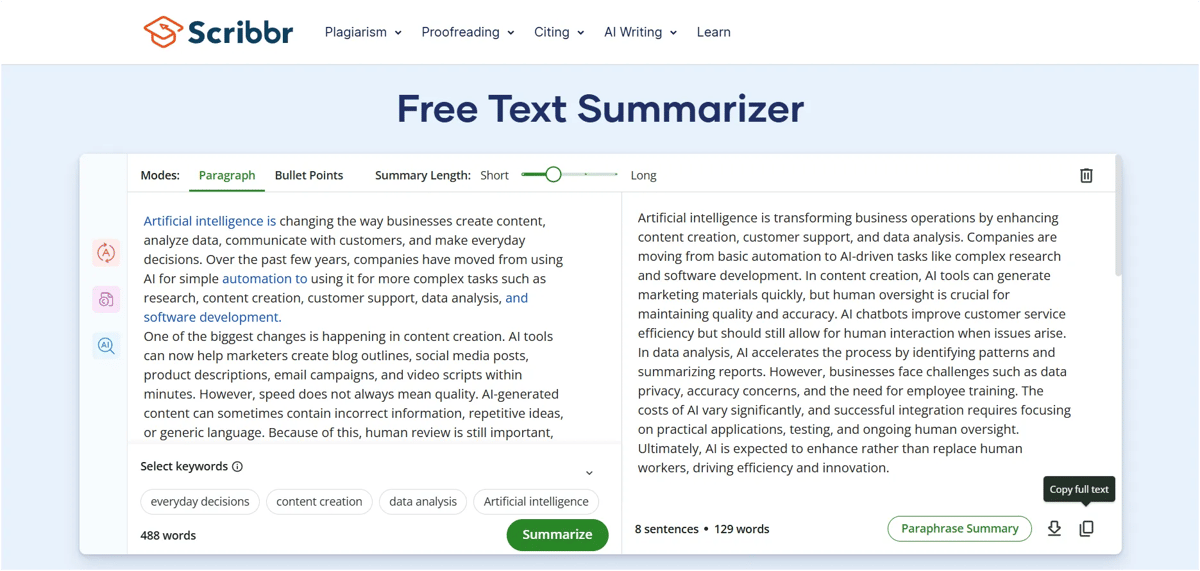
We tested Scribbr using the same 488-word text as the other tools. Scribbr turned it into a 129-word summary with 8 sentences. The summary was clear, easy to understand, and covered most of the important points from the original text.
We liked that Scribbr kept important ideas such as AI in content creation, customer support, and data analysis, along with challenges like data privacy, accuracy, employee training, and AI costs. It also kept the point that AI is more likely to support and improve human work rather than completely replace workers.
Just like QuillBot, Scribbr gives you different ways to customize the summary. You can choose between paragraph and bullet-point formats and adjust the summary length from short to long. It also has useful options like keyword selection, paraphrase summary, copy, and download. The tool also shows the word and sentence count of the generated summary.
One thing worth knowing: Scribbr’s summarizer is powered by QuillBot’s technology, and both belong to the same parent company. That’s why the two tools look so alike. In our test, though, they still kept different details from the same text.
Features worth knowing about:
- Paragraph and Bullet Points modes
- Short-to-long length slider
- Keyword selection, so you can tell it which topics to focus on
- Paraphrase Summary button
- Word and sentence count on the output
- Copy and download buttons
Pros
- Completely free, with no signup
- Kept most of the nuance in very few words
- Keyword selection is genuinely useful for focused summaries
Cons
- Input is capped per submission, so long documents need to be split
- No document upload
- Business details like cost differences got simplified
Who it's for: students and anyone who wants a quick, accurate summary of an article or a few paragraphs without making an account.
Scribbr output
Artificial intelligence is transforming business operations by enhancing content creation, customer support, and data analysis. Companies are moving from basic automation to AI-driven tasks like complex research and software development. In content creation, AI tools can generate marketing materials quickly, but human oversight is crucial for maintaining quality and accuracy. AI chatbots improve customer service efficiency but should still allow for human interaction when issues arise. In data analysis, AI accelerates the process by identifying patterns and summarizing reports. However, businesses face challenges such as data privacy, accuracy concerns, and the need for employee training. The costs of AI vary significantly, and successful integration requires focusing on practical applications, testing, and ongoing human oversight. Ultimately, AI is expected to enhance rather than replace human workers, driving efficiency and innovation.
3. QuillBot: best for long documents and other languages
Our Experience with QuillBot
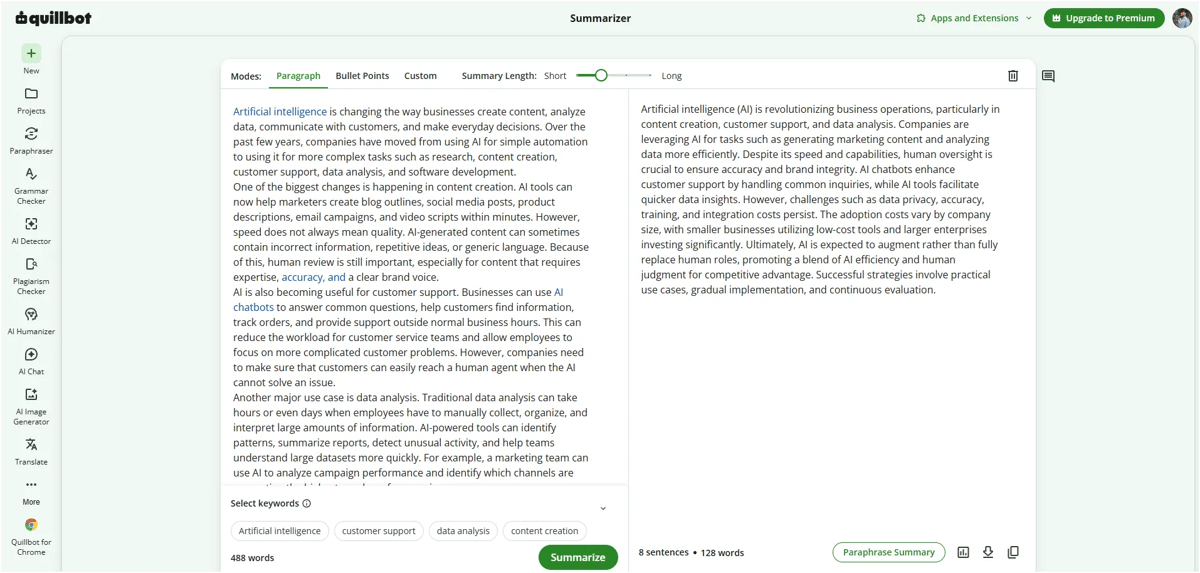
QuillBot turned our 488 words into 128, almost exactly the same length as Scribbr, but it made different choices about what to keep.
Its strongest part was the business advice at the end. It gave the most detail on cost, explaining that small businesses use low-cost tools while large ones invest heavily. It also kept the full adoption strategy: practical use cases, gradual rollout and continuous evaluation. Privacy, accuracy and the need for human oversight were all there too.
It missed two things. It skipped the article's opening idea that companies have moved from simple automation to complex work. And on customer support, it said chatbots handle common questions but left out the point that customers must be able to reach a human. For a support team reading this summary, that's the part that matters most.
Free limits we ran into:
- Signup wall. We could summarize 4 to 5 times without an account. After that, QuillBot asked us to sign up.
- Word limit. We uploaded a 4,887-word document. The free version only processed the first 1,200 words and asked us to upgrade for the rest. Premium raises the limit to 6,000 words per summary.
Features worth knowing about:
- Paragraph, Bullet Points and Custom modes (Custom is Premium)
- Short-to-long length slider
- Keyword selection
- Document upload
- Multiple languages
- Paraphrase Summary button, copy and download
- Part of a bigger toolkit: paraphraser, grammar checker, AI detector and more
Pros
- Best coverage of cost and adoption strategy
- Handles long documents on Premium (6,000 words per summary)
- Works in several languages
- Document upload, which Scribbr lacks
Cons
- Missed the shift to complex work and the human handoff in support
- Free version stops at 1,200 words
- Asks you to sign up after a few uses
- Most expensive paid plan of the three
Who it's for: people who summarize long documents regularly, work in more than one language or already use QuillBot's other writing tools.
QuillBot output
Artificial intelligence (AI) is revolutionizing business operations, particularly in content creation, customer support, and data analysis. Companies are leveraging AI for tasks such as generating marketing content and analyzing data more efficiently. Despite its speed and capabilities, human oversight is crucial to ensure accuracy and brand integrity. AI chatbots enhance customer support by handling common inquiries, while AI tools facilitate quicker data insights. However, challenges such as data privacy, accuracy, training, and integration costs persist. The adoption costs vary by company size, with smaller businesses utilizing low-cost tools and larger enterprises investing significantly. Ultimately, AI is expected to augment rather than fully replace human roles, promoting a blend of AI efficiency and human judgment for competitive advantage. Successful strategies involve practical use cases, gradual implementation, and continuous evaluation.
Which AI Summarizer Should You Use?
Best Article Summarizer
For a news story or blog post you want to understand properly, use Summarizer.org. It keeps the supporting examples that make an article make sense.
Best Free Summary Generator
If you want something free that works right away, use Scribbr. There’s no account and no paywall. Just split anything longer than its input limit.
Best Document Summarizer
For reports, PDFs and long documents, QuillBot Premium is the most practical choice. It takes up to 6,000 words per summary and accepts uploads.
Best Paragraph Summarizer
For a single paragraph or a short email, any of the three works. Scribbr is the quickest because there’s nothing to sign into.
Final Conclusion
After testing all three with the same content, Summarizer.org is our top pick because it kept the most information, including examples the other tools cut. Scribbr is the best free option if you don’t want to sign up, and QuillBot is the one to pay for if you regularly summarize long documents or work in other languages.
FAQs
1. What is the best AI text summarizer?
Based on our test, Summarizer.org was the best overall. It kept the most information from our article while staying easy to read.
2. Which AI summarizer is best for short summaries?
Scribbr and QuillBot were practically tied at 129 and 128 words (about 26% of the original). If you want it free with no signup, go with Scribbr. All three tools have a length slider, so you can make any summary shorter.
3. Which AI summarizer gives the most detailed summary?
Summarizer.org gave the longest output in our test at 152 words and retained more of the original information.
4. Can AI summarizers summarize long documents?
Yes, but document and word limits vary by tool and plan. For example, QuillBot's free version processed up to 1,200 words in our document test.
5. What features should a good AI summarizer have?
Look for summary length control, paragraph and bullet-point modes, document support, accurate information retention and easy copy/download options. Features such as customization and paraphrasing are useful extras.