Today, writing plays a major role in almost everything we do, whether it is emails, assignments, blogs or social media. The way we write directly impacts how clearly our ideas are understood. But writing well is not easy. It requires choosing the right words, maintaining clarity, avoiding grammar mistakes and keeping a consistent tone. Even a simple paragraph can take time to refine and rewriting sentences or fixing awkward phrasing often becomes a slow, repetitive process. This is where tools like QuillBot come in. Instead of manually editing everything, such tools help simplify the process and reduce effort. In this article, let’s take a detailed look at how QuillBot works, what problems it solves and where it actually helps in real-world use.
What is QuillBot?
QuillBot is an AI-based writing tool designed to help users improve and rewrite text more efficiently. Instead of creating content from scratch, it focuses on refining existing content by making it clearer, more readable and better structured.
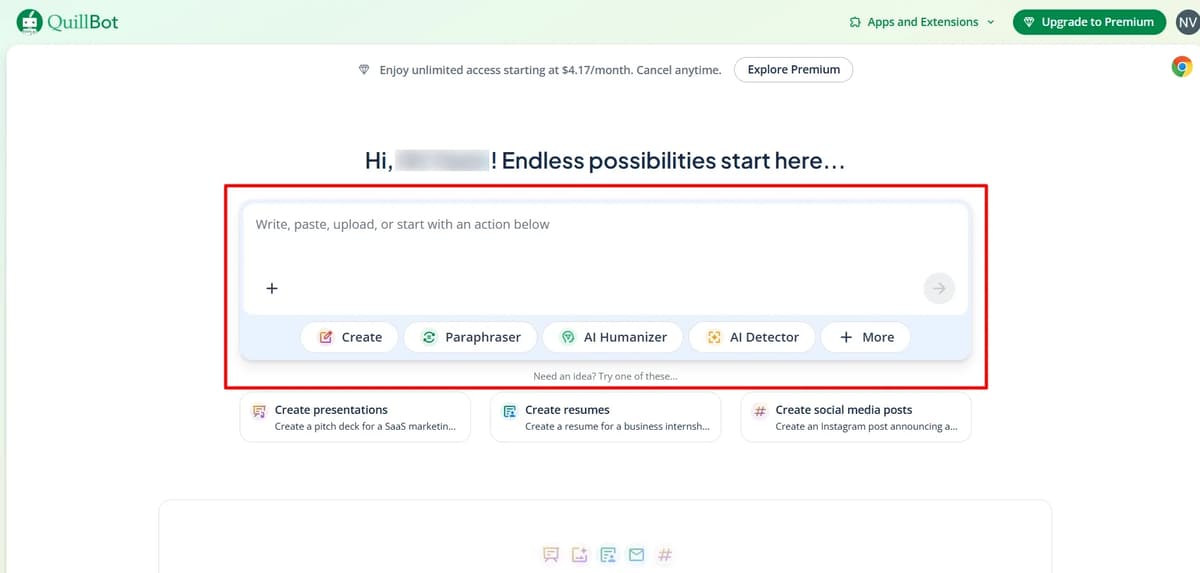
It works by analyzing your input and suggesting alternative ways to express the same idea while preserving the original meaning.
QuillBot Features Overview (Quick Table)
Feature / Tool | What It Does (Simple) | Best Use Case |
|---|---|---|
Paraphraser | Rewrites sentences with different wording and tone (multiple modes available) | Rewriting content, avoiding repetition |
Grammar Checker | Fixes grammar, spelling, punctuation, and improves clarity | Editing and polishing writing |
Summarizer | Converts long content into short summaries or key points | Research, notes, quick understanding |
AI Detector | Checks whether content is AI-generated or human-written | Content verification |
AI Humanizer | Makes AI-generated text sound more natural and human-like | Improving AI-written content |
Plagiarism Checker | Detects copied or duplicate content | Academic and blog writing |
Translator | Translates text into multiple languages | Multilingual content |
Citation Generator | Creates citations in different formats | Academic writing |
AI Chat / Writer | Helps generate ideas, drafts, and answers | Content creation & brainstorming |
QuillBot Flow | All-in-one writing workspace with editing, research, and writing tools | End-to-end writing workflow |
Image Generator | Converts text prompts into images | Basic visuals & blog images |
File Tools (Converter) | Convert files and edit documents | File handling & editing |
Word & Character Counter | Counts words and characters instantly | Writing limits & SEO |
Proofreader Tools | Advanced checking beyond grammar (style, tone, clarity) | Final content refinement |
Extensions (Chrome) | Use QuillBot directly in apps like Gmail, Docs, etc. | Writing anywhere |
QuillBot Paraphrasing Tool
In the below screenshot, the left side shows a simple dummy paragraph about blog writing. This is the original content. Within a few seconds, QuillBot rewrites the same content on the right side using its Standard mode. The meaning stays the same, but the sentence structure, wording, and flow are changed to make it look fresh and different.
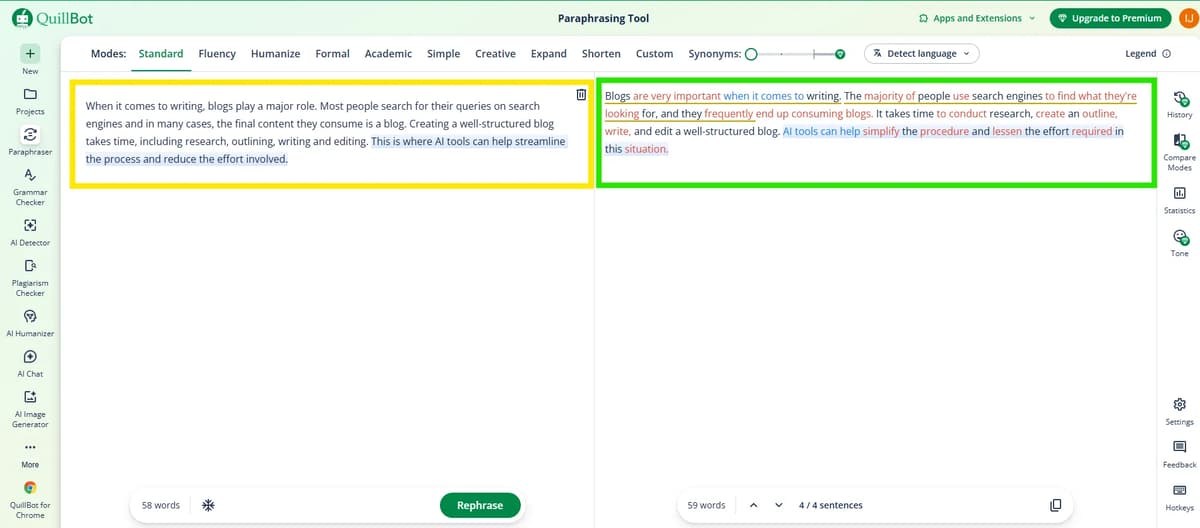
One important thing to notice is the color highlighting. The words highlighted in orange or red indicate the parts that have been changed from the original text. The more color you see, the more aggressively the tool has rewritten the sentence. If only a few words are highlighted, it means the paraphrasing is light. If almost the full sentence is highlighted, it means the structure has been heavily modified.
QuillBot also allows you to control how much paraphrasing you want using the Synonyms slider at the top. If you keep it low, the output will stay close to your original content. If you increase it, the tool will replace more words and restructure sentences more aggressively. This is useful depending on your goal, whether you want slight improvement or a complete rewrite.
In terms of usage, you can paste short paragraphs or long content, but it works best when you break content into manageable sections instead of dumping huge blocks. This helps maintain clarity and avoids awkward rewriting. Apart from paraphrasing, you can also switch between different modes like Fluency, Humanize, Formal or Creative depending on the tone you want.
Overall, QuillBot makes rewriting faster, but it is not perfect. You still need to review the output, fix unnatural phrases, and make sure the final content feels natural and readable.
QuillBot Image Generator
QuillBot’s image generator is a simple AI tool that converts text prompts into visuals. You describe what you want and it produces images based on that input.
You can generate up to three images per day for free using QuillBot’s image generator. Once this limit is reached, you need to wait until the next day to continue using the free plan or upgrade to the premium plan for higher usage limits.

If you want to use multiple image generator tools and create images for free every day, check out the full best ai image generator blog in the end you’ll be able to generate images daily for free.
How to create AI Images using QuillBot AI Image generator
Step: 1 → Enter your Image generation Prompt
Step: 2 → Choose Image Style
Step: 3 → Choose Aspect Ratio
Step: 4 → Click Generate an image button
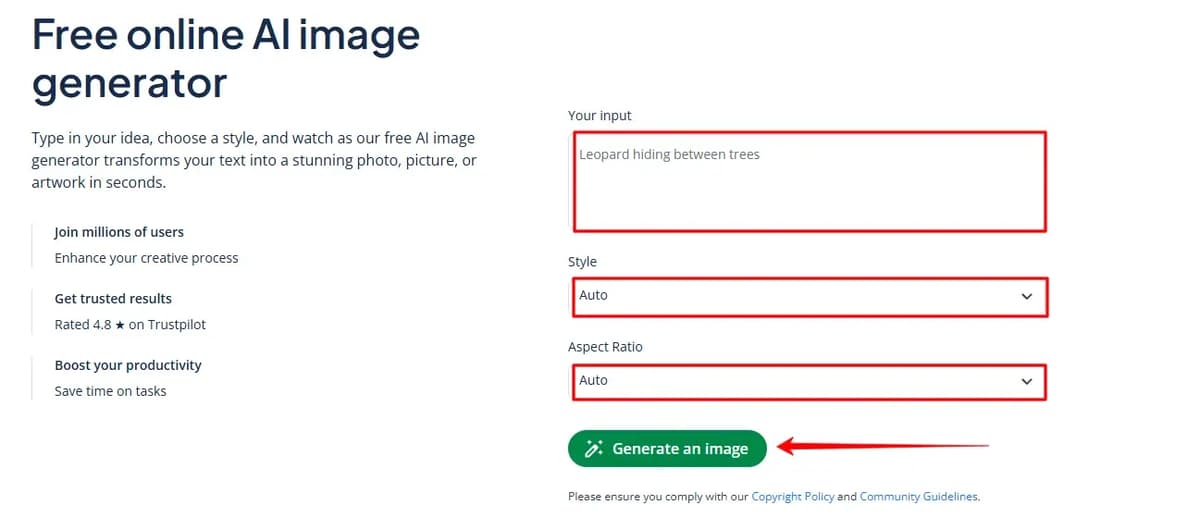
Images get generated in just a few seconds and the quality is pretty good but it’s not 100% realistic you can still tell a bit that it was created using ai.
you can convert any image into png jpeg webp or jpg using quillbot’s online image converter after that you can edit your images with the ai photo editor and also remove backgrounds using the background remover tool
and if you’re already generating images with LLMs, quillbot also has an ai chat feature where you can switch to image mode, enter a prompt, and create images easily. It also includes an ai image detector to check whether an image is ai generated or not
QuillBot’s AI Humanizer
It also has an ai humanizer tool where you can take ai generated content and make it sound more natural and human I’ve shared a real output image below for your reference.
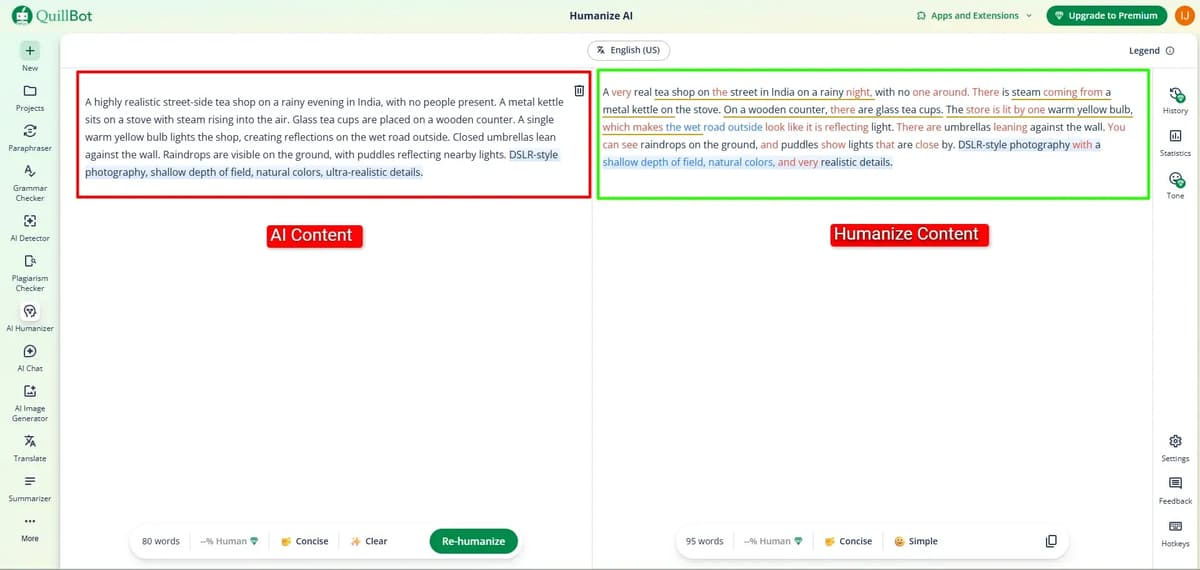
if you need more tools you can check this blog i’ve analyzed everything and shared the best ai humanizer tools with real output examples so it should be useful for you best ai humanizer in 2026
QuillBot AI Detector
It’s not just about humanizing ai content they also have an ai detector so you can take the humanized content and check it there to see how it performs
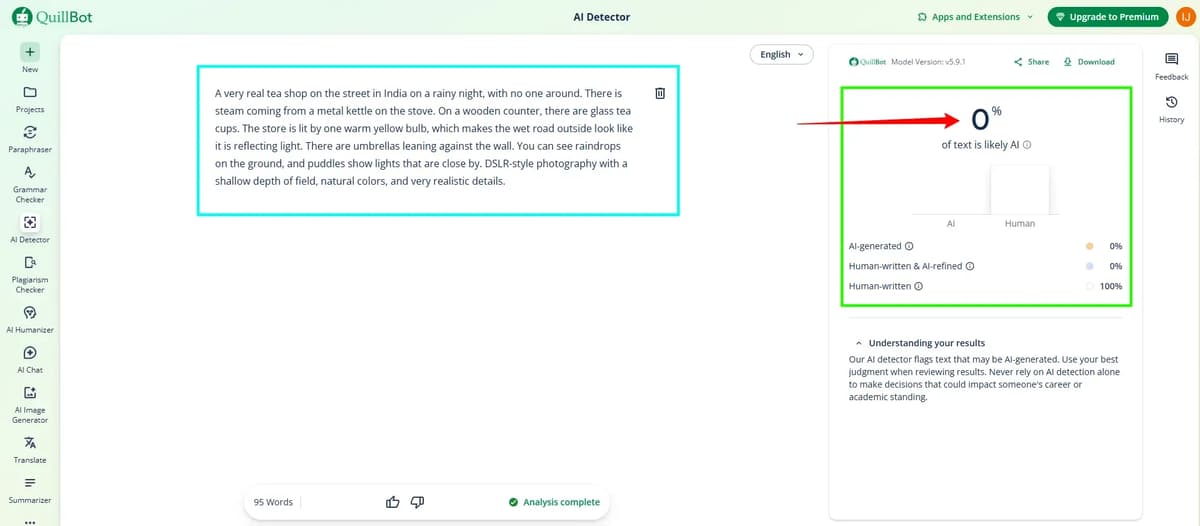
i tested quillbot humanized content in its ai detector and it showed as 100% human written so it works pretty well overall i’ve also researched and reviewed the best ai detector tools with real examples if you check that blog you’ll get a much clearer idea best ai detectors in 2026.
So many tools in QuillBot
You can correct your grammar mistake using grammar checker and if you want to rewrite your content use quillbot Paraphraser to rewrite, edit and change the tone of text to improve clarity, fluency, and comprehension. It helps students and professionals restructure sentences while maintaining original meaning, offering multiple modes (standard, fluency, formal, etc.) to enhance writing and reduce plagiarism.
It also has a summarizer, translator, citation generator, and quillbot flow, and if you upload your docs you can easily edit the whole document fix grammar mistakes, rephrase content and improve it overall.
QuillBot Pricing Comparison
Plan | Best For | What You Get (Short) |
|---|---|---|
Free Plan | Occasional users | Basic features with word limits and fewer modes |
Premium Plan | Regular writers & professionals | Unlimited access, all modes, plagiarism checker |
Team Plan | Teams & organizations | Multi-user access, shared usage, centralized control |
Student Plan | Students | Premium features at a discounted price |
If your usage is light, free is enough. For consistent work, premium is more practical. Teams benefit from shared access, while students can save with discounted plans.
Frequently Asked Questions (FAQ)
1. What is QuillBot mainly used for?
QuillBot is mainly used for rewriting and improving existing text. It helps make sentences clearer, more readable and better structured without changing the original meaning.
2. Can QuillBot create content from scratch?
No, QuillBot is not designed as a full content generator. It works better as a tool to edit, rephrase and refine content that you already have.
3. Is QuillBot free to use?
Yes, QuillBot has a free version, but it comes with limits. For example, the image generator allows only a few uses per day, after which you need to wait or upgrade.
4. How accurate is QuillBot’s paraphrasing?
In most cases, it maintains the original meaning while improving clarity. However, for complex or sensitive content, manual review is still necessary.
5. Does QuillBot support image generation?
Yes, it includes an image generator where you can create visuals using text prompts. The process is simple, but the output is not always fully realistic.
6. Can QuillBot detect AI-generated content?
Yes, it has an AI detector feature. Based on testing mentioned in the document, humanized content was identified as human-written, but results may vary depending on the text.
7. What other tools are included in QuillBot?
QuillBot includes a grammar checker, summarizer, translator, citation generator and document editing features, making it a multi-purpose writing assistant.
Conclusion
QuillBot is a practical tool for improving and rewriting content rather than creating it from scratch. It helps reduce the time spent on editing by making sentences clearer and more structured. Features like paraphrasing, summarizing and grammar correction are useful in everyday writing tasks, especially when working with existing content.
At the same time, it is not a complete replacement for human writing. Some outputs may still need adjustments, especially when accuracy or tone matters. The additional tools, including image generation and AI detection, add value, but they also have limitations.
Overall, QuillBot works best as a support tool that helps speed up writing and editing, while still requiring human judgment to finalize the content.
Related Readings
n8n review
Kling ai review
Gravitywrite review
Grok ai image and animation review