

QuillBot is actually a useful tool, but there’s a reason I’m writing this blog. Instead of just explaining it in text, I’ve shared real screenshots for you to see. Once you look at them, you’ll clearly understand why this QuillBot alternatives blog is needed.
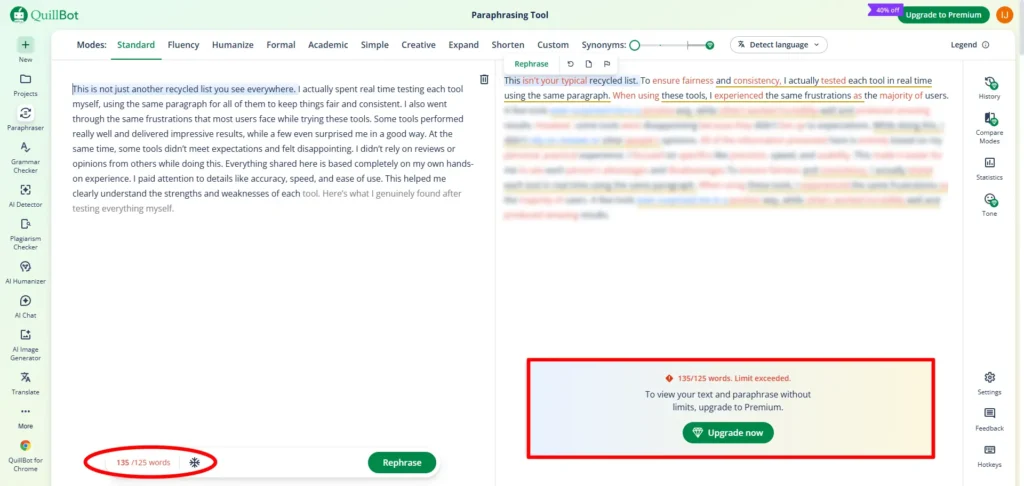
If you paste more than 125 words, it will ask you to upgrade to a paid plan. But when we write articles or blogs, we usually need to paste longer content. So in this blog, we’ll check which tool allows more text and how the output quality looks. Also, with QuillBot, the free plan limits get used up very quickly. If you have any doubts about QuillBot, feel free to check out this Quillbot review blog.
I researched the best alternatives for each option available in quillbot. I also tested how each tool performs and listed everything in a simple way so you can understand it easily.
All the tools mentioned in this blog were personally tested and the experience shared here is based on real usage.
Table of Contents
Quillbot paraphraser alternatives
What is a paraphraser? (Short simple explanation)
A paraphraser is a tool that rewrites your sentence or paragraph in different words without changing the meaning. It helps make your writing clearer, smoother and easier to read.
Sample text : one day, a young man decided to start a small online business from his home. he did not have a big budget, a big team, or any special support, but he had a clear dream to build something on his own. at first, he thought everything would be easy because he had watched many success stories online. but after starting, he understood that real work is very different from what people show on social media. some days he got good response from customers, and some days nobody even replied to his messages. many people told him to stop wasting time and look for a normal job, but he did not give up. instead, he started learning slowly every day. he improved his product photos, wrote better descriptions, studied what customers liked, and tested different ideas. he also made many mistakes, but each mistake taught him something useful. sometimes he felt tired and confused, but he reminded himself why he started. slowly, he learned how to manage his time, handle pressure, and stay focused even when results were small. he began writing down his daily tasks, checking what worked, and removing what wasted his energy. this simple habit helped him become more serious and organized. after a few months, his business started getting small orders. it was not a huge success, and he was not earning a lot, but those first orders gave him confidence. he realized that growth does not always happen fast. it comes step by step when we keep learning, improving, and staying consistent. in the end, he understood one important lesson: success is not only about big money or quick results. it is also about patience, discipline, and the courage to continue even when nobody believes in you. that mindset became his real strength every single day.
1. ZeroGPT
When I searched for “paraphraser” on google, zerogpt appeared near the top of the results, so I decided to test it.
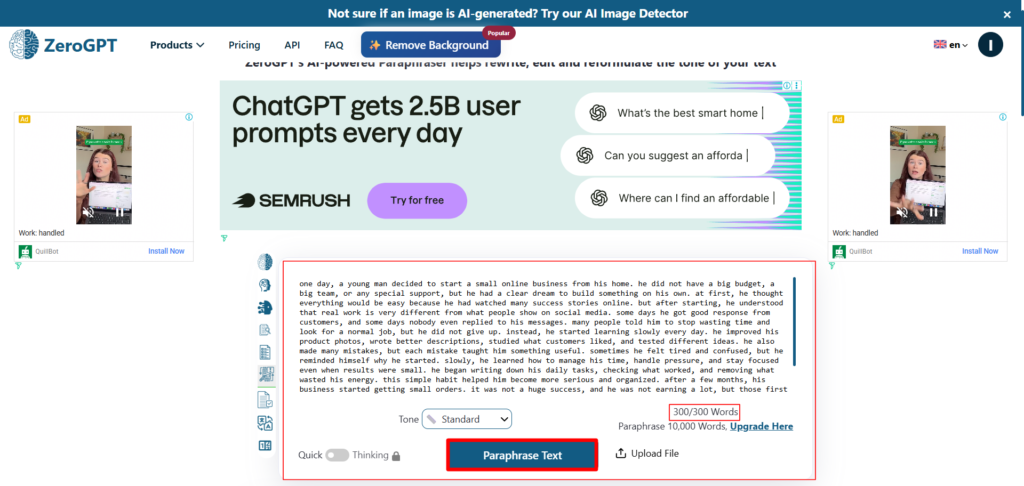
For this test, I used a sample paragraph of around 300 words and pasted it into the zerogpt paraphraser tool. By default, the tool was set to standard mode. The other rewriting modes and extra options were locked behind the paid plan.
In the free version, zerogpt allows users to paste and paraphrase up to 300 words at a time. This makes it useful for testing small paragraphs, short blog sections, or basic rewriting needs before deciding whether the paid features are worth using.
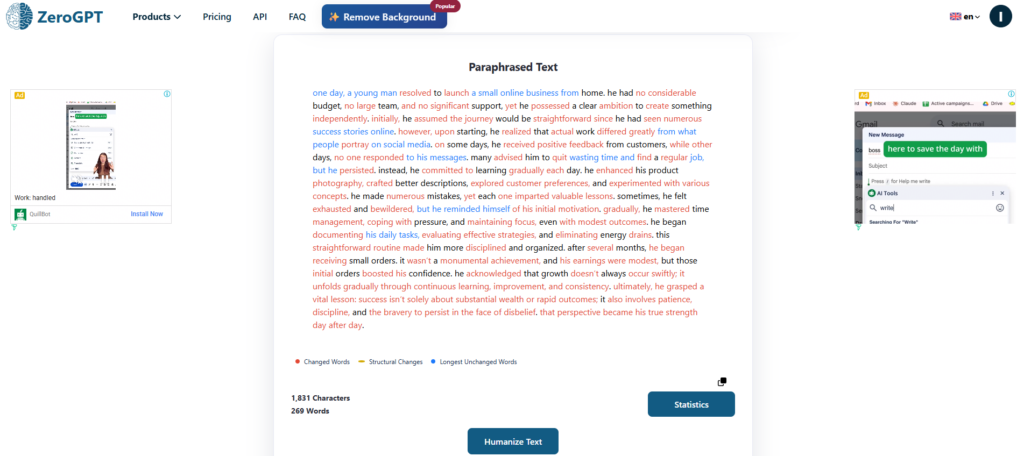
We gave a total of 300 words to paraphrase and this tool returned the paraphrased output with 269 words. You can easily see the changes here. The red-colored text shows the changed words and some blue-colored words show the longest unchanged words. I’m sharing the real output image below for better understanding.
2. Writefull
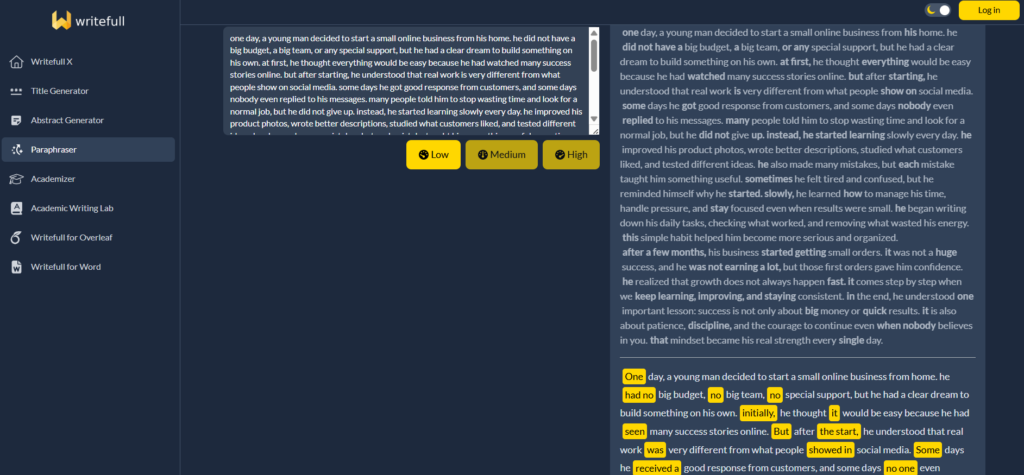
Writefull has a very simple and clean user interface. When I pasted my sample content into the tool, it showed three rewriting options: Low, Medium and High.
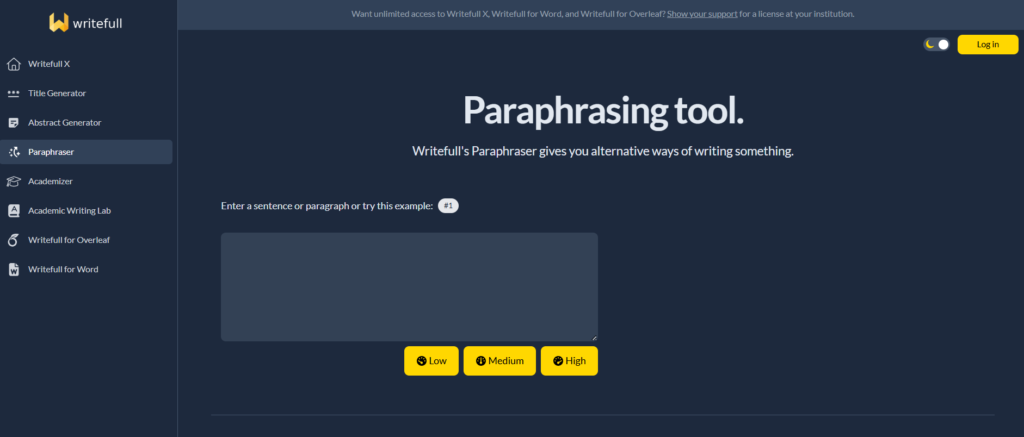
If you only want minor changes in your text, you can choose the Low option. For word and phrase-level changes, the Medium option works better. If you want stronger changes at the phrase and sentence structure level, you can use the High option.
Writefull allows users to paste up to 2,000 characters at a time. After generating the result, the tool shows three different output variations. You can compare all three versions and copy the one that fits your content best.
3. Kroolo
You can use the Kroolo AI Paraphrasing tool without signing in. It allows you to paste up to 5,000 characters, and you can easily change the content into the language you need. It also provides many free options that you can use easily.
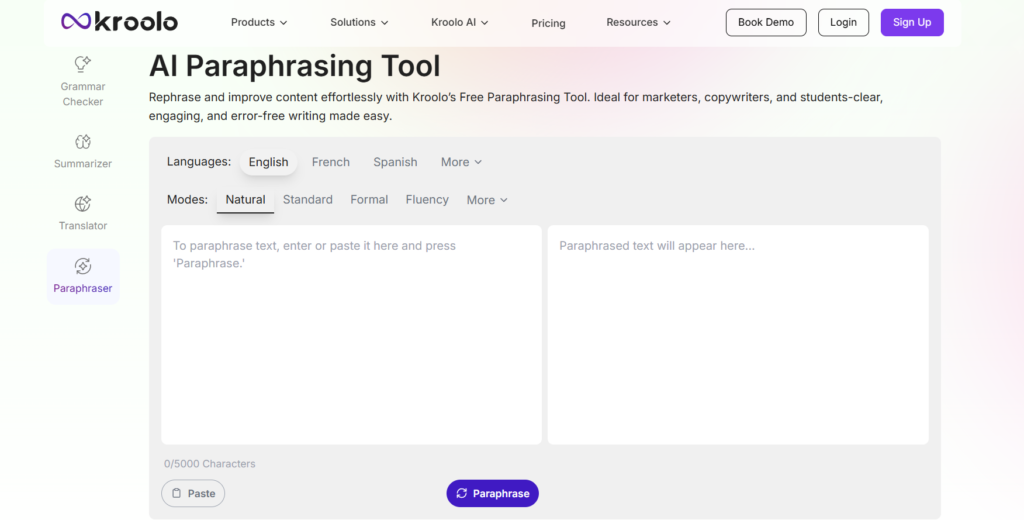
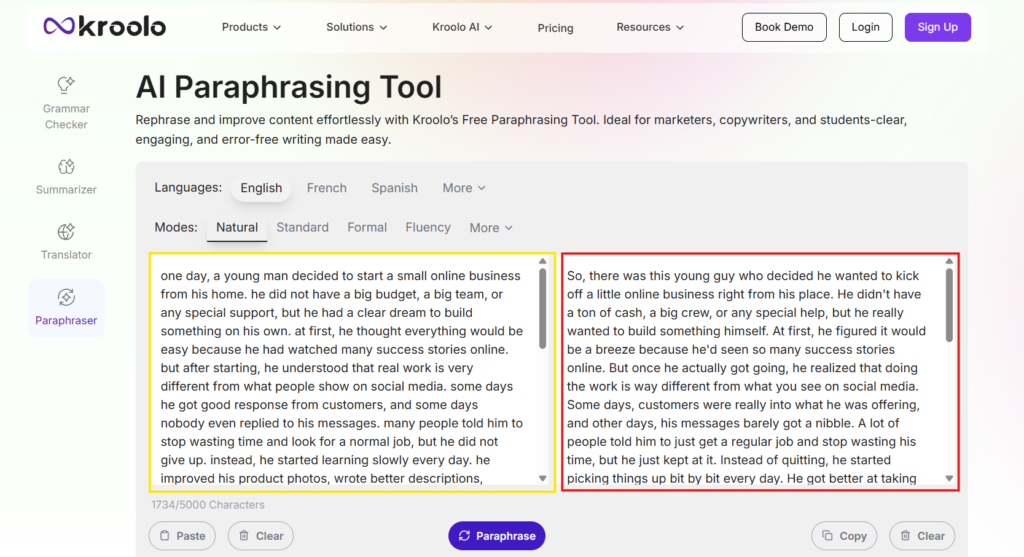
Note: during my test, kroolo paraphraser allowed only 5 free uses. After the free limit was over, it asked me to log in to refill credits. but after logging in, I was redirected to the kroolo workspace dashboard, where I could not find a direct paraphraser option. so, the tool works as a standalone ai paraphraser, but accessing it again after the free limit may feel confusing for new users.
4. Originality.ai
Honestly, Originality.ai matches its name well. The platform showcases its features in a very detailed and transparent way, which makes the user experience much better. For any new user, the tool feels easy to understand because everything is clearly explained without creating confusion.
From my experience, this was one of the best parts of using Originality.ai. The tool does not just provide features; it also explains them properly, so users can understand what they are using and how it works. This gives a more satisfying and trustworthy experience, especially for beginners.
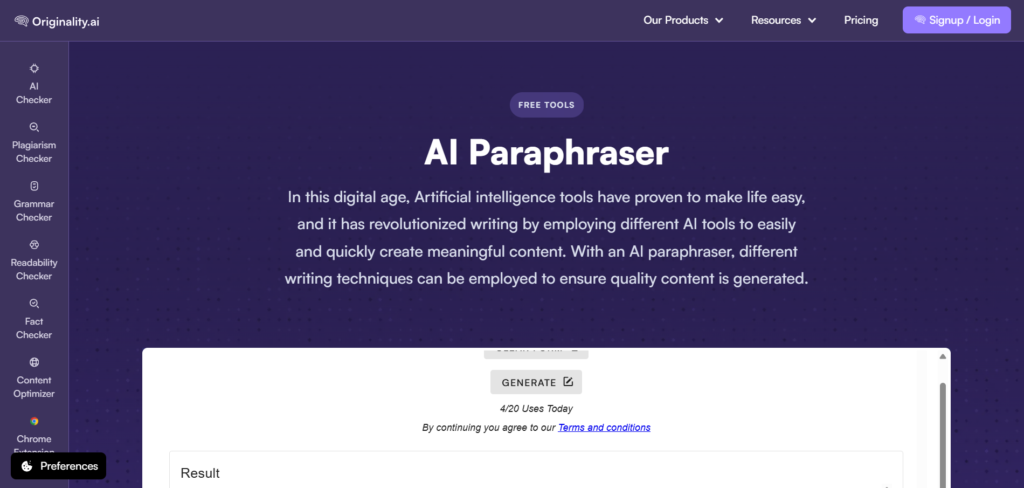
The tool says users can paste and paraphrase up to 5,000 words. However, during my test, it did not work properly with longer text. When I pasted nearly 5,000 words and tried generating the output multiple times, it showed an “API or Parsing Error.” I also tested it with around 4,000 words, but the same issue continued.
After reducing the text to around 3,000 words, the tool finally generated the paraphrased output properly. This was a little disappointing because the tool claims to support up to 5,000 words, but in my test, it worked smoothly only with shorter input.
Still, compared to many other paraphrasing tools, this one is useful because it allows users to paraphrase around 3,000 words for free. It also offers helpful options like generating up to 3 output versions, selecting the tone, choosing the target audience, changing the language and using the tool 20 times for free without logging in. Another useful option is Fine Tune. After generating the paraphrased result, if you feel that a specific line or section needs improvement, you do not have to rewrite everything again. You can use the Fine Tune option to quickly adjust that particular part.
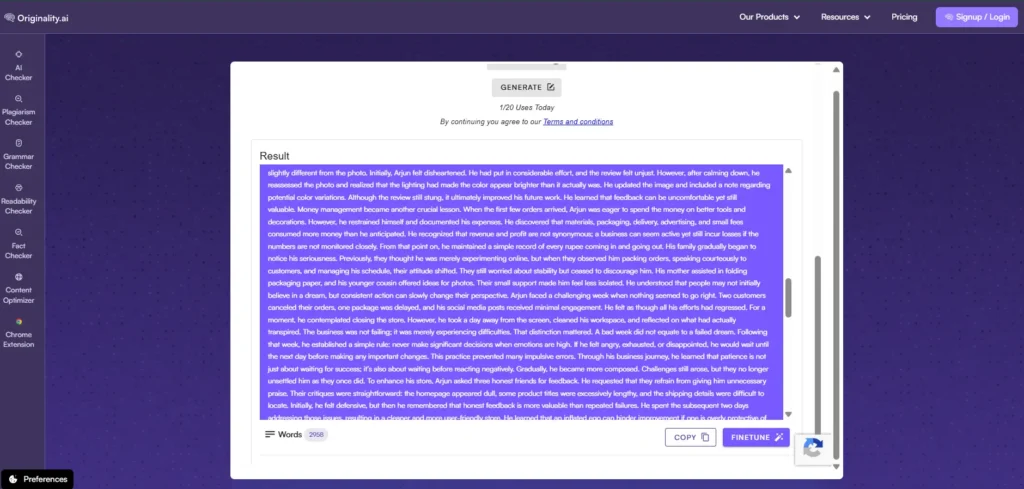
This makes the editing process much easier because users can improve the final output based on their needs instead of generating a completely new version every time.
One important point is that the free version works best without login. When I contacted customer support, they mentioned that users can generate 20 free outputs per day. So, even with the long-text issue, this tool is still a good free option for basic and medium-length paraphrasing needs.
Another useful thing about this tool is its beginner-friendly guidance. If you are not sure how to use the paraphraser, you can simply scroll down below the tool. They have provided a detailed step-by-step guide that explains how to paraphrase text properly.
This makes the tool easier for new users because they do not have to guess how it works. Even beginners can understand the process and start using the tool without much confusion.
QuillBot AI Humanizer Alternatives
What is AI Humanizer? (Short simple explanation)
An AI humanizer is a tool that rewrites AI-generated text to make it sound more natural, clear, and human-written. It helps reduce robotic wording, improve sentence flow and make the content easier to read. Best ai humanizer nu oru thani detailed blog review panni detailed experience share panniruka ungaluku theyva patta best ai humanizer check panni parunga
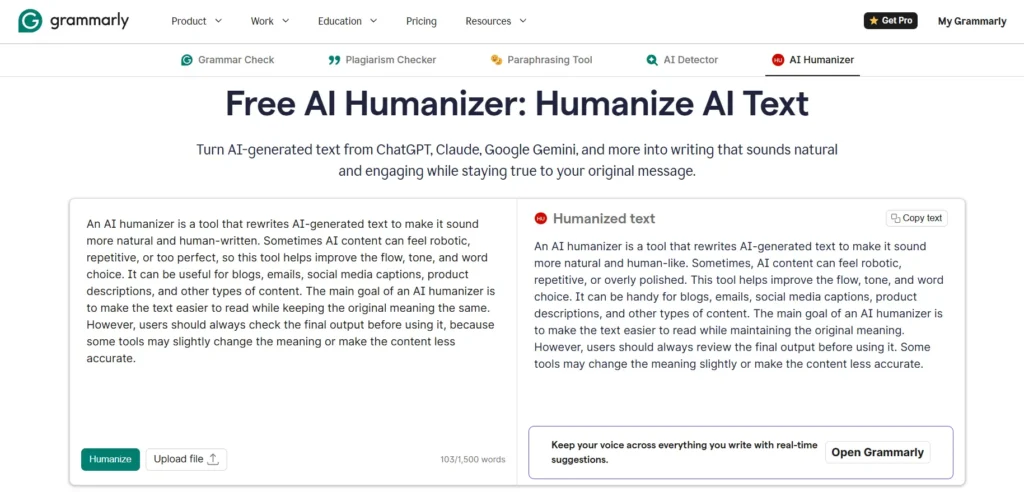
Sample AI Text: An AI humanizer is a tool that rewrites AI-generated text to make it sound more natural and human-written. Sometimes AI content can feel robotic, repetitive, or too perfect, so this tool helps improve the flow, tone, and word choice. It can be useful for blogs, emails, social media captions, product descriptions, and other types of content. The main goal of an AI humanizer is to make the text easier to read while keeping the original meaning the same. However, users should always check the final output before using it, because some tools may slightly change the meaning or make the content less accurate.
1. Humanize AI
You can use this tool quickly without signing in. It helps you humanize AI-written content, and it also has an AI detector on the same page, so you can easily check how much of the output still looks AI-generated.
In the free version, you can paste around 170 words and humanize the text multiple times. But if your content goes above 200 words, you need to upgrade to a paid plan to see the full output.
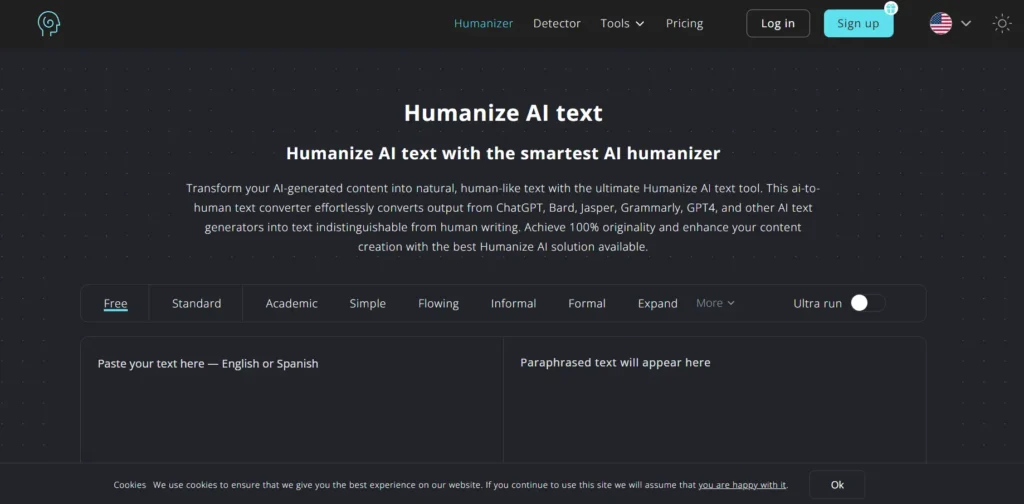
Let’s generate an output using the sample AI text. I have also added a reference image below, so you can check it clearly.
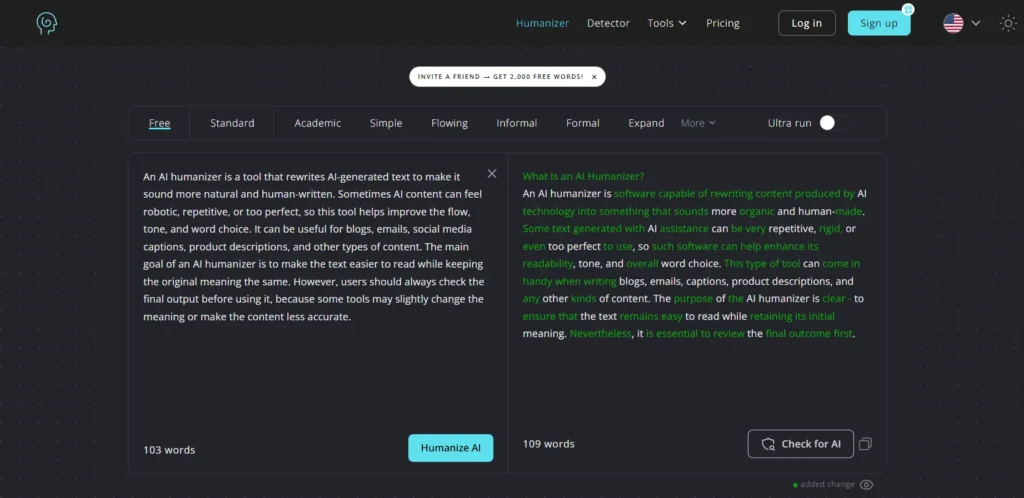
When you click the Check for AI button, it quickly shows what percentage of the content looks AI-generated. It also uses multiple AI detection tools and gives an overall result, which makes it easier for users to understand.
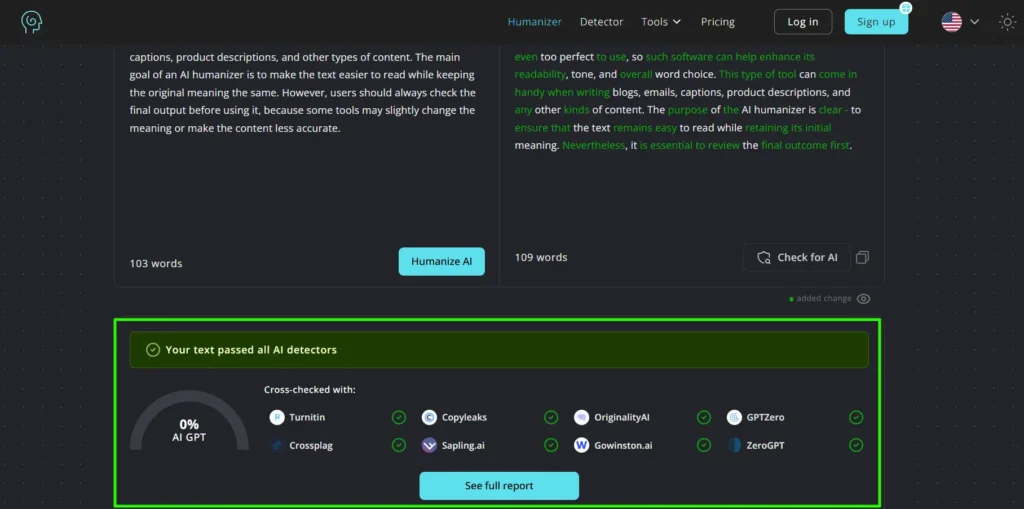
It cross-checks the content with multiple AI detectors. When you click See Full Report, the AI detector report opens and clearly shows what percentage of the content looks AI-written and what percentage looks human-written.
You can also select the tone based on your needs. There is also a special option that claims to make the output harder for AI detectors to identify as AI-written. I tested it with my sample content, and the result showed 100% human-generated content in the report. Features like this being available for free may be one reason why this tool ranks well on Google.
2. Super Humanizer
You can use the Super Humanizer tool to humanize AI-written content for free without logging in. This tool allows you to paste up to 1,200 words and humanize the content. You can also rehumanize the output as many times as you want.
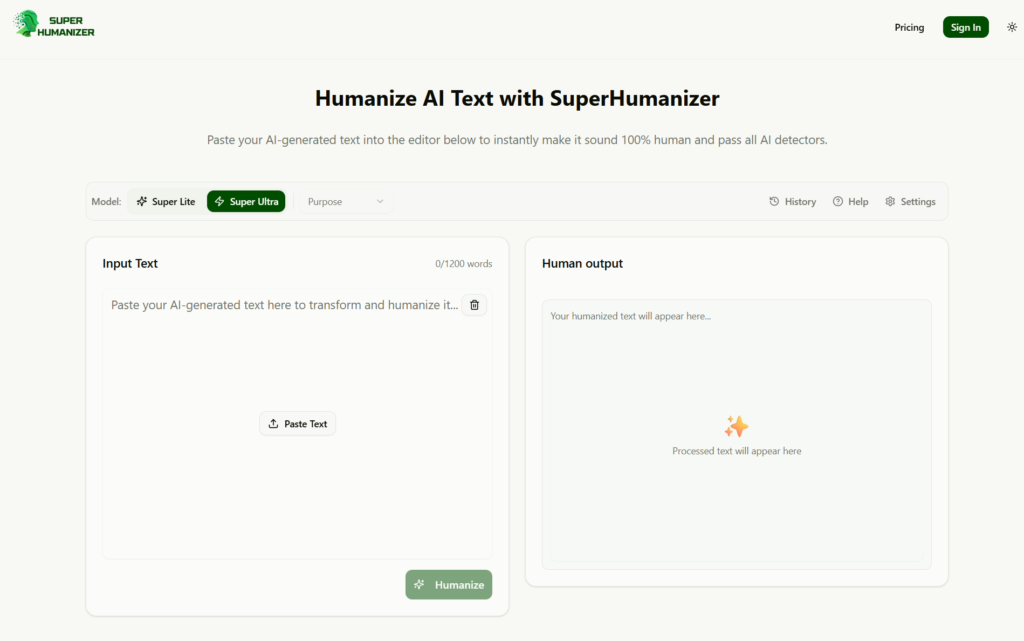
This tool has two models: Super Lite and Super Ultra. You can choose the model based on how strongly you want to humanize your content.
If you want to change or regenerate only a specific line in the output, you can use the Edit option. Just select the line, rehumanize it and click Apply. The improved version will be added back into the content.
3. Grammarly
Grammarly is a popular tool, so most people already know about it. You can use Grammarly’s AI Humanizer for free to humanize AI-written content. It allows you to paste up to 1,500 words or upload a PDF.
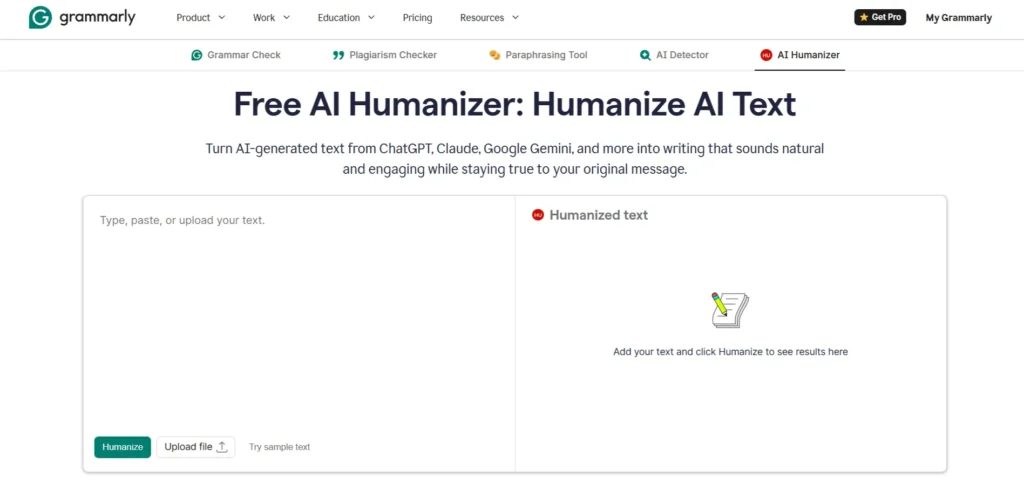
When I pasted the AI-written content and clicked humanize, it generated the humanized version within a few seconds. I have added the screenshot below for your reference.
QuillBot AI detector Alternatives
What is AI Detector? (Short simple explanation)
An AI detector is a tool that checks whether a text may be written by AI or by a human. It is useful for reviewing blogs, essays, articles and other content. I have written a detailed blog about which AI tools are best for AI detection. You can check the best AI detectors blog to get a better idea.
To test an AI detector properly, we should not only check AI-generated content. We should also test it with human-written content. The tool that correctly identifies both AI-written and human-written content is the more reliable AI detector. Now, let’s get into the tools.
1. Copyleaks
Let’s check how the Copyleaks AI Detector works. First, we will test it with AI-written content and then we will test it with human-written content. I have shared the output images below for reference. You can use this tool for free without logging in.
First Test AI Content
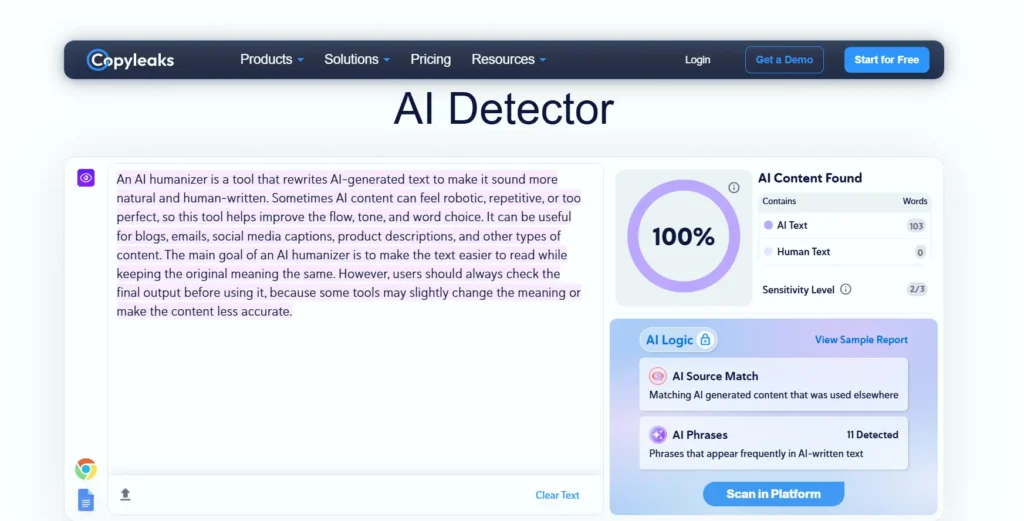
In the first test, we pasted AI-written content, and the tool detected it as 100% AI-generated. Now, let’s check how it performs in the second test with human-written content.
Second Test Human Content
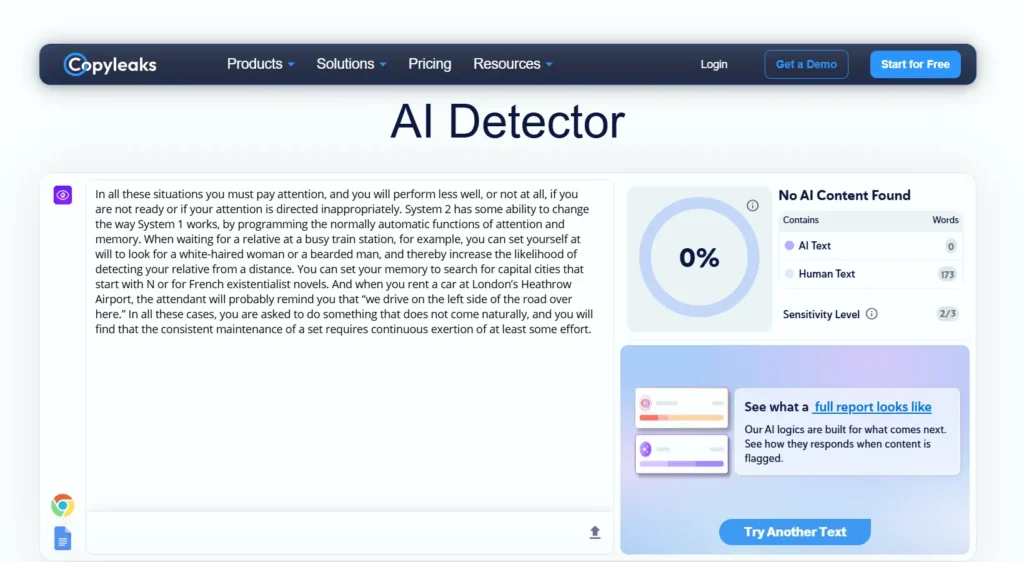
When I pasted human-written content, it detected it correctly and showed 0% AI-written. So, this tool works well in this test. It can easily detect AI-generated content from different AI tools.
2. FINALSCANPRO
FinalScanPro is an AI detection and plagiarism checker that helps users find out whether their content looks human-written or AI-generated. It also provides plagiarism, similarity and originality reports, which makes it useful for students, bloggers, writers and professionals before submitting or publishing their work.
First Test AI content
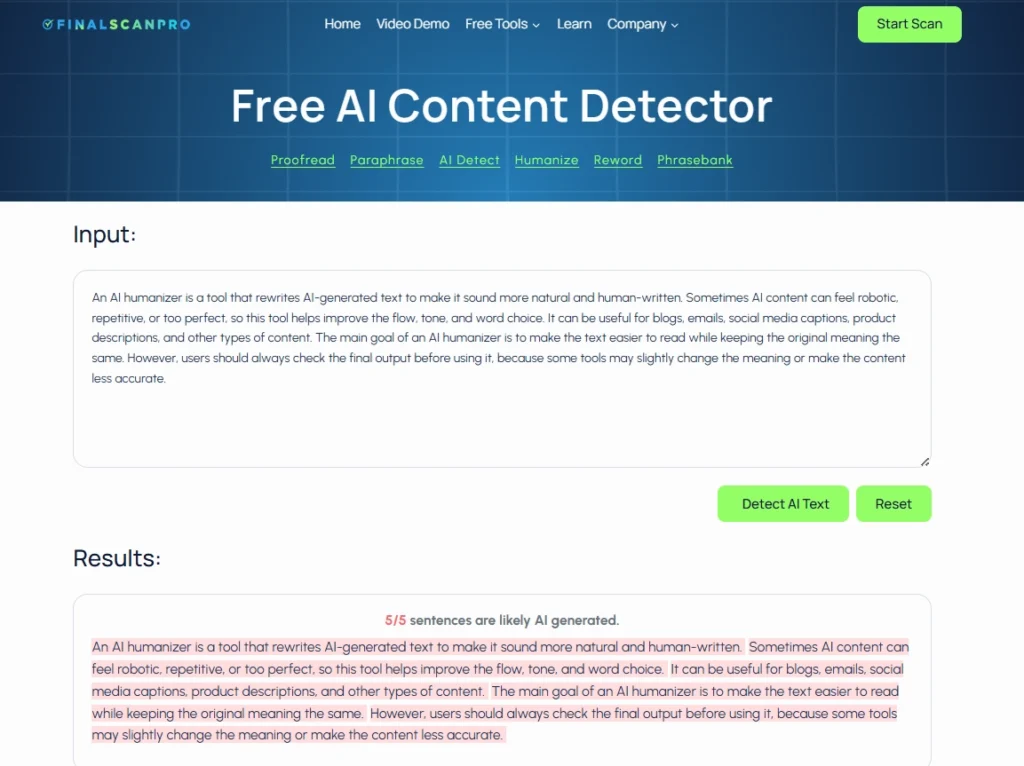
It correctly detected the AI-written content I provided and marked it as AI-generated. Now, let’s see how it performs in the second test.
Second Test Human Content
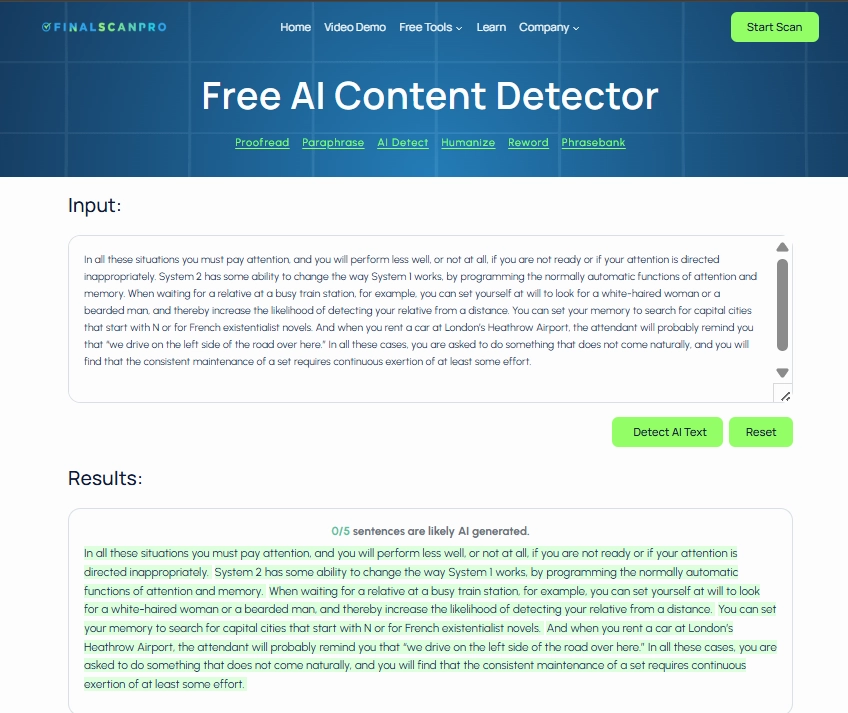
It clearly detected the content as human-written, so this tool also performed well in the test.
3. Detector.io
Detector.io is a free AI detector tool that helps users check whether a text may be written by AI or by a human. When I pasted AI-written content and checked the output, this tool felt a little slower compared to the other tools. The other tools detected the content as 100% AI-written, but Detector.io showed it as 98% AI-written. The difference is not huge, but compared to the previous AI detector tools, this one performed slightly lower in my test. You can check the screenshot below for reference.
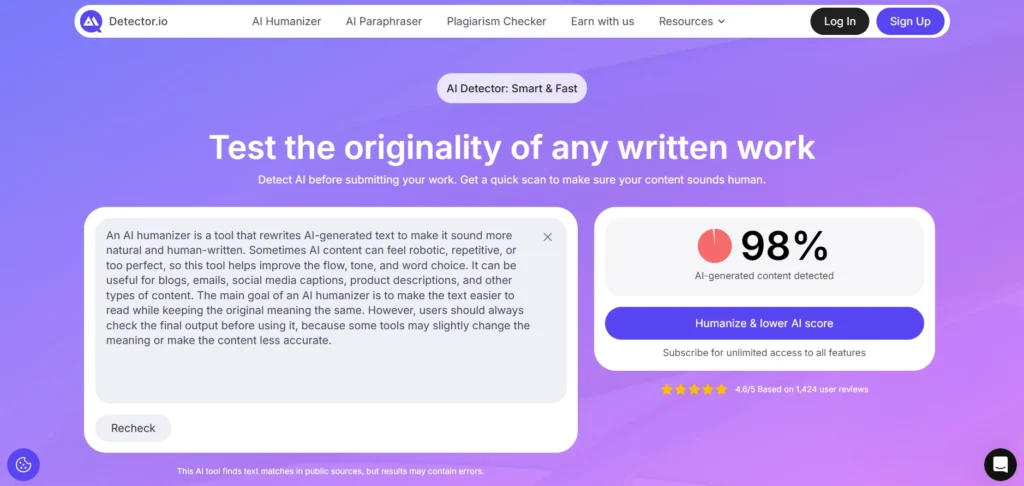
Now, let’s test it with human-written content and see how it performs. I have added the screenshot below again for your reference.
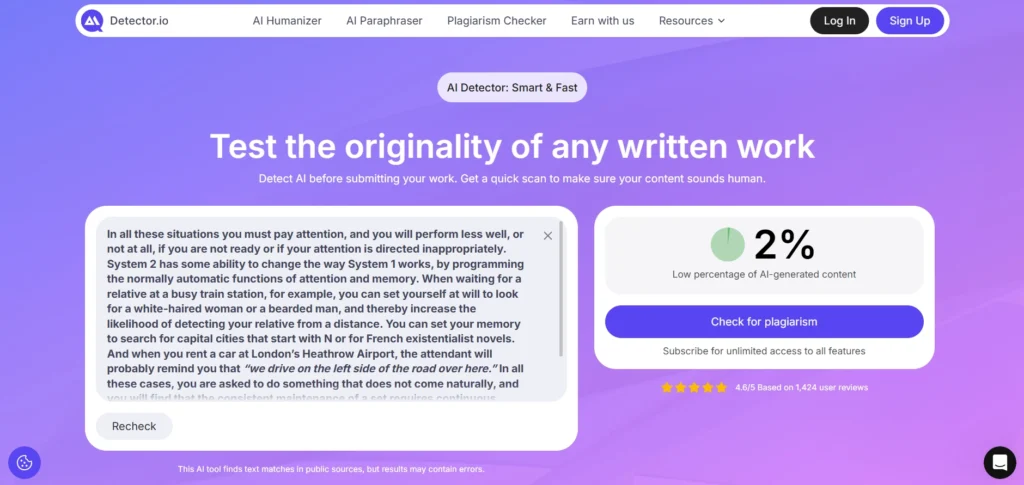
Compared to the other tools, this one performed slightly lower in my test. It showed that the human-written content had a 2% chance of being AI-written, while the other tools detected the same content more accurately as human-written.
FAQs
1. What is the best free QuillBot alternative in 2026?
The best free QuillBot alternative depends on what you need. If you want to paraphrase short content, ZeroGPT and Writefull are simple options. If you want longer text support, Kroolo and Originality.ai feel more useful. But from my testing, Originality.ai gave a better overall experience because it offers tone options, multiple output versions and fine-tune editing. Still, it worked better with around 3,000 words instead of the full 5,000-word claim.
2. Which QuillBot alternative is best for long articles or blog content?
For blog writers, the biggest problem with QuillBot is the short free limit. If you are working on long articles, Originality.ai is one of the better options because it handles longer content compared to many other tools. Kroolo also allows up to 5,000 characters, but after a few free uses, the access flow may feel confusing for beginners. So, for serious blog rewriting, test Originality.ai first and always review the final output manually.
3. Is there any QuillBot alternative without sign-up?
Yes, some tools can be used without sign-up. In my testing, ZeroGPT, Writefull, Kroolo, Humanize AI, Super Humanizer, Grammarly Humanizer and Copyleaks worked without forcing users to create an account at the starting stage. This is useful if you only want to test a tool quickly. But free limits, word limits and locked features can still appear depending on the tool.
4. Can QuillBot alternatives make AI content sound human?
Yes, AI humanizer tools can make AI-written content sound more natural, but don’t trust the output blindly. Tools like Humanize AI, Super Humanizer and Grammarly Humanizer can improve sentence flow, reduce robotic tone and make the writing easier to read. But sometimes these tools may slightly change the meaning. So after humanizing, you should always read the content once and fix any wrong or unnatural lines.
5. Which AI detector is better than QuillBot AI detector?
Copyleaks and FinalScanPro performed better in the tests because they correctly identified both AI-written and human-written samples. Detector.io also worked, but it showed slightly weaker results compared to the other tools. The smart way is not to trust only one AI detector. If the content is important, check it with two or three tools and then make your final decision.
Final conclusion
QuillBot is still a useful tool, but it is not the perfect option for everyone, especially if you are using the free version. The biggest issue is the limit. When you write blogs, articles, essays or long content, you need more freedom to paste and rewrite larger text. That is where QuillBot alternatives become useful.
From my testing, each tool has its own strength. Some tools are better for short paraphrasing, some are better for long content, some are useful for AI humanizing and some are good for AI detection. But no tool is 100% perfect. A tool may give a good output, but you still need to check the meaning, tone and sentence flow before publishing or submitting the content.
So, the best approach is simple, don’t choose a tool only because it is popular. Choose it based on your actual need. If you want quick rewriting, use a simple paraphraser. If you want to improve AI-written content, use a humanizer. If you want to check originality, use an AI detector.
No matter how much AI tools help you work faster, simpler and smarter, your final review is still important. There is always a chance of mistakes, so you should check the output carefully before using it.
0 Comments