Quick Short Intro of Manus AI
Manus AI is a digital assistant that does more than just reply to messages. It can actually complete tasks for you. It can browse the internet, write code and even handle full projects with very little supervision.
It was created by Xiao Hong and Ji Yichao through their startup called Butterfly Effect. The company started in China and later moved its headquarters to Singapore as it expanded worldwide.
In late 2025, Meta, the company that owns Facebook, bought Manus for around $2 billion. Even after the deal, you can still use Manus on its official website as a separate tool. Now, it has become an important part of Meta’s plan to build more practical and action-focused AI tools.
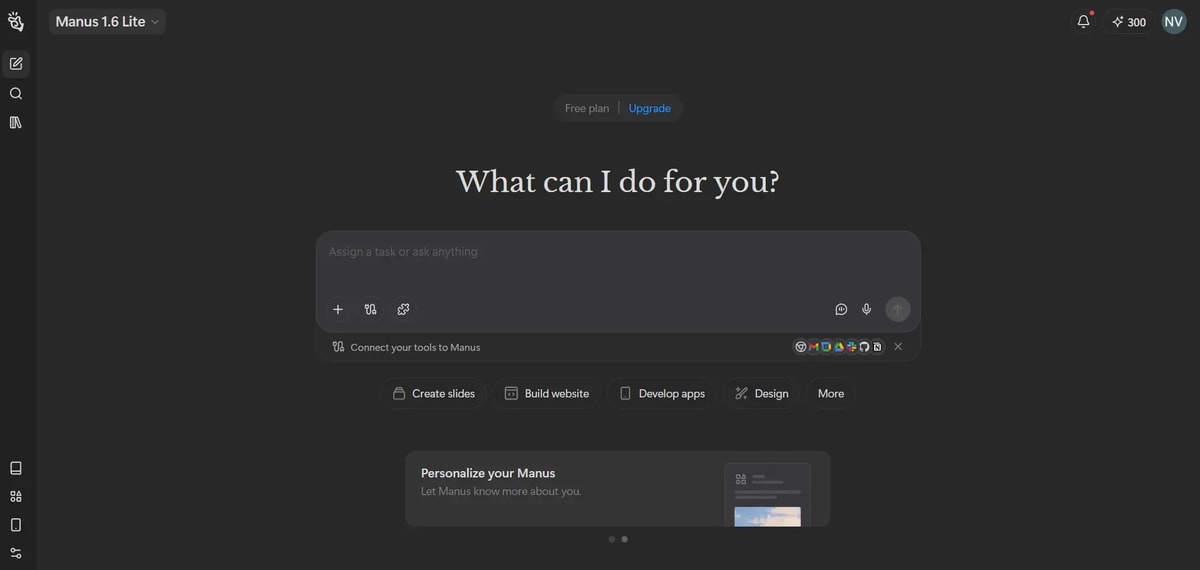
Manus AI gives daily refresh credits 300 for free users. If anything you need to upload it allows only one at a time for free users.
Manus AI Features Overview
Feature | What It Does |
|---|---|
Projects | Persistent workspaces with shared instructions and files |
Skills | Reusable AI workflows and automation modules |
Design View | Advanced image editing and visual refinement |
Wide Research | Parallel large-scale research processing |
Slides Generator | Auto-create structured presentations |
Scheduled Tasks | Time-based task automation |
Data Visualization | Convert data into charts and visual insights |
Multi-modal Processing | Work with text, images, audio, and video |
Mail Manus | AI-assisted email workflows |
Collaboration | Real-time team workspace |
Cloud Browser | AI interacts with live websites |
Browser Operator | Automate actions in your local browser |
Website Builder | Build web apps from prompts |
Integrations | Connect with third-party tools |
AI Image Generation (Free) | Generate high-quality AI images at no cost |
AI Video Generation (Paid) | Create AI-generated videos with premium plans |
Meeting Mode | Record, transcribe, summarize, and extract action items from meetings |
AI Image Generation (Free)
One of the biggest advantages of Manus AI is that it lets users generate high quality AI images without needing a paid plan, depending on the current access level.
You can create realistic photos, digital art, social media graphics, thumbnails, marketing visuals, and try different artistic styles. Image generation is built directly into the workflow system, so you can create images while building slides, designing landing pages or preparing marketing content without switching tools.
For creators and marketers, this removes the need for separate design platforms. Images are shown in canvas mode, where you can edit text, upscale up to 8K resolution and remove the background with a single click.

The image looks really good. Imagine how it would look if we animate it. Let’s try it and see. And if you want to generate more images, check this best AI image generator blog, I guarantee you can create images daily for free.
If you also want to create animations like this, it’s actually very easy. You can do it using Grok Imagine. I’ve written a detailed blog about it, including a full review of Grok AI image and animation features. Go check it out.
AI Video Generation (Paid Feature)
Manus also offers AI video creation under its paid plans. It allows you to generate videos from text, create short promotional clips, turn scripts into visual stories and produce automated explainer or social media videos.
Since video creation needs more computing power than images, this feature is available in premium plans. If you create marketing videos, reels, product demos, or educational explainers, it can save you a lot of time compared to traditional editing tools.
If you want a free credit video generation tool, check this updated blog on the best AI video generators, you can easily create AI videos with a free account.
Projects – Organized, Repeatable Workflows
Projects let you create a workspace where you define shared instructions and files. Every task inside that project inherits the same setup automatically – no more repeating setups every time you start something new. This is especially helpful for recurring reports, templates and team-wide standards.
Skills – Reusable AI Workflows
Skills are like preset capabilities or mini-programs that tell Manus exactly how to handle certain kinds of work. Once you build or import a Skill, you can trigger it in any conversation, saving time and ensuring consistent results. Skills can be combined, shared and reused across workflows.
Design View – Take Control of Visuals
Design View lets you generate and refine visual designs with precision. Instead of regenerating images from scratch, you can mark specific areas of an image and tell Manus to change them. This makes design editing much more intuitive and accurate.
Wide Research – Massive Parallel Processing
Wide Research solves the problem of context limits in regular AI. Instead of analyzing many items one by one (which can degrade quality), Manus dispatches multiple dedicated agents in parallel, each handling an item independently. This makes research across hundreds of products, companies or topics fast and thorough.
Slides Generator – Presentations in Minutes
Manus’s AI slides feature turns any idea into a structured, visually appealing presentation. You tell it the topic and it researches, outlines, and formats slides for you, including visuals and key points, ready for export to PPT, PDF or Google Slides.
I simply uploaded the image and used it to create the slides. I’ve attached them below for your reference.
Cloud Browser – AI That Browses Like You
Unlike tools that only read text from a page, Manus’s cloud browser can open websites, click buttons, log into accounts, extract data and complete workflows that require real web interaction. This allows it to go beyond static answers and perform real actions based on live web content.
Browser Operator – Local Browser Automation
This feature extends Manus’s capabilities into your own browser. Once you grant permission, Manus can perform actions inside tools you are already logged into such as CRM platforms, analytics dashboards and subscription services. It can automate complex multi step tasks without forcing you to switch between different tools.
Collab – Work Together in Real Time
Manus Collab turns a task into a shared workspace where team members can view and edit output together in real time. Everyone sees updates instantly and can interact with Manus directly. This reduces confusion, version conflicts and scattered feedback across platforms.
Multi modal Processing – Beyond Text
Manus can work with images, video content, voice output, and speech transcription. You can combine multiple media types in a single workflow whether you are generating visuals, transcribing audio, or building multimedia reports.
Scheduled Tasks – Automation on Your Time
You can schedule Manus to run tasks at specific times such as daily summaries, weekly reports, or recurring checks. This removes the need to manually trigger routine tasks and helps maintain consistency.
Data Visualization – Turn Numbers Into Insights
Manus can convert raw data into visual charts and structured summaries. Instead of manually building graphs, you can generate clear insights that are easier to understand and share.
Mail Manus – Smarter Email Workflows
This feature supports email drafting, follow ups, and organization. It helps manage outreach and communication more efficiently while maintaining consistency in tone and structure.
Website Builder and Integrations – Build and Extend
Beyond automation and content generation, Manus can create full web applications and landing pages from simple prompts. These can include backend logic, databases, and search optimization structure. It also supports integrations with third party tools to expand its functionality across different services.
Manus Meeting Minutes
Meeting Mode helps record and organize meetings automatically. It captures conversations, creates accurate transcripts, and turns them into structured summaries.
It generates clear summaries, key points, action items with owners, decision records, and follow up email drafts. This is useful for founders, remote teams, project managers, and agencies handling multiple clients.
It reduces note taking time and ensures nothing important is missed.
What Manus AI Does Well
Manus AI does a great job at handling real work instead of just generating text. It can research topics deeply, interact with live websites, create images, build presentations, summarize meetings, and even automate recurring tasks. The Projects and Skills features help keep work organized and reusable, which saves time. Its ability to browse the web, process different media types, and generate structured outputs makes it feel more like a digital assistant than a basic AI tool. For users who need automation, content creation, and workflow support in one place, it performs strongly.
Where Manus AI Falls Short
Limitation | What It Means |
|---|---|
Learning Curve for Advanced Features | Some features like Skills, Projects, and browser automation take time to understand and set up. |
Cloud Browser Restrictions | Certain secure websites or multi-factor authentication pages may not work smoothly with the cloud browser. |
AI Video Generation Is Paid | Video creation is only available on premium plans, not the free tier. |
Output Quality Depends on Prompts | Results can vary significantly based on how well prompts are written. |
No Offline Version | Manus operates entirely in the cloud and requires an internet connection. |
Resource Limits on Free Tier | The free plan has usage limits and may restrict access to advanced features. |
Occasional Automation Errors | Complex workflows may sometimes require manual verification or correction. |
Manus Pricing Page Details
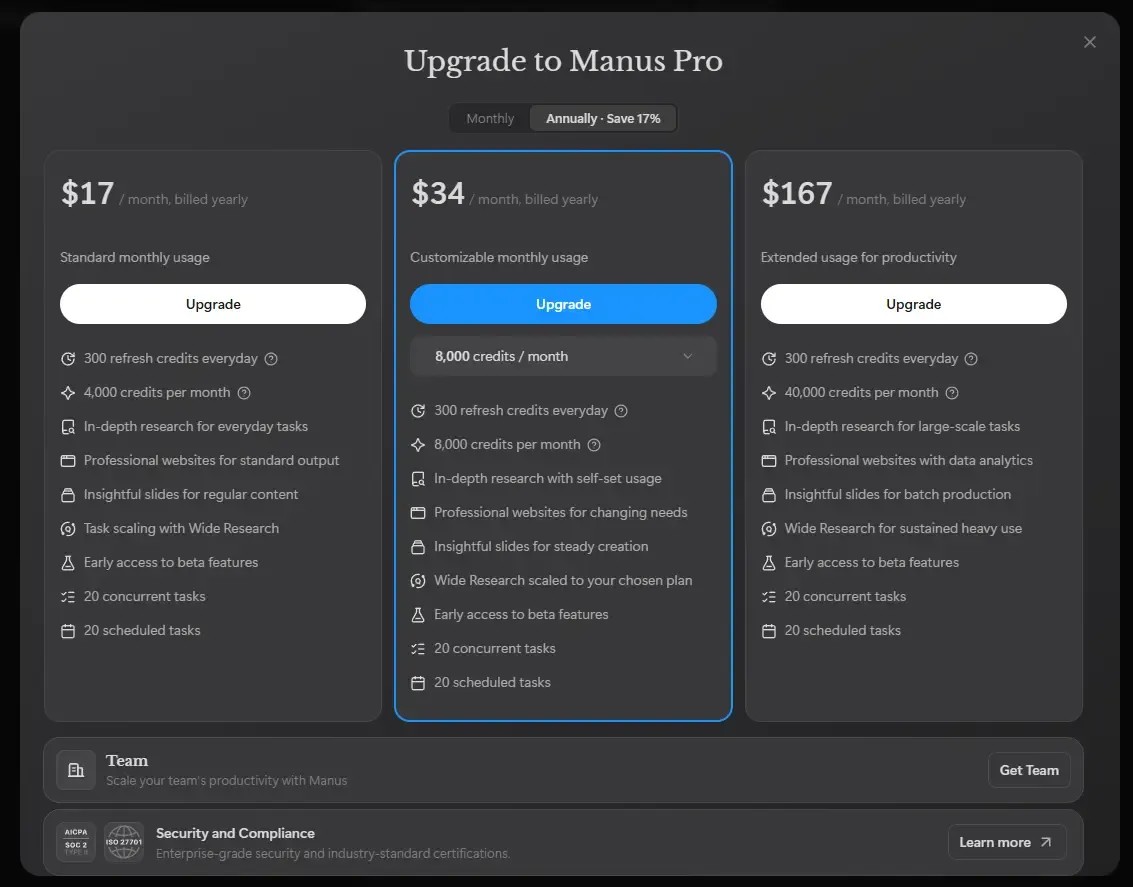
Bottom Line on Cost vs Value
If you need research automation, real web interaction, team collaboration or multimedia content creation, the paid plans offer strong value for the features provided.
If your needs are limited to basic content tasks or occasional image generation, the free version is more than capable for everyday use.
Frequently Asked Questions
1. Do I need special skills to use Manus?
No. Manus is built so anyone can use it with simple, clear prompts. You do not need coding skills or deep technical knowledge to get started.
2. Can Manus automate real web tasks?
Yes. With its cloud browser and browser operator features, Manus can interact with websites like a real user, including handling login-based tasks.
3. Does it support collaboration?
Yes. Manus Collab allows teams to work together in a shared workspace and manage tasks in sync.
4. What kind of outputs can Manus create?
It can generate text, presentations, visuals, data charts, websites, audio transcriptions and more. It works for both structured tasks and creative projects.
Conclusion: Is Manus AI worth it?
Manus AI is more than a basic chatbot or content tool. It acts as an autonomous assistant that can automate tasks, interact with the web, handle research, and support creative work. For marketers, developers, researchers, and business owners, it can improve productivity and reduce manual effort. If you want an AI tool that does more than just answer questions, Manus is definitely worth exploring.
Related Reading
Kling AI Review: I Tested It in Detail, Here Is the Honest Truth
Grok AI Review (Tested Image & Video Generation deeply)
Reve AI Review: The Best AI Image Generator or Hype?